
Short answer: A local SEO audit checks how your business shows up in Google Maps and local results, and why. Run it risk first: fix anything that could get your Google Business Profile removed, make your details match everywhere, then work on categories, reviews and pages, check rankings from where customers search, and confirm you can count the calls.
What a local SEO audit checks, and what it leaves out
A local SEO audit reviews everything Google uses to place you in local results: your Google Business Profile, the listings and reviews around it, your website's service and location pages, and where you actually appear when nearby customers search.
Google names the factors here, even though it keeps the details confidential. Its help page on improving your local ranking says local results are "mainly based on relevance, distance, and popularity", and the heading it gives that third factor still reads Prominence. It also says there's no way to request or pay for a better local ranking. Every item on a local SEO checklist should connect to one of those three, or to turning a searcher into a call. Our guide on how to rank higher on Google Maps goes deep on the three factors. This audit is the wider check around them.
Two things sit outside it. Crawling, speed and indexing problems belong to a technical review, covered in our SEO audit checklist. Ads, social and the path from first click to booked job belong to a whole-business review, covered in our digital marketing audit guide. Keep this one to search, and to local.
Before you start, gather owner access to your Google Business Profile, access to Search Console and Google Analytics, a spreadsheet, and a list of five to ten searches a customer would type, such as your main service plus your town.
A local SEO checklist: six checks, risks first
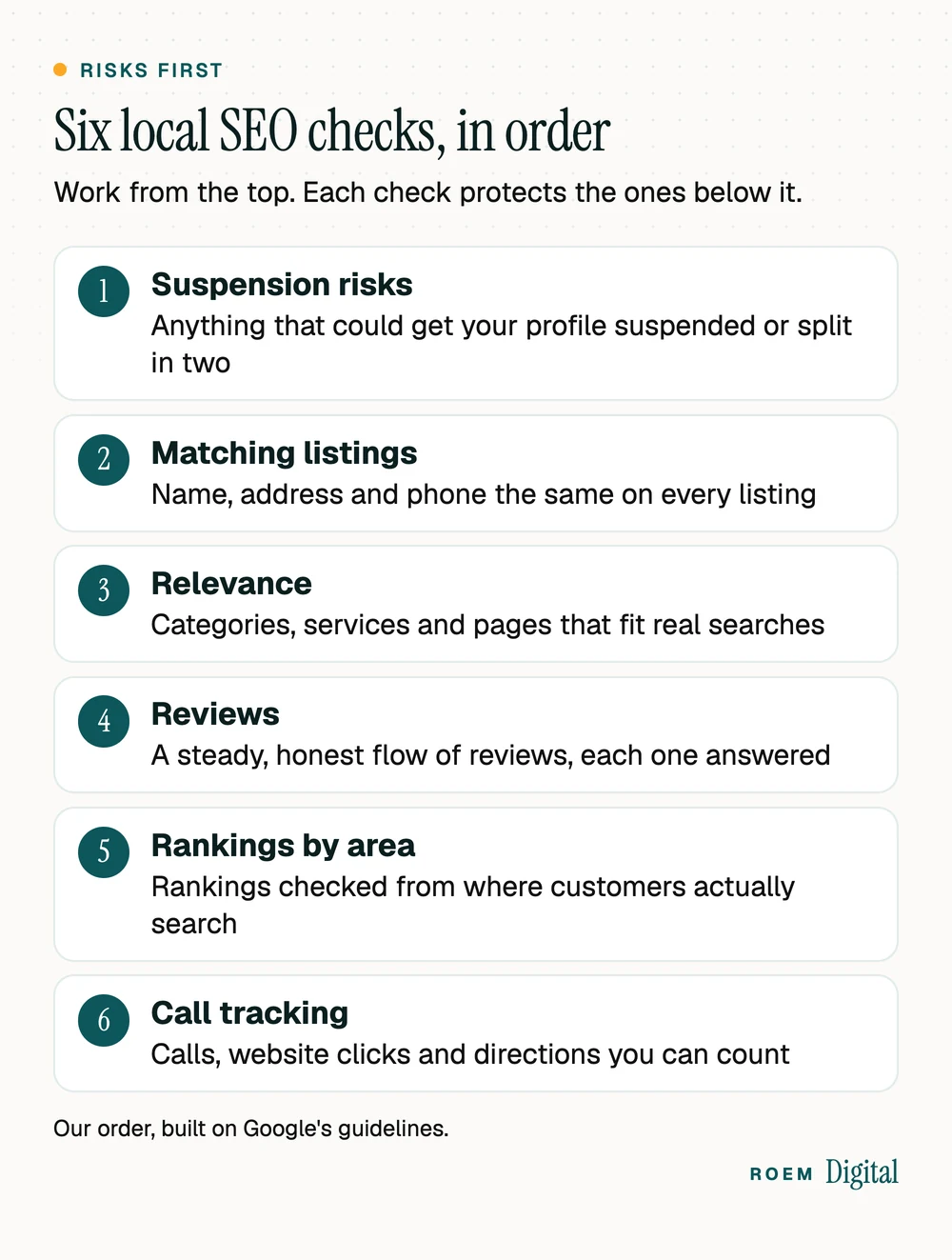
Most checklists start with rankings. We start with risk. A profile that gets suspended, or split into two competing duplicates, wipes out every gain below it, so the things that can remove you come first. The order is ours, built on Google's own guidelines, and each check protects the ones after it:
- Remove anything that could get the profile suspended, disabled or treated as a duplicate.
- Make sure your name, address or service area, phone and website say the same thing everywhere.
- Check that your categories, services and website pages fit what people search.
- Build a steady, honest flow of reviews, collected by Google's rules and answered.
- Check where you rank from the streets your customers search from, not from your desk.
- Confirm you can count calls, website clicks and direction requests.
Score each check in your spreadsheet as green (fine as it is), amber (fix this month) or red (fix this week). Anything red in the first two checks outranks everything else on the list. If you work around Orlando, our local SEO playbook for Orlando businesses shows how the same checks play out when customers search town by town.
Checks 1 and 2: remove the risks, then make every listing match
Open your profile and compare it against Google's guidelines for representing your business. These are the problems that can take a profile down or split it in two:
| What to check | What Google's rules say | Fix |
|---|---|---|
| Extra words in the business name | Unnecessary information in the name isn't permitted and could result in suspension | Use the real-world name on your sign, website and paperwork |
| A P.O. box or virtual office address | P.O. boxes aren't acceptable, and a rented mailing address you don't operate from isn't eligible | Use the address where you actually work, or hide it if you're a service-area business |
| A home address showing on a service-area business | Service-area businesses should hide the address from customers | Turn off the address and list the areas you serve |
| Two profiles for one business | A profile treated as a duplicate won't show on Search or Maps | Remove one you created by mistake, or ask Google to merge them |
| Owner access held by a former employee or vendor | Only owners can add or remove other users | Make sure the primary owner is an account you control |
Google's page on duplicate profiles adds a detail worth knowing before you delete anything: removing a duplicate removes all of its content and linked managers, so make sure you remove the right one. If a profile has already been taken down, our guide to a suspended Google Business Profile covers the appeal.
Check 2 is consistency. Write down one exact version of your name, address or service area, phone number and website, then compare it with your website footer and contact page, Apple Maps, Bing, Yelp, Facebook and the directories in your industry. Old phone numbers and former addresses matter far more than "Suite" versus "Ste". Our guide to business listings and citations covers which listings are worth fixing first.
Checks 3 and 4: relevance fields and reviews
Relevance, in Google's words, is how well a profile matches what someone is searching for, and Google asks for complete and detailed business information to judge it. In the audit, check each of these against what you really do:
- Primary category: the most specific one that describes the core of the business.
- Additional categories: only for services that are a real part of the business.
- Services list: every service you want to be found for, named the way your website names it.
- Hours and special hours: including holidays and storm closures.
- Website pages: a page for each main service, and a page for each area you serve that has something genuinely local to say.
Our Google Business Profile checklist walks through each field. If you serve customers at their homes, the setup differs, and our guide to local SEO for service-area businesses explains how to write area pages that help rather than look like doorway pages. Schema markup can confirm what your pages say, but it doesn't replace the pages.
Check 4 is reviews. Look at the total, the date of the newest one, the share you've answered, and how you ask. Google's Maps content policy on fake engagement bans offering incentives such as discounts or free services for reviews, discouraging negative reviews, and selectively asking only happy customers. An audit that finds any of those has found a risk, not a growth tactic. Our guide to getting more Google reviews shows how to ask every customer the right way.
Check 5: your local ranking is a map, not a number
This is the check most owners get wrong, and it's the next problem you'll hit once the profile is clean. Google measures distance from the person searching, and its ranking page says that if a customer doesn't share where they are, Google uses what it knows about their location. So the result you see at your desk is your best case. A customer across town can see a different map pack.
- Pick five to ten searches a customer would type, including "near me" versions.
- Choose three to five spots across your service area, such as the neighborhoods your best customers live in.
- Check each search from each spot: a phone in that neighborhood, or a local rank grid tool that simulates the location.
- Record three things per search: whether you're in the map pack, where you sit in the regular results below it, and who outranks you.
- Repeat on the same dates each month so the comparison is fair.

| What you see | Likely cause | Next step |
|---|---|---|
| In the map pack near your base, gone a few miles out | Distance, which you can't change | Strong service and area pages for the regular results, or ads for the farther towns |
| Missing from the map pack even close to your base | A relevance or risk problem | Recheck the category, the name, verification and duplicates |
| In the map pack, but few calls from the profile | The profile doesn't persuade | Photos, recent reviews and replies, hours and the services list |
| One competitor ahead almost everywhere | Usually prominence: reviews, links and mentions | Compare their categories and review history with yours |
Add AI answers to the same sheet. Google's guide to optimizing for generative AI features says Business Profiles can help your products and services show in both AI responses and other Google Search results. Ask an AI assistant who offers your service in your town and note whether you're named. Our AI search optimization guide explains what earns a mention, and Google Search Console now reports impressions in Google's AI features.
Check 6: can you count the calls a local SEO audit is meant to grow?
An audit that improves rankings you can't connect to calls leaves you guessing next month. Before you change anything, confirm you can measure:
- Profile actions: calls, website clicks and direction requests in your profile's performance report, compared month over month. Google counts actions from both organic results and Google Ads there, so if you run ads, don't credit every call to local SEO.
- Website visits from the profile: tag the website link in your profile with UTM parameters so analytics can tell those visits apart from other search visits.
- Calls: if you use a tracking number on the profile, put it in the primary phone field and keep your main number as an additional phone (Google allows up to 2 more). Keep the tracking account in the business's name, because Google's guidelines say the number must be under the business's direct control. Our call tracking guide explains the setup.
- Form fills and bookings: set up as key events in Google Analytics, as our guide to tracking calls and forms in GA4 explains.
Then fix in the same order: risks the same week, mismatched listings next, then relevance fields and pages, then a review routine. Leave rankings and tracked calls as the scoreboard. Re-run the full local SEO audit every quarter, and the rank and review checks monthly. One more habit from Google: in an April 16, 2026 post on its Maps blog, it said it was rolling out email alerts so verified, active owners can review important edits to their profiles before they go live. Keep the owner inbox monitored, and verify the profile if it isn't yet, with help from our verification guide.
Where ROEM fits in a local audit
Google Business Profile optimization and local SEO are part of our SEO and content service. We're a small senior team based in Davenport, Florida, working with businesses across Central Florida and nationwide. Our free audit looks at your website, Google listing, ads and tracking from the outside, with no logins needed, and you get a short written plan in plain English. You keep ownership of the profile and every account, whoever does the work.
“Moving to a new city and rebuilding your business isn’t an easy task, so we turned to Robert to help with our business website, run our social media and help get our Google biz profile back up and running! He was extremely thorough and even came on a job site to take photos for our website. What he built in a short amount of time is amazing. We would absolutely NOT have been able to do any of this without him. We would highly recommend for any website building and project management!!”
Frequently asked questions
What is included in a local SEO audit?
A local SEO audit checks your Google Business Profile for risks and missing fields, compares your business details across listings, reviews your categories, services and location pages, looks at your reviews and how you ask for them, checks rankings from several spots in your service area, and confirms you can track calls and website visits from the profile.
How often should I run a local SEO audit?
Run the full audit about once a quarter, and check rankings, reviews and suggested edits monthly. Run it again right away if you move, change your phone number, rename the business, add a service or see calls from Google drop suddenly, because those are the moments when listings fall out of step.
Can I do a local SEO audit myself?
Yes. Most of it needs owner access to your Google Business Profile, a spreadsheet and a phone. The hard parts are honesty and order: checking rankings from your customers' neighborhoods instead of your desk, and fixing anything that risks a suspension before chasing new rankings. A free outside audit can confirm what you found.
Why does my business rank in Google Maps at my office but not across town?
Google says local results depend partly on distance from the person searching, and that it uses what it knows about their location when they don't share it. Your desk is usually your strongest spot. Customers farther away see different results, which is why an audit checks rankings from several places across your service area.
Do citations still matter in a local SEO audit?
Accurate ones do. The audit isn't about having hundreds of listings. It's about making sure the listings that exist, especially major map apps and your industry's directories, show the same name, phone and address or service area as your Google profile and website. Old numbers and former addresses are the ones to fix first.
Is a local SEO audit the same as an SEO audit?
No. A general SEO audit looks at your website: crawling, indexing, speed and page content. A local SEO audit looks at how you appear for nearby searches: your Google Business Profile, listings, reviews, location pages, map pack rankings from different spots, and whether calls from Google are tracked. Most local businesses need both.