
Short answer: How to rank higher on Google Maps comes down to the three factors Google names: relevance, distance and prominence. You can't move your address, so fix relevance first (category, services, hours and matching pages), then build prominence through steady reviews, links and mentions. Check your ranking from where customers search, not from your desk.
How to rank higher on Google Maps, in Google's own words
Google names the factors behind local ranking, though it keeps the details confidential, and the list is shorter than most guides suggest. Its help page on improving your local ranking names three factors:
- Relevance: how well a Business Profile matches what someone is searching for.
- Distance: how far each business is from the customer who's searching. If the customer doesn't share where they are, Google uses what it knows about their location.
- Prominence: how well known a business is, based partly on how many websites link to it and how many reviews it has. Google adds that more reviews and positive ratings can help your local ranking.
The same page says there's no way to request or pay for a better local ranking. One wording detail stood out when we read it on November 25, 2026: the summary sentence says local results are "mainly based on relevance, distance, and popularity", while the heading underneath still says Prominence. Treat the two as the same factor. Reviews and links sit at the center of both.
How to get on Google Maps if you aren't there yet
- Sign in with a Google Account you control, ideally one tied to your business email, so the profile never belongs to a former employee or vendor.
- Go to business.google.com/add to add the business, or find it on Google Maps and select Claim this business if a listing already exists.
- Choose how you serve customers. If they don't come to your address, Google says to remove the address and list your service areas instead.
- Verify with whichever method Google offers you. Google says verification reviews take up to 5 business days.
- Fill in every field before you judge your ranking.
Google's ranking page lists verification first among its tips, saying it makes a business more likely to show up in search results. Our Google Business Profile verification guide covers each method and what to do when it fails.
Sort every Google Maps ranking factor by how fast it moves
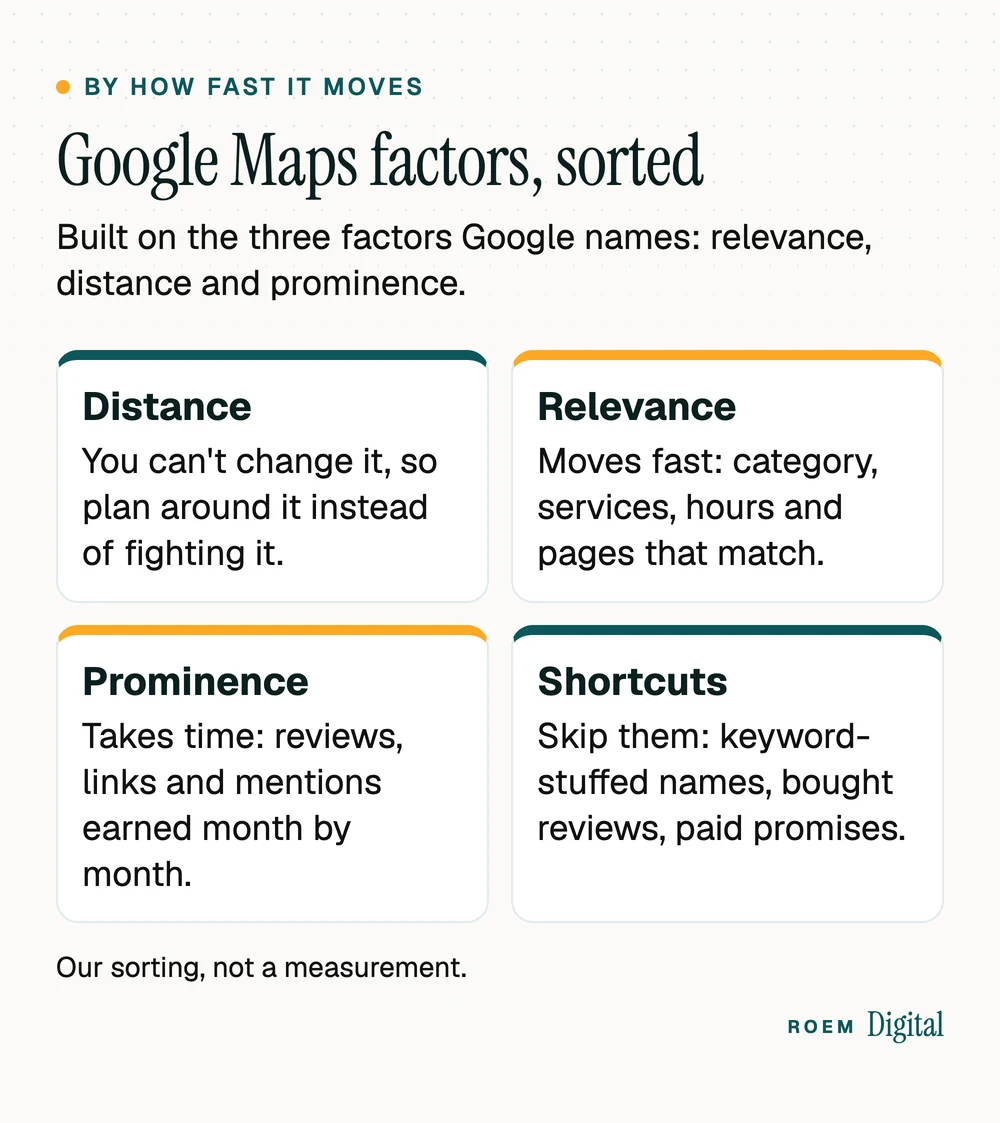
Most advice on how to rank higher on Google Maps arrives as one long flat list of tips, so owners spend a Saturday on the wrong ones. We sort every factor by how much control you have and how quickly it moves. The sorting is ours, and the three factors are Google's:
- Distance you can't change. You can't move your base or the customer, so plan around it instead of fighting it.
- Relevance moves fast. Your category, services, hours and website pages can change this week.
- Prominence takes time. Reviews, links and mentions build month by month and can't be rushed honestly.
- Shortcuts to skip: anything that puts the profile at risk, such as keyword-stuffed names and bought reviews.
Before you change anything, run the risk checks in our local SEO audit. A suspended or duplicated profile won't rank at all, whatever you do to relevance.
Relevance fixes you can make this week
Google asks for complete and detailed business information so it can match you to relevant searches. In practice, that means every field that tells Google what you do:
- Primary category. Choose the most specific one that describes the core of the business, then add extra categories only for services that are a real part of it.
- Services. List each service you want to be found for, using the same names as the pages on your website.
- Hours and special hours. Wrong holiday hours cost visits and bring bad reviews.
- Attributes and description. Answer every attribute that's true, and describe what you do and where in plain sentences.
- Business name. Use your real-world name only. Google's guidelines say unnecessary information in the name isn't permitted and could result in suspension.
- Website pages. Give each main service its own page, and link the profile to the page that fits most visitors. Your site should say the same name, phone and area as the profile.
The same Google page lists the other relevance work that's yours to do: keep your information complete and up to date, respond to reviews, and add photos and videos that show what you offer. Retailers in eligible countries can also show in-store products, which may then appear in local results.
Then protect what you've fixed. Anyone can suggest an edit to your profile. In an April 16, 2026 post on its Maps blog, Google said it blocked 79 million inaccurate or unverified edits to Business Profiles in 2025, and that it was rolling out email alerts so verified, active owners can review important edits before they go live. Keep the owner inbox monitored so a wrong category or phone number doesn't undo a week of work.
Our Google Business Profile checklist covers each field in detail. Markup that matches the profile can confirm the details, as our local business schema guide explains, but the visible page does the persuading.
Building prominence with reviews, links and mentions
Prominence is the factor you can't rush, and nobody can fake it for long. Google names links and reviews directly. Build each one steadily:
| Signal | What Google says | What to do |
|---|---|---|
| Reviews | More reviews and positive ratings can help your local ranking | Ask every customer, every time, with a direct link, and answer each review |
| Review rules | Incentives, discouraging negative reviews and asking only happy customers are banned | One honest ask for all, no discounts or gifts in return |
| Links | Prominence is based partly on how many websites link to your business | Local sponsorships, trade associations, chamber listings and suppliers' dealer pages |
| Listings | Not named as a ranking factor, but Google updates profiles from sources such as user reports and licensed content | Keep major map apps and the directories in your trade accurate |
The review rules come from Google's Maps content policy, and they matter because rule-breaking reviews get removed. Our guide to getting more Google reviews shows how to ask every customer without breaking them, and our guide on how to respond to negative reviews covers the replies. For listings, start with our business listings and citations guide.
A steady pace beats a burst. Ten reviews in a weekend and then silence for months looks odd to customers reading them, and a profile whose newest review is a year old looks quiet. Build the ask into how the job ends, so the flow keeps going without anyone remembering to push it.
Distance and the edge of your map
Distance is the factor owners least like to hear about. Because Google measures how far each business is from the person searching, you're generally strongest near your base and weaker the farther away a searcher is, and no profile edit moves your base. Service areas aren't a way around distance. Google's service area page says "When you set your service area, it helps people find your Business Profile", and that it shows customers where you can provide your products and services. It allows up to 20 and says the overall area shouldn't be more than about 2 hours of driving time from where you're based. Nothing on the page says a service area moves your base.

What to do about the towns past your edge:
- Win the regular results below the map with a strong page for each service and each area you genuinely serve. Our guide to local SEO for service-area businesses explains how to write those pages without making doorway pages.
- Use paid search for the farther towns. Ads can target the cities you choose, wherever your base is. Our paid media service sets that up with call tracking.
- Never invent an office. Google's guidelines say a virtual office isn't eligible for a Business Profile, and a coworking desk needs signage, staff and customers received during business hours.
Google Maps ranking myths to skip
Some advice keeps circulating because it once seemed to work. Each of these either has no support in Google's own pages or puts the profile at risk:
| The myth | What to do instead |
|---|---|
| Add your city and main service to the business name | Use your real-world name. Google says extra information in the name can get the profile suspended. |
| Pay someone who promises a guaranteed spot in the map pack | Google says there's no way to request or pay for a better local ranking. Ads are a separate, paid product. |
| Buy reviews or reward customers for them | Ask everyone honestly. Incentivized reviews break Google's policy and are removed from Maps. |
| Post on your profile every day to climb | Post when you have something useful to say. Our guide to Google Business Profile posts explains why they aren't a listed ranking factor. |
| Check your ranking by searching from your own office | Check from several spots across your service area, because results change with the searcher's location. |
Track your Google Maps ranking the way customers see it
Your rank on Google Maps isn't one number. Check the same searches from several spots across your service area each month, as our local SEO audit explains, and pair it with what the profile sends you: calls, website clicks and direction requests in its performance report, plus the leads they become. Google counts actions from both organic results and Google Ads in that report, so separate the two if you advertise. Our guide to call tracking for small businesses shows how to count the calls. If rankings rise and calls don't, the profile needs better photos, recent reviews or clearer services, not more ranking work.
Google's guide to optimizing for generative AI features says Business Profiles also help you show in AI responses, so the same work feeds those answers.
Local SEO and Google Business Profile optimization are part of our SEO and content service. We're a small senior team based in Davenport, Florida, working with businesses across Central Florida and nationwide. We don't promise map pack positions, because Google says nobody can buy them. We work on relevance and prominence, track the calls, and you keep ownership of the profile and every account.
Frequently asked questions
How long does it take to rank higher on Google Maps?
Google doesn't publish a timeline, and nobody can honestly promise one. Fixes to your category, services, hours and website can be made in days, and Google may take time to reflect them. Reviews, links and mentions build over months. Track the same searches from the same spots monthly so you can see real movement.
Why is my business not showing up on Google Maps?
Check four things first: whether the profile is verified, whether it's suspended or treated as a duplicate, whether the primary category matches what people search, and where you're searching from. Google ranks partly by distance from the searcher, so a business can show up near its base and disappear a few miles away.
Do Google reviews help you rank on Google Maps?
Yes. Google's own help page says prominence is based partly on how many reviews you have, and that more reviews and positive ratings can help your local ranking. Ask every customer honestly, never offer incentives, and never ask only the happy ones, because Google's policy bans both and removes those reviews.
Can I pay Google to rank higher on Google Maps?
No. Google states there's no way to request or pay for a better local ranking. You can buy ads, but they're a separate, paid product, not a way to raise your local ranking. Be wary of anyone who promises a guaranteed map pack position, because Google says that position can't be bought.
Does adding service areas help me rank in more towns?
Google says setting service areas helps people find your profile and shows customers where you work. It allows up to 20, within about two hours of driving from your base. Google doesn't say they change your location, so towns far from your base are usually won through strong service and area pages, or ads.
How do I get my business on Google Maps for free?
Go to business.google.com/add and add your business, or find it on Google Maps and choose to claim it if a listing already exists. Then verify it using the method Google offers. A Business Profile costs nothing, and verifying it lets you manage your details and reply to reviews.