
Short answer: Local business schema is structured data that labels your name, address, phone, hours and service area so search engines read them reliably. Add it to a page that shows those details, make it match your Google Business Profile word for word, and skip star ratings for your own reviews, because Google won't show them.
What local business schema is, and what it won't do
Local business schema is structured data, usually a block of JSON-LD code in a page's HTML, that labels your business details in the schema.org vocabulary. It tells search engines which text is your name, address, phone number and hours, so they don't have to guess.
Google's LocalBusiness structured data documentation says that with this markup "you can tell Google about business hours, different departments within a business, reviews (if your site captures reviews about other businesses), and more." Of the three formats Google accepts, its general structured data guidelines mark JSON-LD as recommended.
Don't expect it to lift you up the map. Google's help page on local ranking says "Local results are mainly based on relevance, distance, and popularity," and its advice is about your Business Profile, not your code. The same general guidelines add that Google "does not guarantee that your structured data will show up in search results, even if your page is marked up correctly." Treat schema as a way to confirm your details, one piece of the technical work in our SEO and content service, not as a ranking shortcut.
The three-way match: your profile, your page and your markup
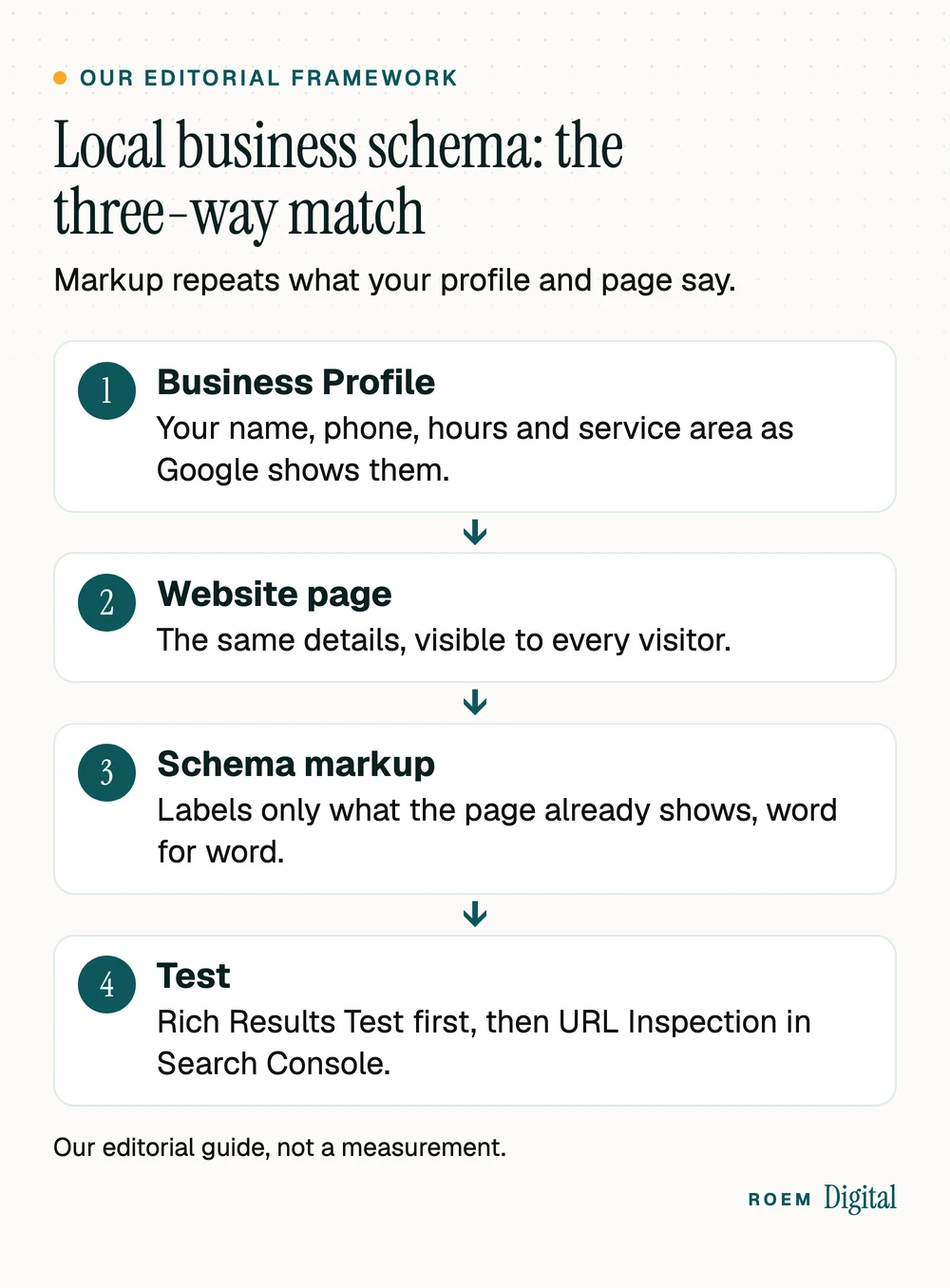
Because Google already knows a great deal about a local business from its Business Profile, the value of local business schema lies in agreement. We call this the three-way match (our editorial framework): the details on your Google Business Profile, the same details visible on your website, and markup that labels only that visible text. When all three agree, every source tells Google the same story.
Google's own rules point the same way. Its general guidelines say "Don't mark up content that is not visible to readers of the page," and list markup that "is not representative of the main content of the page, or is potentially misleading" as a reason it may not appear. Before writing any code, get the profile right with our Google Business Profile checklist, then settle on one version of your name, address and phone using our guide to business listings and citations.
The LocalBusiness schema properties worth adding
Google lists two required properties, name and address, and a set of recommended ones. It also asks you to "use the most specific LocalBusiness sub-type possible" and to list several types as an array if more than one fits. Schema.org's home and construction types include Electrician, HVACBusiness, HousePainter, Plumber and RoofingContractor, for example.
| Property | What to put in it | Google's rule or tip |
|---|---|---|
| @type | The most specific type that fits, such as HousePainter or DaySpa | Several types go in an array. Google doesn't support additionalType here. |
| name | Your business name exactly as it appears on your profile and signage | Required |
| address | Street, city, state, ZIP and country, or less if you hide your address (see the next section) | Required. "Include as many properties as possible." |
| telephone | The main number customers call | Include the country code and area code. |
| url | The page for this business or location | "The URL must be a working link." |
| openingHoursSpecification | Days, opening time and closing time | Times in hh:mm:ss. validFrom and validThrough mark a seasonal closure. |
| geo | Latitude and longitude of the location | At least 5 decimal places |
| priceRange | A short range, such as $$ | Under 100 characters, or Google won't show it |
| logo and sameAs | Your logo file, and links to your profiles on other sites | From Google's Organization guidance. sameAs can list several profile URLs. |
| areaServed | The towns or counties you serve | A schema.org property. Google's LocalBusiness page doesn't list it. |
Where it goes: Google says you can add LocalBusiness markup to any page, "though it may make more sense to put it on a page that contains information about your business." Its Organization structured data guidance recommends the home page or a single page about the business and adds, "You don't need to include it on every page of your site." Matching markup to the page is also one of the checks in our SEO audit checklist.
Service-area businesses: what to put in the address
Here the rules pull in two directions. Google's guidelines for representing your business say "If you're a service-area business, you should hide your business address from customers," and give the example of a plumber who runs the business from home. Google's LocalBusiness documentation still lists address as required, and it doesn't describe a version for a business that hides its street.
Our editorial judgment: never put a street address in your markup that you've hidden on your profile. Anyone can read a page's source code, so a hidden address in the markup isn't hidden at all, and it breaks the three-way match. Instead:
- Fill in the city, state and country in address, and leave the street out.
- List the towns you serve in areaServed, which schema.org defines as "The geographic area where a service or offered item is provided." Use the same towns as your profile's service area.
- Skip the older serviceArea property. Schema.org marks it as superseded by areaServed.
- Leave out geo coordinates that would point to your home.
One site we built works this way. GK Painting, a cabinet refinishing and painting company in the Madison, Wisconsin area, is marked up as a HousePainter with Waunakee, WI as the address locality, no street, and nearby cities in areaServed. Google's documentation doesn't say whether a partial address qualifies for every feature, so run it through the Rich Results Test. For the rest of the picture, read our guide to local SEO for service-area businesses.
Why your own reviews won't show up as stars
Some local business schema templates you'll find online include an aggregateRating for the business's own reviews. Google won't show it. Its review snippet guidelines are blunt: "If the entity that's being reviewed controls the reviews about itself, their pages that use LocalBusiness or any other type of Organization structured data are ineligible for star review feature." That includes reviews shown through "an embedded third-party widget (for example, Google Business reviews or Facebook reviews widget)."
The same page says "Don't aggregate reviews or ratings from other websites," and Google's LocalBusiness page recommends review and aggregateRating only for sites that capture reviews about other local businesses. Fake reviews are worse: the general guidelines name them as misleading content, which can bring a structured data manual action. That costs the page its eligibility for rich results, though Google says it doesn't affect how the page ranks in web search. Fake reviews also break the FTC's rule on consumer reviews and testimonials, whatever the markup says. Our guide to AI for small business marketing covers what that rule bans.
Keep real reviews on your page, because people read them. Just don't mark them up for stars. The reviews that count for local ranking live on your Business Profile, where Google says more reviews and positive ratings can help your local ranking. How you answer them matters too, which our guide on how to respond to negative reviews covers.
How to add local business schema and test it
- Settle the details. Copy your name, phone, hours and service area from your Business Profile into one document. If your profile's primary number is a call tracking number, use your main business number (the profile's additional phone) on the page and in the markup, as our guide to call tracking for small businesses explains.
- Show them on the page you'll mark up, usually the homepage or the contact page.
- Write the JSON-LD block, or use your CMS plugin. Google notes a plugin may be easier on a CMS. Check that the plugin doesn't add a rating you didn't ask for, and that your theme isn't printing a second, different business block.
- Run the page through Google's Rich Results Test and fix every critical error. Google says fixing the non-critical issues can improve your data but isn't needed for eligibility.
- Publish, then check the live page with URL Inspection in Search Console. Make sure robots.txt, a noindex tag or a login isn't blocking it.
- Give it time. Google's documentation says "it may take several days after publishing a page for Google to find and crawl it."
- Change all three together. New hours, a new phone number or a new service area go on the profile, the page and the markup on the same day. Add the check to your website launch checklist whenever a site is rebuilt.

If you use more than one location, give each its own page and its own LocalBusiness block, since Google asks you to "define each local business location as a LocalBusiness type." Each block should carry that location's own phone, hours and URL.
| Mistake | Fix |
|---|---|
| The markup lists hours the page doesn't show | Show the hours on the page, or take them out of the markup. |
| A street address in the code that your profile hides | City, state and country only, plus the towns you serve in areaServed. |
| An aggregateRating built from your own reviews | Remove it. Google treats those stars as self-serving and won't show them. |
| Plain LocalBusiness when a closer type exists | Use the most specific type, such as Plumber or HousePainter. |
| Coordinates rounded to two or three decimals | Google says the precision must be at least 5 decimal places. If you can't give that, leave geo out: it's recommended, not required. |
| Keywords added to the business name | Use your real-world name. Google's profile guidelines ask for the name customers know, as used on your signage and website. |
| An old phone number left in the code after a change | Update the profile, the page and the markup on the same day. |
Getting local business schema right without the guesswork
We're a small senior team based in Davenport, Florida, and we build custom websites for businesses across Central Florida and nationwide, including the GK Painting site above. Our SEO and content service covers technical SEO and Google Business Profile optimization, the two halves of the three-way match. You own your domain, your website and your analytics accounts.
Frequently asked questions
What is local business schema?
Local business schema is structured data, usually JSON-LD code in a page's HTML, that labels your business name, address, phone, hours and service area using the schema.org LocalBusiness vocabulary. It helps search engines read those details reliably. It doesn't replace a complete Google Business Profile and doesn't guarantee any special search feature.
Do I need local business schema for local SEO?
It isn't the main lever. Google says local results are mainly based on relevance, distance and popularity, its advice centers on your Business Profile, and that help page doesn't mention structured data. Schema is still worth adding because it confirms your details in a format machines read, as long as it matches your profile and page.
Can I use LocalBusiness schema without a physical address?
Google lists address as required, but its Business Profile guidelines tell service-area businesses to hide their address. A sensible middle ground is to give your city, state and country without a street, list the towns you serve in areaServed, and test the page in Google's Rich Results Test before publishing.
Can I add review stars to my own website with schema?
Not for your own business. Google's review snippet guidelines say that when a business controls the reviews about itself, its LocalBusiness or Organization pages are ineligible for star reviews, including reviews shown through a Google or Facebook widget. Show real reviews to visitors, but don't mark them up for stars.
Where should I put LocalBusiness schema on my website?
On a page that shows your business details, usually the homepage or contact page. Google says it can go on any page but makes more sense on a page about your business, and its Organization guidance says you don't need it on every page. Businesses with several locations should give each location its own page and block.
How do I test my local business structured data?
Paste the page into Google's Rich Results Test and fix any critical errors. After publishing, run URL Inspection in Search Console to confirm Google can reach the live page and isn't blocked by robots.txt, a noindex tag or a login. Google says crawling a new page can take several days.
What is the difference between Organization and LocalBusiness schema?
LocalBusiness is a more specific type of Organization meant for a physical business or branch. Google suggests Organization markup on the homepage to describe the company, its logo and profiles, and LocalBusiness for each location customers can visit or call. A one-location business can use a specific LocalBusiness subtype that covers both.