
Short answer: A website launch checklist works best in four passes: a week out, finish the content and confirm you own every account, and the day before, test every form, call button and page speed. On launch day, let Google in and submit your sitemap, then recheck your leads every day for the first week.
What a website launch checklist covers, and what it doesn't
A website launch checklist is the set of checks that prove a new site works, can be found on Google and belongs to you, run in the days before and just after it goes live. It covers the launch itself, not the design.
This one is organized by timing, because the same check can pass on Tuesday and fail on Thursday: a form tested before the final email settings went in, or a search block that nobody remembered to lift. If an AI tool built the site, run our checks for a vibe-coded website first.
Replacing an existing site? Start with our website redesign checklist, which covers keeping old pages, rankings and calls through a rebuild, then come back here for launch week. Our website and branding service builds custom sites for service businesses, and this list is the owner's side of the job: what to check yourself, whoever builds your site.
| Your situation | Start with |
|---|---|
| A first website, or a new site on a brand-new domain | This website launch checklist |
| A new site replacing an old one at the same address | The redesign checklist first, then this one for launch week |
| Moving to a new domain as well | Both, plus a plan for redirecting the old domain |
| A few new pages on a site that's already live | Neither: test the new pages and add them to your sitemap |
The 7-1-0-7 launch countdown
We call our version of the website launch checklist the 7-1-0-7 launch countdown: seven days out, one day out, launch day (day zero) and the first seven days after. It's our editorial framework, not an industry standard, and each pass has one job.
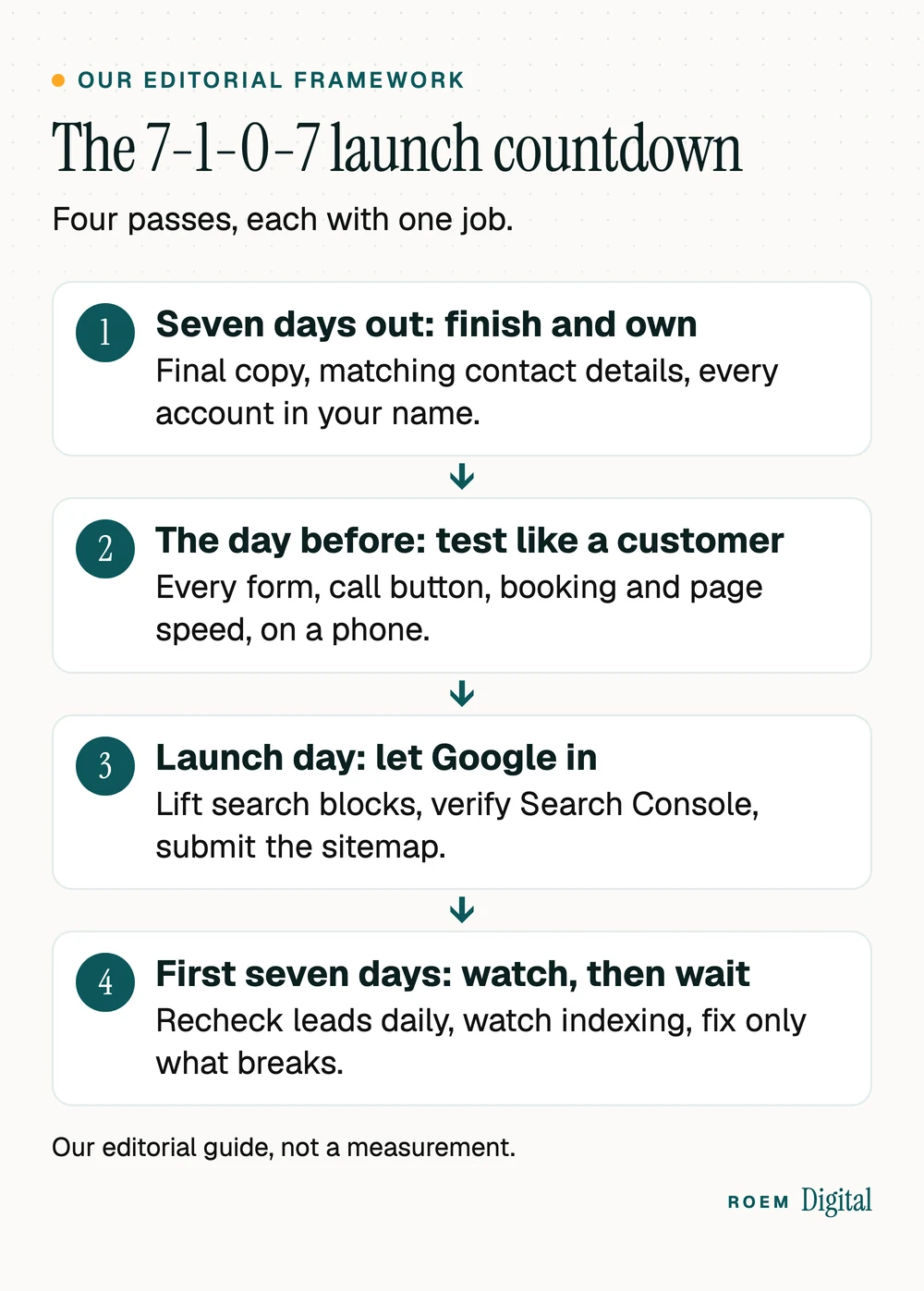
- Seven days out: finish and own. Final copy, matching contact details, required pages and every account in your name.
- The day before: test like a customer. Every form, call button, booking flow and payment, on a real phone.
- Launch day: let Google in. Lift any search block, verify Search Console, submit the sitemap and update your Google Business Profile.
- First seven days: watch, then wait. Recheck leads daily, watch indexing and fix only what's broken.
If an agency or freelancer is building your site, ask which of these they handle and which they expect from you. Our page on what to expect when we build your website shows how we split that work with clients.
Seven days out: the pre-launch checklist
A week gives you room to fix what you find without moving the launch date. Work through these while the site is still on its preview address:
- Every page has final copy. Search for placeholder text, sample prices and stock headlines, and read every page once on a phone.
- Your business name, phone number and address match your Google Business Profile exactly. If you don't serve customers at your address, keep it off both.
- Hours, service areas and any published prices match what your team says on the phone.
- A privacy policy is live. If the site uses Google Analytics, Google's Analytics terms of service say you must post a privacy policy that gives notice of your use of cookies and discloses your use of Google Analytics. This is general information, not legal advice.
- Images are compressed and described, with alt text on every image that carries meaning, so the page loads fast and makes sense to someone using a screen reader.
- A helpful 404 page sends anyone who hits a broken link back to your services or contact page.
- The browser tab icon and the preview image that appears when someone shares a link are set.
- Every account is in your name: the domain registrar, hosting, Google Analytics, Search Console and your Google Business Profile. Our guide to choosing a domain name covers the registrar side.
If the site takes bookings or payments
Add a few checks if customers can book, buy or pay on the site. Run a full purchase or booking in the payment provider's test mode, then switch to live mode and run one small real transaction you refund yourself. Read every confirmation email and text the customer receives, check that taxes, shipping and deposits show the amounts you expect, and make sure the notice of a new order or booking reaches the person who acts on it.
The day before: test it the way a customer would
This is the part of a new website checklist people rush. Use a real phone, not a desktop browser squeezed narrow, and act like someone who has never heard of your business.
- Submit every form and confirm each one lands in an inbox someone actually reads. Check the automatic reply the customer gets, too.
- Tap every phone number and email link and confirm each one dials or opens the right address.
- Book a test appointment or place a test order, then cancel or refund it, so you know the whole flow works and who gets notified.
- Confirm leads are tracked. Open the GA4 Realtime report while you submit a form and check that the event appears. Our guide to tracking calls and form fills in GA4 shows how to set this up.
- Check speed on your main pages with PageSpeed Insights. The Core Web Vitals guide on web.dev sets good targets as a Largest Contentful Paint within 2.5 seconds, an Interaction to Next Paint of 200 milliseconds or less and a Cumulative Layout Shift of 0.1 or less. A brand-new site may not have enough real visits for field data yet, so treat the lab result as a first read.
- Open the site in a second browser, and on both an iPhone and an Android phone if you can borrow one.

Write down anything that fails and who will fix it. A short list with a name next to every item gets finished. A long list with no names doesn't.
Launch day: the go-live checklist that lets Google in
Do these in order, early in the day, so there's time to fix anything before customers notice:
- Point the domain at the new site and confirm the www and non-www versions both land on one address over https.
- Lift any search block left over from development. Google's noindex documentation explains that when Google finds a noindex rule on a page, it drops that page entirely from search results. Check robots.txt as well.
- Verify the site in Search Console. Google's verification guide suggests adding more than one verification method in case one fails later, for example when a template change removes a tag. A DNS record at your domain provider verifies the whole domain and doesn't depend on the site's code.
- Submit your sitemap. Google's guide to asking Google to recrawl says a sitemap can be very helpful if you just launched your site, and its sitemap overview lists a new site with few external links as one that might need one.
- Inspect your homepage with Search Console's URL Inspection tool and request indexing.
- Add or update the website link on your Google Business Profile, using the full address with https://. Our Google Business Profile checklist covers the rest of the profile.
- Update the link everywhere else: social profiles, directory listings and email signatures.
- Send one more test lead after the switch, because forms and tracking sometimes behave differently on the live domain than on a preview address.
Have a way back before you flip the switch
Know who can log in to the domain's DNS settings on launch day, keep a full backup of the new site, and if you're replacing an old site, keep its hosting active until every check above passes. If something serious breaks, you want to fix it in minutes, not wait for a reply from whoever set up the account years ago.
The first seven days: watch your leads, be patient with Google
The first week is for catching broken things, not for judging the site. Google's recrawl guide says crawling can take anywhere from a few days to a few weeks, and that requesting a crawl doesn't guarantee your pages will show up quickly, or at all. Leads are what you can check today.
- Days 1 to 3: check the form inbox and your call log every day. If the phone goes quiet, tap the call button yourself before you blame the design.
- Day 2 or 3: open Search Console's Page indexing report, and run URL Inspection on your top pages to see what Google has picked up.
- Day 4 or 5: compare GA4 key events with the leads in your inbox. If customers reached you and GA4 shows nothing, tracking is broken, not demand.
- Day 7: ask a few new customers how they found the site and whether anything confused them, then fix the small things.
Then hold off on big changes for a while. Rewriting pages or moving the menu in week one makes it hard to tell what caused what. Once things settle, our website maintenance checklist covers the monthly and yearly upkeep, and our guide to website conversion rate shows how to set a baseline from your first full month.
Tell people it's live
Once the first checks pass, announce the new site where your customers already are: a post on your Google Business Profile, a short email to past customers, and a post on the social accounts you actually use. Point each one at the page that matters most, such as booking or a quote request, rather than the homepage. Reprint cards and signs only after you're sure the address and phone number on the site are final.
How launch works on the sites we build
We're a small senior team based in Davenport, Florida, and we hand-build websites rather than adapting templates, for service businesses across Central Florida and nationwide. Calls, forms and bookings are tracked before any ad spend starts. You own the domain, the site and every account, and when we replace an older site, every old URL gets a permanent redirect to its new home.
“I have been working with ROEM for the last few years. This has been the best business experience. He has made my website flawless. The look and feel is organic. Customers can't say enough great things about how the website is a good experience, easy to understand and use. Saying that I highly recommend this company feels like an understatement!”
See our website and branding work, or browse the sites we've built to see how they look on a phone before you ever talk to us.
Frequently asked questions
How far ahead should I start a website launch checklist?
Start about a week before launch. That leaves time to finish content, confirm you own every account and fix what testing turns up without moving the date. Save the search steps, like removing a noindex tag and submitting the sitemap, for launch day itself, once the site is final.
How long does it take Google to index a new website?
There's no fixed time. Google says crawling can take anywhere from a few days to a few weeks, and that requesting a crawl doesn't guarantee pages will appear quickly or at all. Submit your sitemap, request indexing for the homepage and watch the Page indexing report in Search Console.
Do I need to submit a sitemap for a new website?
It helps. Google lists a new site with few external links as one that might need a sitemap, and says a sitemap can be very helpful right after launch. Submit it in Search Console on launch day, after you've removed any noindex tags left over from development.
What should I do right after my website goes live?
Confirm Google can reach the site, verify it in Search Console, submit the sitemap and update your Google Business Profile link. Then send a test lead through every form on the live domain, and check your inbox and GA4 every day for the first week.
Should I add more than one Search Console verification method?
Yes. Google suggests adding more than one verification method in case one fails later, for example if a template change removes a verification tag. A DNS record at your domain provider covers the whole domain and doesn't depend on the site's code, so it's a sensible second method.
Does my website need a privacy policy?
If you use Google Analytics, its terms of service say you must post a privacy policy that gives notice of your use of cookies and discloses your use of Google Analytics. Other rules may apply depending on what you collect. This is general information, not legal advice, so ask an attorney about your situation.