
Short answer: A vibe coding website is one you build by describing it to an AI tool, and it can look finished in an afternoon. Before customers see it, run six checks a demo hides: you own every account, secrets are locked away, everyone can use it, leads get counted, old links redirect and pages load fast.
What a vibe coding website is, and why it looks finished early
A vibe coding website is a site you build by telling an AI tool what you want in plain language and letting it write the code. You judge the result by how it looks and works, then ask for changes in conversation instead of editing code yourself.
The phrase went mainstream fast. On November 6, 2025, Collins Dictionary named vibe coding its Word of the Year for 2025. The announcement credits AI pioneer Andrej Karpathy with coining it, defines it as using AI prompted by natural language to write computer code, and notes that tech experts debate whether it's revolutionary or reckless.
For a business owner, the useful answer sits in between. You can build a website with AI and get an impressive draft quickly. What the draft hides are the jobs a business website does behind the screen: who owns it, who can get into it, whether every customer can use it, whether leads get counted, whether old links still work and whether it loads fast on a phone. This guide gives you a six-check test for those jobs, written for owners rather than developers.
If you're still deciding how to build, our comparison of custom-built sites and website builders covers the platform question. This post picks up once a draft exists.
Is vibe coding safe? The risk lives in the parts you can't see
Vibe coding is about as safe as the review that follows it. AI tools are good at the parts you can see: layouts, colors, headlines and buttons. You check those by looking. The risky parts are invisible from the homepage, so a site can pass every visual check and still expose a password, let anyone into an admin page or send every lead to an inbox nobody reads.
None of these problems is new or unique to AI. The OWASP Top 10 for 2025, a standard awareness document for web application security, lists broken access control first: people able to act outside the permissions they should have. OWASP's write-up of that risk reports that 100% of the applications tested had some form of it. The 2025 list also widens its old outdated-components category into software supply chain failures, now ranked third, which is a reminder that the packages a site depends on need updates too.
Secrets are the other classic leak. OWASP's Secrets Management Cheat Sheet warns that many organizations hard-code API keys and database credentials in their source code in plain text. On a website, anything in the code that runs in a visitor's browser can be read by anyone who opens the page source.
That doesn't mean you should avoid AI. It means a vibe-coded site needs the same acceptance check you'd give a site from any builder or developer before it carries your name. The same principle runs through our post on using AI without publishing slop: the tool isn't the problem, unchecked output is.
The Storefront Test: six checks for a vibe coding website
We call this the Storefront Test. It's our editorial checklist, not an industry standard. A demo only has to look right. A storefront has to be owned, locked, open to everyone, counted, connected to your old links and fast. If one check fails, the site isn't ready for customers, however good it looks.
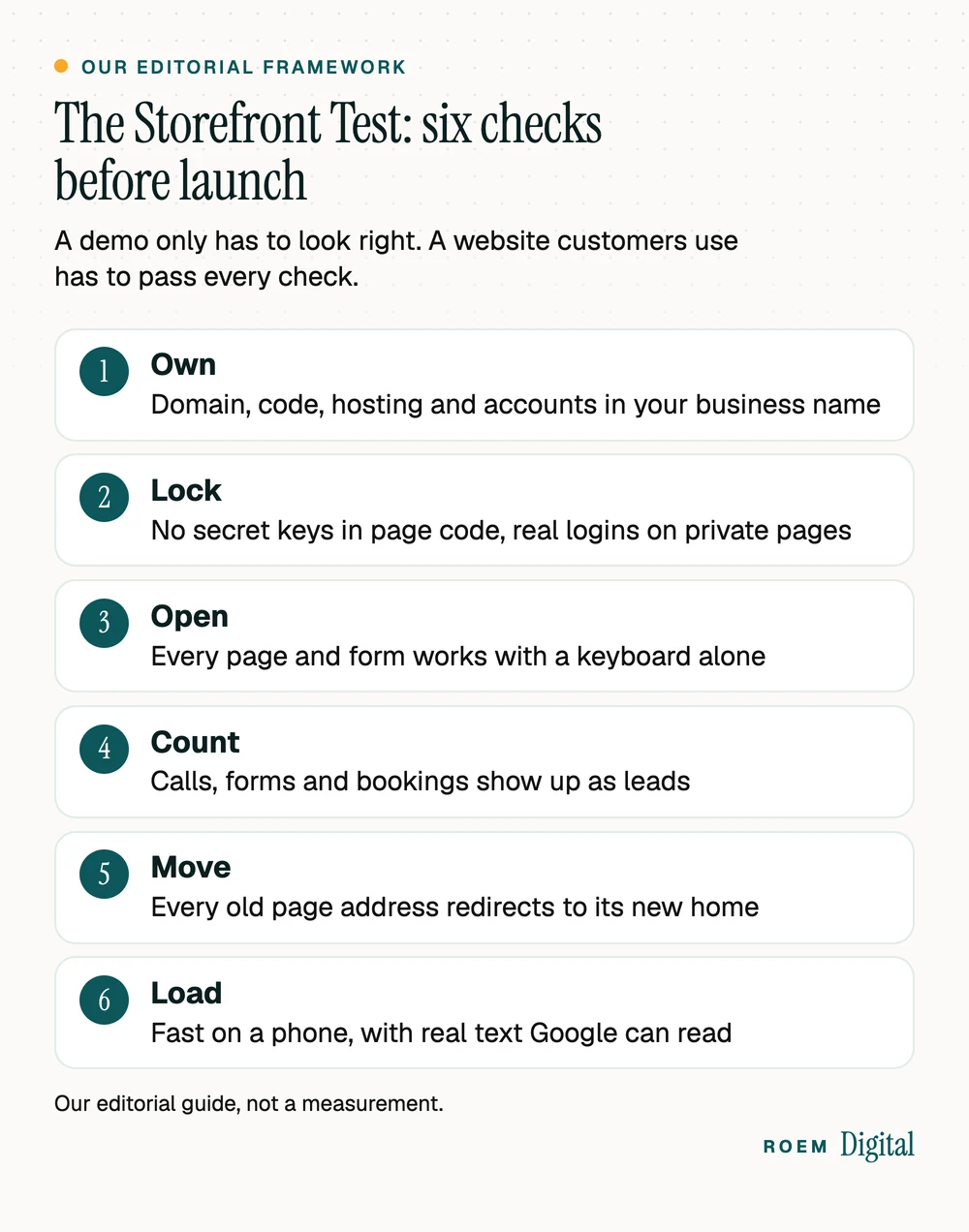
| Check | What to confirm | A test you can run |
|---|---|---|
| Own | The domain, code, hosting and every account are in your business's name | Log in to each one yourself, without the person who built the site |
| Lock | No secret keys or passwords in page code, and private pages need a real login | View the page source and search for words like key, secret and token |
| Open | Every page and form works with a keyboard and has proper labels | Tab through the site without a mouse and fill in each form |
| Count | Calls, forms and bookings show up as leads in your analytics | Submit a test form and tap the call button, then look for both in GA4 |
| Move | Every old page address sends visitors to its new home | Open your top old URLs and confirm each lands on the right new page |
| Load | Pages load fast on a phone and show real text in the HTML | Run PageSpeed Insights on mobile and view the source for your headings |
Each check maps to something we already insist on in our own custom website builds: you own the accounts, leads are tracked before any ad money is spent, and every old URL gets a permanent redirect.
Check one: make sure you own the site, not the tool
Ownership comes first because every other fix depends on it. A vibe-coded site often lives in several places at once: the AI tool's workspace, a code repository, a hosting account, a domain registrar and sometimes a database service. If any of those sits under a freelancer's personal email or a free trial that quietly expires, you don't fully own your website.
- Domain: registered to your business, with the registrar login in your hands. Our guide to choosing a domain name covers the registrar basics.
- Code: you can export or download it. If the site exists only inside one tool's workspace, moving it later can mean starting over.
- Hosting and database: billed to your business, with you as the account owner and the builder added as a user.
- Analytics, Search Console and Google Business Profile: owned by you, with anyone else added as a user you can remove.
Our guide to who owns your website and ad accounts explains how to check each account and how to get access back when someone else holds it.
Checks two and three: lock it down, then open it up
Lock: secrets, logins and forms
- Search the page source. Open your site, view the source, and search for words like key, secret, token and password. Some keys are designed to be public, so ask whoever built the site to confirm in writing which ones are. A secret key found in that code should be removed and replaced with a new one.
- Try private pages logged out. Open any admin area, dashboard or customer page in a private browser window. If it loads without asking you to sign in, it isn't locked.
- Follow every form. Submit each form and confirm where the message lands and who can read it. Names and phone numbers are customer data, so that inbox or database needs a strong password and two-step sign-in.
- Ask who updates the parts. Someone has to apply security updates to the packages the site depends on. Get a name, not a shrug.
Open: a site every customer can use
AI tools sometimes build menus and buttons that look right but only respond to a mouse. The Justice Department's guidance on web accessibility lists mouse-only navigation and forms without labels that screen readers can announce among its examples of website accessibility barriers, and states the department's long-held position that the ADA applies to what businesses open to the public offer on the web. This is general information, not legal advice.
Two quick tests catch a lot. Tab through every page using only the keyboard, and confirm every form field has a visible label rather than gray placeholder text that disappears when you type. For the fuller picture, read our guide to ADA website compliance.

Checks four to six: count the leads, keep the old links, load fast
Count: tracking that proves the site works
A vibe coding website can look great and still be invisible in your reports. Before launch, confirm that form submissions, taps on the call button and bookings show up as key events in Google Analytics 4. Our walkthrough on tracking calls and form fills in GA4 shows the setup.

Move: redirects from your old site
If the new site replaces an old one, every old address needs a permanent redirect to its closest new page, including the ones printed on flyers and business cards. Google's redirect documentation recommends a permanent server-side redirect whenever possible when a page's URL changes, and explains that the 301 and 308 status codes mean a page has moved for good. Our website redesign checklist walks through building the old-to-new map.
Load: speed, and pages Google can read
Some AI-built sites assemble every page in the visitor's browser with JavaScript. Google can process JavaScript, but its JavaScript SEO basics guide still calls server-side or pre-rendering a great idea, because it makes a site faster for users and crawlers and not all bots can run JavaScript. A quick check: view the page source and look for your headings and service descriptions as plain text.
Then test speed on a phone. Google's Core Web Vitals targets are a Largest Contentful Paint within 2.5 seconds, an Interaction to Next Paint of 200 milliseconds or less and a Cumulative Layout Shift of 0.1 or less. Our guide to whether a slow website is costing you calls shows how to test yours.
Keep it, fix it or hand it to a professional
Not every vibe-coded site needs a rebuild. Let the Storefront Test results decide, and be honest about what you find.
| What the test shows | What it usually means |
|---|---|
| All six checks pass | Keep it. Write down who maintains it, who applies updates and where the code is stored. |
| Ownership or tracking fails | Fix it. Move every account into your name and add lead tracking before you advertise. |
| A secret key is exposed or private pages open without a login | Take those pages offline, replace the exposed keys, and have a developer review the code before relaunch. |
| It takes payments or bookings, or stores customer records | Have a qualified developer review it. If it handles health, student or payment data, also ask an attorney or compliance professional about your obligations. |
| Nobody can change it without breaking something else | Rebuild. A site nobody can maintain drifts out of date and gets harder to fix. |
When the thing you need is software rather than a brochure site, such as booking, a portal or customer accounts, that's custom software territory, and it deserves a real build plan. When you're ready to go live, our website launch checklist covers the week before and the week after.
How we help owners who started with AI
We're a small senior team based in Davenport, Florida, working with businesses across Central Florida and nationwide by video. Our websites are hand-built, not templated, and you own the domain, the website, the ad accounts and the analytics. Keep the draft you made with AI: it's a clear way to show any builder how you want the site to look and feel.
Every plan starts with a free audit of your live site, Google listing and tracking from the outside. The quote comes after, once we both know whether your vibe coding website needs a few fixes or a fresh foundation.
“Working with ROEM Digital has been a great experience for my business. From developing our website to guiding us through a complete rebrand, they took the time to understand my vision and bring everything together in a way that truly represents the business. What I’ve appreciated most is their continued support. They’ve remained responsive, reliable, and willing to help whenever needed. That level of commitment goes a long way, especially as a business owner. I’d highly recommend ROEM Digital to anyone looking to establish or strengthen their brand. Having a great website is important, but having the right people behind it makes all the difference.”
Frequently asked questions
What is a vibe coding website?
It's a website built by describing what you want to an AI tool in plain language and letting the tool write the code. You review the result by how it looks and works, then ask for changes in conversation. Collins Dictionary named vibe coding its Word of the Year for 2025.
Is vibe coding safe for a business website?
It can be, if someone reviews what the tool built before customers use it. The usual problems sit out of sight: secret keys in the page code, private pages that open without a login, forms sending leads to the wrong place, and software packages nobody updates. Check those before launch, not after.
Can a website built with AI rank on Google?
It can, if it meets the same basics as any other site. Google needs to read your text, so pages that show their content in the HTML help. The site also needs fast load times on phones, unique titles, redirects from any old pages, and content that genuinely answers what your customers search for.
Who owns a website built with an AI tool?
That depends on where its parts live and whose name is on each account. Check the domain registrar, the code, the hosting and any database. Each should be in your business's name, with your login, and you should be able to export the code instead of leaving it locked inside one tool.
Does a vibe-coded website need to be accessible?
The Justice Department's position is that the ADA applies to what businesses open to the public offer online, however the site was built. Test with a keyboard alone and check that every form field has a label. This is general information, not legal advice, so ask an attorney about your own situation.
Should I fix my vibe-coded site or rebuild it?
Fix it when the problems are accounts, tracking or a few pages. Rebuild it when secrets were exposed in ways you can't fully trace, when it handles payments or customer records nobody has reviewed, or when nobody can change one page without breaking another. A free audit is a low-risk way to decide.