
Short answer: A website maintenance checklist keeps four things true: the site is safe, it works, its facts are current and Google can find it. Test forms and check backups monthly, review content and speed quarterly, and audit renewals and account access yearly, updating pages when your business changes rather than to look fresh.
Website maintenance checklist: the short version
Website maintenance is the routine work that keeps a live site secure, working, accurate and visible on Google. For most small businesses, that means a few checks a month, a deeper review each quarter and a yearly look at accounts and renewals.
If nobody has touched your site since launch, start with three checks today. Submit your own contact form and confirm the email arrives. Make sure your domain is set to auto-renew in an account you control. Then read your services and hours against what you actually offer. Those three catch the failures that quietly cost you calls.
The rest of this guide gives you the full schedule, then answers the questions owners ask next: how often to update a website, and what drives the cost of having someone else do it. If your site is one we built through our website and branding service, you already own the domain, the website and the analytics.
The four jobs every maintenance task serves
A website maintenance checklist gets long because it mixes very different kinds of work. We sort every task into what we call the four jobs of website maintenance: Safe, Working, True and Found. It's our editorial framework, not an industry standard.
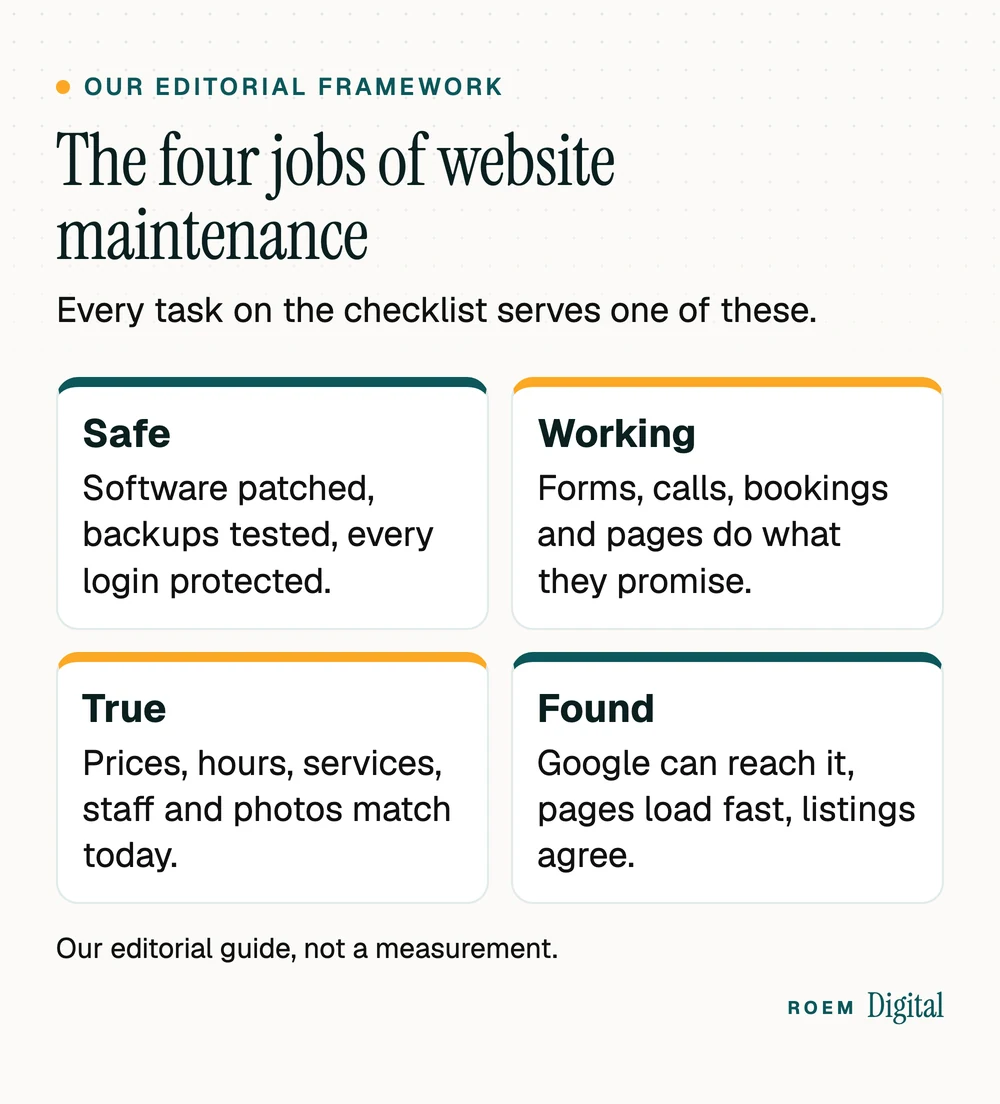
- Safe: software and plugins patched, backups that actually restore, and logins protected with two-step verification.
- Working: forms reach a real inbox, phone links dial, bookings and payments go through, and no page is broken.
- True: prices, hours, services, team, photos and service areas match the business you run today.
- Found: Google can crawl your pages, they load fast on a phone, and your listings show the same details. Our guide to whether a slow website is costing you calls covers the speed side.
When a task doesn't serve one of the four, ask whether it's worth doing. When one of the four has no task at all, that's your gap.
Website maintenance tasks by week, month, quarter and year
Here's the website maintenance checklist we suggest for a small business site. Adjust it to your platform: a hosted builder handles some software updates for you, while a WordPress site with many plugins needs more of them.
| How often | Tasks | Job |
|---|---|---|
| Weekly, if you take bookings or sell online | Place or book a test order you then cancel. Check that new order and booking notices still arrive. | Working |
| Monthly | Submit every form and tap every phone link. Apply software, plugin and theme updates. Confirm a recent backup exists. Check Search Console for new errors and security issues. | Safe, Working, Found |
| Quarterly | Read every key page against today's prices, services, hours and team. Test speed on your top pages. Restore a backup to a test copy. Remove users who no longer need access. | True, Safe, Found |
| Yearly | Confirm domain, hosting and security certificate renewals and the card on file. Review your privacy policy and other legal pages. Compare a year of leads by page and decide what to rewrite, merge or retire. | Safe, True, Found |
| After any change | Test forms and tracking after an update, a new plugin, a new page or a change in who receives leads. | Working |
Our website launch checklist has the full test routine for forms, phones and tracking. Run it again after any big change, not just at launch.
Keep it safe: updates, backups and logins
CISA, the federal cybersecurity agency, calls outdated software one of the most significant security risks to a business and recommends turning on automatic updates where possible, in its guide to updating business software. The same page notes that software no longer supported by its maker doesn't get security updates, so a plugin or theme its developer has abandoned should be replaced, not left in place.
On WordPress, the official update guide says to always update to the latest version, to back up first and to check that plugins and themes are compatible. It notes that minor and security releases can apply automatically in the background. Major releases depend on the site: WordPress's developer note for version 5.6 says new installations from then on are opted in to major updates by default, while existing installations stayed as they were, so someone must opt in. Check Dashboard, then Updates, to see which applies to yours. Afterward, visit the site and make sure everything works, as the guide advises.
Backups only count if they restore
CISA's backup guidance for small businesses lists website and operational databases among the data to protect. It recommends the 3-2-1 rule: three copies of important files, on two different types of storage, with one copy off-site. It also says to test that your team can actually restore. For a website, that means at least one backup kept outside your hosting account, and a restore you've tried at least once.
Lock down the logins
Turn on two-step verification for your website admin, hosting, domain registrar and Google accounts. CISA's page on multifactor authentication says users who enable it are significantly less likely to get hacked. Remove former employees and past vendors from every account, and keep logins in a password manager the business controls. Our guide to who owns your marketing accounts walks through each one.
Then check Search Console's Security issues report each month. Google says affected pages can appear with a warning label in search results or a warning page in the browser, which is a problem you want to find before your customers do.
How often to update a website: for accuracy, not freshness
Update your website when your business changes, not on a calendar. Google's guide to creating helpful content warns against changing page dates to make them seem fresh when the content hasn't substantially changed, and says adding or removing lots of content to make a site seem fresh won't help its rankings.
What does need prompt updates is anything a customer acts on:
- Prices, packages and promotions, the day they change. An expired offer still on the page is a phone call that starts with an apology.
- Hours and holiday closures, on the site and your Google Business Profile together.
- Services you've added or stopped offering.
- Team members and photos, when people join or leave.
- Service areas, when you start or stop serving a town.
- Your About page, when the story has moved on. Our roundup of about us page examples shows what to keep current there.
New content still has a place. A page for a service people keep asking about, or a guide that answers a real customer question, adds something. Changing the date on an old post doesn't.
What drives website maintenance cost
There's no honest single price for website maintenance, because the work depends on the site. These are the factors that move the cost, whoever you hire:
| Factor | Why it changes the work |
|---|---|
| The platform | A hosted builder bundles hosting and core updates into its plan. A WordPress site needs core, plugin and theme updates applied and tested. A custom-built site depends on how it was built, so ask what needs updating and who can edit it. |
| Plugins, apps and integrations | Every add-on is one more thing to update, test and eventually replace. |
| Booking, payments or a store | More flows to test after every change, and more at stake when one breaks. |
| How often your content changes | A menu, schedule or price list that changes weekly is ongoing work, not a quarterly check. |
| Pages in more than one language | Every change happens twice, in both versions. |
| Backups, monitoring and response time | Off-site backups, restore tests and a promised fix time all add work, and they're what you're paying for when something breaks. |
| Who does it | Your own time, a staff member, a freelancer or an agency each trade cost against speed and reliability. |
Some costs aren't labor at all: domain renewal, hosting, business email and paid add-ons. Our guide to what a small business website should cost lists the ongoing bills to expect beyond the build.
Questions to ask before you pay for maintenance
- What exactly is included each month, and what's billed extra?
- How fast will you respond when the site is down or a form stops working?
- Where are backups stored, and when did you last test a restore?
- Will every account stay in my business's name?
- What will I see each month that shows the work was done?
CISA's update guide also tells businesses to confirm that their vendors regularly update their own systems, since a vendor's weak spots can lead to a breach in your business. Ask your maintenance provider how they handle that, too.
Doing it yourself, or handing it off
Plenty of owners can run the monthly checks themselves. Testing forms, reading pages and opening Search Console take no special skill. Software updates, restores and security fixes are where outside help earns its keep, because a bad update can take the whole site down.
Whoever does the work, keep the accounts in your name. That's how we work: we hand-build sites rather than adapting templates, our clients own their domain, website and analytics, and calls, forms and bookings are tracked before any ad spend starts. Read more about our website and branding work, and once your website maintenance checklist is running, our guide to website conversion rate shows how to measure what the site actually produces.
If the person who built your site is gone
Start by finding where the domain is registered with ICANN's free registration data lookup, then ask your hosting company or website platform how to recover the account in your business's name. Collect every login in one password manager as you go. Our guide to choosing a domain name covers what the registrar account should look like once you have it back.
When maintenance isn't enough
Upkeep keeps a working site working. It won't fix a site that's hard to use on a phone, can't be edited by anyone you can reach, or describes a business you no longer run. If you keep patching the same problems, our website redesign checklist helps you decide between a refresh and a rebuild.
Frequently asked questions
What should a website maintenance checklist include?
At minimum: monthly form and phone tests, software updates and a backup check, quarterly content reviews, speed tests and a test restore, and yearly checks of domain, hosting and certificate renewals, legal pages and account access. Sort tasks by job: keeping the site safe, working, accurate and findable.
How often should I update my website?
Update it whenever something a customer acts on changes: prices, hours, services, staff or service areas. Apply software and security updates as they're released. Google says adding or removing content just to make a site seem fresh won't help its rankings, so update for accuracy rather than on a fixed calendar.
How much does website maintenance cost?
It depends on the platform, the number of plugins and integrations, whether you take bookings or payments, how often your content changes and how fast you need problems fixed. Ask any provider to list what's included each month, what's billed extra and where your backups are stored before you compare quotes.
Can I maintain my own website?
Often, yes. Testing forms, reading pages for accuracy and checking Search Console take no special skills. Software updates, restoring backups and cleaning up a hacked site are riskier, so many owners hand those to a developer. Whoever does the work, keep every account in your business's name.
How often should I back up my website?
Back up automatically, and at least as often as the site changes, so a store or booking site that changes daily needs daily backups. CISA recommends the 3-2-1 rule: three copies on two types of storage, with one off-site. It also recommends testing that you can actually restore.
What happens if I don't maintain my website?
Small problems pile up quietly: a form stops sending, an expired offer stays live, a plugin goes unpatched. CISA calls outdated software one of the most significant security risks to a business, and Google can show warnings on hacked pages. You often won't notice until the calls drop.