
Short answer: Google Business Profile verification proves you run the business, and Google chooses the method: phone or text, email, a live video call, a postcard code or a recorded video. For video, film your location, proof the business exists and proof you manage it in one unedited take. Google says reviews take up to 5 business days.
Google Business Profile verification: you don't choose the method
Verification is how Google confirms you're allowed to manage a business's profile. Until it's done, you can't edit details such as your name or hours, or interact with customers through the profile.
The detail most owners miss: you don't pick the method. Google's help page on verifying your business says verification methods are automatically determined by Google and can't be changed, and that the options depend on your business type, public info, region and business hours. Sometimes Google asks for more than one. These are the methods it may offer:
| Method | What you need | Watch out for |
|---|---|---|
| Phone or text | To answer the business phone or receive texts on it | Automated phone menus won't get the code |
| Access to the email address shown on the verification screen | You must be able to use that exact address | |
| Live video call | To be at the business during its hours, on a device that supports video calls | It isn't offered to every business |
| Postcard | A mailing address where the card will reach you | Codes expire after 30 days |
| Video recording | A phone and one continuous take that meets Google's list | No edits, no breaks, no pre-recorded clips |
Google says some profiles verify instantly, for example when you've already verified your website in Google Search Console, and that after you finish the steps, verification reviews take up to 5 business days. If you haven't set up Search Console, our Google Search Console guide walks through it. When video is offered, Google recommends using it.
It's worth the effort for more than editing rights. Google's page on improving your local ranking puts verification first among its tips, saying it tells Google you're authorized to represent the business, so the profile is more likely to show up in search results. Unverified listings do exist on Maps, but until you verify, you can't correct their details yourself or reply to reviews.
Before you verify your profile, fix the three things that sink it
Most failed attempts trace back to details set up before verification began. Check these first:
- The name matches your sign. Google's guidelines for representing your business require your real-world name, and its video page says the name in your video must match the name on your profile. Extra keywords in the name break both rules.
- The address is real and findable. Google's page on managing your address says to enter a business address Google can find, including suite or unit numbers. P.O. boxes and virtual offices aren't eligible. If customers don't come to that address, read the service-area rules below before you add it.
- The business is eligible. Google only gives profiles to businesses that meet customers in person, at a location or at the customer's. Its video page says an online-only shop isn't eligible and can't be verified.
Also check which Google Account you're signed in with. Google suggests linking a company email address to your Google Account, and we'd add that it keeps the profile with the business rather than with one person's inbox. Our Google Business Profile checklist covers the rest of the setup.
Google Business Profile video verification: what to film, in order
Video verification is where most owners get stuck, because it's judged against a checklist you can't see while recording. Google's page on verifying with a video recording sets three requirements: show the business location, show proof the business exists, and show proof you manage it. We turn those into a walking order. The order is ours, and the three requirements are Google's:
- Start outside. Film a street sign, the building number, nearby businesses or a landmark that pins down where you are.
- Turn to the business. A storefront shows the permanent sign with your name. A service-area business shows its tools, equipment, branded van or business cards.
- Prove you run it. Open the locked door or the branded van, open the register or point-of-sale system, or show a permit, invoice or utility bill in the business name.
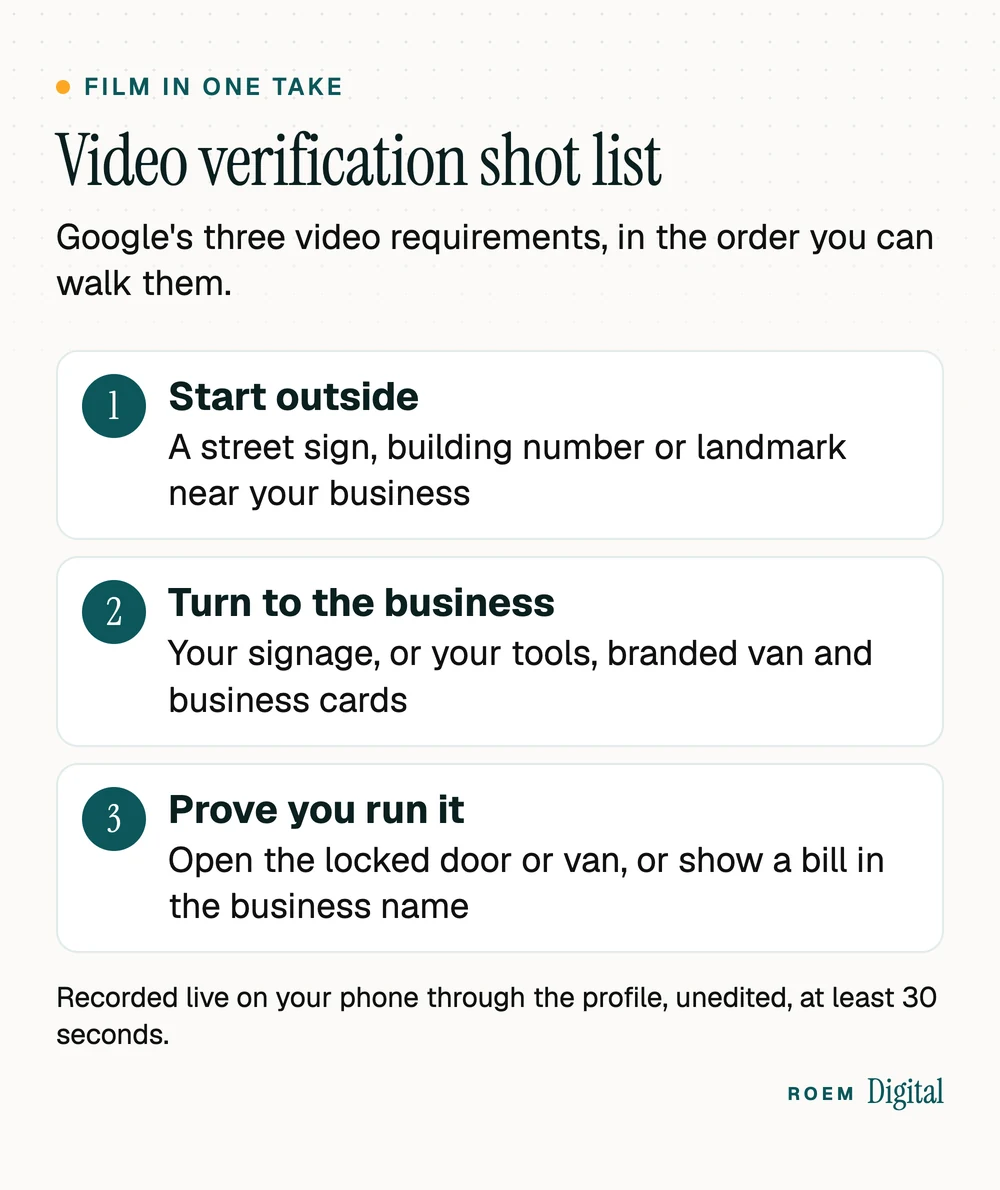
Google's rules for the recording itself: it must be unedited, unique and complete with no breaks, at least 30 seconds long, and recorded and uploaded from a mobile device through your Business Profile. Pre-recorded videos aren't allowed. Keep out bank account, tax and ID numbers, private information, and other people's faces. Plan the route before you press record, and do one dry run without the camera. The same habit pays off later: real photos of your sign, van and team are what a strong profile shows, as our Google Business Profile checklist explains.
Phone, postcard and live calls: using a Google Business Profile verification code
If Google offers a code instead of video, a few rules from its verification page save a lot of waiting:
- Phone or text: make sure a person can answer the business line. Interactive voice response systems won't get the code, so if your listed number is a call tracking line that routes through a phone menu, have someone ready to pick up. Our call tracking guide covers how tracking numbers belong on the profile.
- Postcard: most codes arrive within 14 days. Don't edit your business name, address or category while you wait, or the code won't work.
- Don't request a second postcard. A new request cancels the code already in the mail and starts the wait again.
- Enter it on time. Postcard codes expire after 30 days. You type the 5-digit code into the Code field on your profile.
- Keep the code to yourself. Google says it will never ask for your verification code, and not to share it with anyone, even people who manage the profile.
A live video call works differently. Google says it's only available during your location's business hours, and you need to be at the business, ready to show outside signs or a street sign, your products or equipment, and employee-only areas or your keys. A support representative guides the call.
Google Business Profile verification failed? What each message means
A failed attempt is rarely the end. Match what you see to Google's own explanations:
| What you see | What it means | What to do |
|---|---|---|
| The Get verified button appears again | Google couldn't completely verify the business | Re-verify, and try any other method the profile now offers |
| Review issues, after a video | The video wasn't accepted | Read the issues, then record a new video with everything from the first one plus what was missing |
| A request for more information | Usually a recent change to your business details | Select Get verified and follow the steps again |
| Someone else may manage this Business Profile | Another account already owns the listing | Request access, and the owner gets 3 days to respond. A service-area business without a shop or office contacts Google support instead |
| The profile is marked as a duplicate | Google allows one profile per business | Don't make another. Resolve the duplicate instead |
Google gives examples of rejected videos: the business name not visible on the storefront, no nearby area shown, or missing proof of authorization. Its page on requesting ownership adds that if the current owner doesn't respond within 3 days, you may get the option to claim the profile, though that option isn't always available. If a profile was taken down rather than left unverified, see our guide to a suspended Google Business Profile. Google asks you to try every method on offer before you contact support.
Verifying a service-area business without showing your home address
Plumbers, cleaners and mobile services often run the business from home. Google's rules let you verify without publishing that address:
- Keep the address off the public profile. Google's pages word this two ways. Its address page says to enter an address Google can find to verify, then turn off Show business address to customers. Its video and service area pages say not to add, or to remove, an address where you don't serve customers. Either way, customers should see only your service areas.
- List where you work. Google's service area page allows up to 20 areas and says the overall area shouldn't be more than about 2 hours of driving time from your base.
- Film your neighborhood. For video, Google suggests home-based businesses record landmarks and signs in the immediate neighborhood, then show tools, a branded vehicle and a document such as a permit, invoice or utility bill that matches the profile name.
- Check the category. Businesses selling alcohol, cannabis or weapons need a storefront and can't be service-area only.
Our guide to local SEO for service-area businesses covers what to do after verification, from area pages to reviews.
After you're verified: lock in ownership
Google sends a confirmation email when the profile is verified. Then set it up so you never have to do this again:
- Keep the primary owner role yourself. Add your agency or staff as managers, not owners: Google notes that co-owners can upgrade themselves to primary owner. Our guide to who owns your marketing accounts explains why.
- Expect a short wait for new users. Google says a new owner or manager waits 7 days before using every feature, such as removing other users.
- Watch for edits. In an April 16, 2026 post on its Maps blog, Google said it was rolling out email alerts so verified, active owners can review important edits before they go live.
- Expect re-verification after big changes. Google says changes to your business info may require it.
Verification is the starting line for ranking, not the finish. Our guide on how to rank higher on Google Maps covers what comes next, and our local SEO audit checks the whole local picture.
Where ROEM fits
Google Business Profile optimization is part of our SEO and content service. We're a small senior team based in Davenport, Florida, working with businesses across Central Florida and nationwide. Verification itself has to come from you, because it proves you run the business. Before you start, our free audit can check your profile, website and tracking from the outside, with no logins needed, and you keep ownership of every account.
Frequently asked questions
How long does Google Business Profile verification take?
Google says that after you complete the verification steps, reviews take up to 5 business days, and occasionally longer. A postcard adds mailing time, since Google says most codes arrive within 14 days. Some profiles verify instantly, for example when the website is already verified in Google Search Console.
Can I choose how to verify my Google Business Profile?
No. Google says verification methods are automatically determined and can't be changed. The options depend on your business type, public information, region and business hours, and some businesses need more than one method. If several options appear, try them, and Google recommends video when it's offered.
What do I need to show in a Google Business Profile verification video?
Google asks for three things: your business location, proof the business exists, and proof you manage it. Film a street sign or building number, then your signage or tools and branded vehicle, then something only staff can access, such as opening a locked storage room or showing a bill in the business name.
How long does a Google verification video have to be?
Google's video page says the recording must be at least 30 seconds long, unedited and complete with no breaks. It has to be recorded live and uploaded from a mobile device through your Business Profile. Pre-recorded videos aren't accepted, so plan the route and do a dry run first.
What happens if my Google Business Profile verification video is rejected?
Google shows a Review issues notice explaining what was missing, such as the business name not being visible on the storefront. Record a new video that includes everything from the first one plus the missing items, then upload it. You can also try any other verification method the profile offers.
Can I verify a Google Business Profile with a home address?
Yes, as long as customers never see it. Google's address page says to enter an address it can find to verify, then turn off the option to show it, while its video page says not to add one you don't serve customers from. List up to 20 service areas instead, and for video, film landmarks and signs in your neighborhood.