
Short answer: If you find your Google Business Profile suspended, don't create a new one. Open Google's appeals tool, read the reason and policy it shows, fix that issue, then submit one appeal with documents whose name and address match the profile. Google says appeal decisions can take up to 5 business days.
Google Business Profile suspended? Do these four things first
A suspended profile is one Google has taken down or locked because it found a guideline problem with the profile or the account behind it. You fix it by correcting the cause and filing one appeal, not by starting over.
It feels urgent because it is. When Google removes a profile, its help page on suspended and disabled profiles says the public can't go to it and the owner and managers can't act on it. Calls and direction requests from Maps stop with it. The good news: the way back is written down, and most of the work happens before you click submit.
- Don't create a new profile. Google's help page says it directly: do not create a new Business Profile for the same business. A second profile breaks the one-profile rule and hands Google a new problem.
- Don't make random edits. Fix what the decision points to, then check the rest of the profile against Google's guidelines, because Google asks that the whole profile follow them before you appeal.
- Open the appeals tool and read the decision. It shows the date of the decision, the reason, a link to the policy involved and whether it can be appealed. Screenshot all of it.
- Check which account you're signed in with, and whether other profiles you manage went down at the same moment. That tells you which kind of lock you have.
If you want the field by field basics first, our Google Business Profile checklist covers them. This guide is for the moment something has already gone wrong.
Suspended, restricted or disabled: work out which lock you have
A Google Business Profile suspended on its own is a different problem from one suspended because your whole account was restricted, and each starts in a different place. Google says appeals can only be submitted once, and it sets an order for account restrictions, so start in the right place. Match what you see to this table.
| What you see | What it usually means | Where to start |
|---|---|---|
| One profile shows as suspended | Google found a guideline problem with that profile | The Business Profile appeals tool, after you fix the cause |
| Every profile you manage is suspended at once | Your Google account is restricted, for example after a pattern of policy violations | Appeal the account on your My accounts page first, then each profile |
| The profile is disabled | Google may have decided the business doesn't exist where the profile says it does | The appeals tool, with proof of the business at that address |
| New reviews paused, or a warning that fake reviews were removed | A Fake Engagement restriction on reviews, or Google's temporary pause after a spike in spam reviews on your profile | Read Google's email. For a restriction, use the appeal link it gives. For a review attack, report the reviews, and any payment demand through Google's extortion report form |
| A name, phone or photo edit was rejected | A content decision, not a suspension | In the US, Google's contact form (the appeals tool handles these only in the UK and EEA) |
Google's policy overview says that if a merchant's account is restricted, all Business Profiles associated with that account will be suspended, and that Google will disable a profile if it determines the business doesn't exist in the location claimed. The suspension help page sets the order: lift the account restriction on the My accounts page, then appeal each profile. For review problems, Google's page on Fake Engagement restrictions says it notifies owners by email if it plans to restrict a profile.
One account detail matters for anyone who works with an agency or a former employee. If the owner's Google Account is removed, Google removes every location that user owns. Removing a manager's account doesn't affect the locations. An account restriction is different: Google says the profiles a restricted account manages are suspended, so a manager account that breaks the rules can take your profile down with it. Keep the owner role on an account you control, and read our guide to who owns your marketing accounts to check yours.
Why a Google Business Profile gets suspended: the rules to check first
Google doesn't publish a ranked list of causes, but its guidelines name the behavior that puts a profile at risk. Check these first, in Google's own terms, before you write a word of your appeal.
| Cause | What Google's rules say | Fix it before you appeal |
|---|---|---|
| Extra words in the business name: a city, a service, a slogan | Unnecessary information in the name isn't permitted and could result in suspension | Match the name on your sign, website and paperwork exactly |
| A P.O. box address | Profiles with a P.O. box address will be suspended | Use the real address you operate from |
| A virtual office or coworking desk | A virtual office isn't eligible. A coworking office needs clear signage, customers received there and your staff present during business hours | Use the address where your team actually works |
| A service-area business showing a home address | Service-area businesses should hide the address from customers | Clear the address and list the areas you serve |
| Two profiles for one business | Only one profile per business, and a duplicate won't show on Search or Maps | Remove a duplicate you created by mistake, carefully, since removal deletes its content |
| An online-only or lead generation business | A business must make in-person contact with customers during its stated hours | If this is you, a Business Profile isn't the right channel |
| Bought, traded or rewarded reviews | Fake Engagement violations can bring restrictions on the profile's reviews | Stop the practice before you appeal |
Service-area rules catch many contractors and home service owners. Google's guidelines for representing your business say a plumber who runs the business from home should clear that address from the profile, and that the overall service area shouldn't extend farther than about 2 hours of driving time from where the business is based, though larger areas may suit some businesses. Our guide to local SEO for service-area businesses covers that setup in full.
Sometimes the cause is nothing you did on purpose. Google enforces at a huge scale: in an April 16, 2026 post on its Maps blog, it said it removed over 13 million fake Business Profiles in 2025. Its Fake Engagement restrictions page invites owners who believe Google incorrectly evaluated their profile to appeal, so a mistaken decision is worth contesting calmly and with proof.
Build a one-shot appeal kit before you click submit
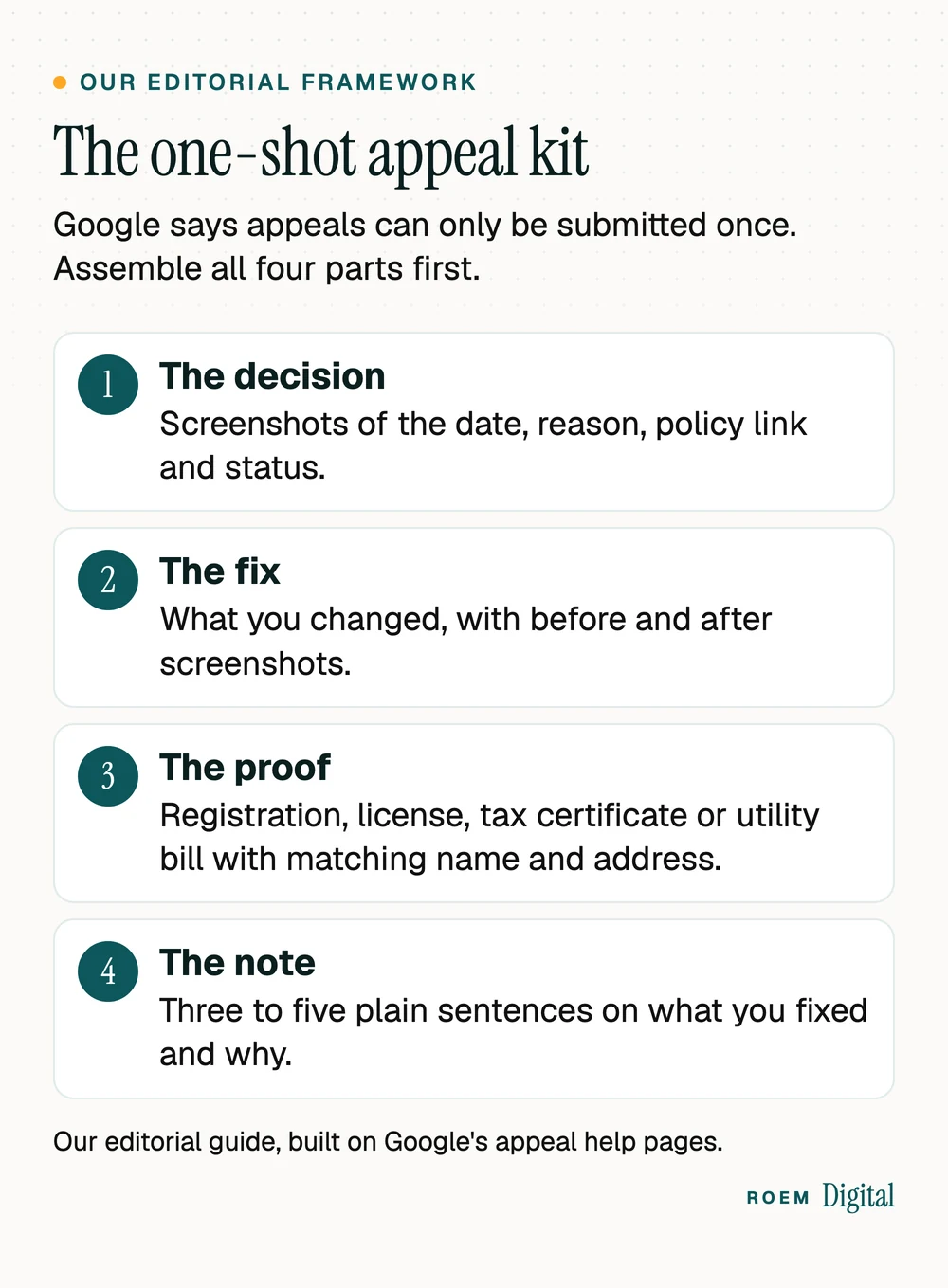
Google's help page is blunt about the detail most owners miss: appeals can only be submitted once. A thin first appeal leaves you with a request for additional review, which Google offers only after a denial. So treat the appeal as a closing argument and assemble it first. We call this the one-shot appeal kit, our editorial framework built on what Google's appeal pages ask for:
- The decision. Screenshots from the appeals tool showing the date, the reason, the linked policy and the status.
- The fix. What you changed to meet that policy, with before and after screenshots of the profile.
- The proof. Google lists official business registration, a business license, tax certificates and utility bills (electricity, phone, water, internet) as evidence that can strengthen an appeal. Check that the business name and address on each one match the profile.
- The note. Three to five plain sentences: what the business is, where it serves customers, what you fixed and why the profile now follows the guidelines.
Two practical warnings. Prepare the documents before you start, as Google's page on appealing profile restrictions recommends. And if the name on your license doesn't match the name on your profile, sort out that mismatch first, because Google asks for documents whose name and address match. Changing a business name has its own rules, which our rebranding checklist walks through.
How to reinstate a Google Business Profile, step by step
With the kit ready, the appeal itself is short. These steps follow Google's help pages for businesses outside the UK and EEA:
- Open the Google Business Profile appeals tool while signed in to the account connected to the profile.
- Select the profile, then select the decision you want to appeal.
- Read the decision details, including whether it can be appealed at all.
- Upload your evidence with Choose file. You can attach several files.
- Type your note in the text box.
- Tick the box confirming your evidence is attached, then select Submit appeal.
Google says appeal reviews and decisions can take up to 5 business days, and asks owners not to submit multiple appeals for the same issue before a decision arrives. The decision comes by email. In the tool, the status reads Submitted, Approved, Not Approved, Can't be appealed or Eligible for appeal.
If the answer is Not Approved, Google says it may be able to do an additional review, and you can add evidence that wasn't in the original appeal. Save that for something new, such as a document you didn't have the first time. If the status is Can't be appealed, don't open a new profile to get around it. Put your energy into the channels below, and get advice from someone who handles local SEO and Google Business Profiles before you change anything else.
Keep the phone ringing while your profile is down
Having your Google Business Profile suspended takes away your Maps listing, not your business. While you wait on a decision, lean on the channels Google's decision doesn't touch:
- Your website. Put a tappable phone number and your main action at the top of every page, so people who search your name and land on the site can still reach you.
- Other listings. Directories and map apps beyond Google keep showing your name, phone and website. Our guide to business listings and citations covers the ones worth checking.
- Paid search. Search ads send people to your website rather than your profile, so they can keep leads coming for now. Our paid media and lead generation service can set that up with tracking in place.
- Past customers and neighbors. A short email or text with your number keeps referrals moving, and a neighborhood platform can help too. See our guide to Nextdoor for business.
- Call tracking. If you track calls by source, you'll see how many Maps calls you lost and when they come back.

After reinstatement: keep it from happening again
Getting the profile back is half the job. The other half is making sure the same problem doesn't return. Build these habits in:
- Keep ownership and sign in. Google's policy overview warns that merchants who don't access their profile for long periods may have access revoked and content removed after adequate warning.
- Watch for edits you didn't make. In the same April 2026 post, Google said it was rolling out email alerts so verified and active owners can review important edits before they go live. Keep the owner inbox monitored.
- Change your name the right way. Google's guidelines allow a minor name change on the same profile. A bigger change means marking the old profile closed and creating a new one.
- Collect reviews honestly. Never buy, trade or reward reviews. When a bad one lands, our guide on how to respond to negative reviews shows how to answer it well.
- Post real updates. Fresh photos and Google Business Profile posts show you're open without any risky shortcuts.
- Run a monthly check of hours, suggested edits, photos and reviews, using the routine in our Business Profile checklist.
Where ROEM fits when a profile is suspended
Google Business Profile optimization is part of our SEO and content service. We're a small senior team based in Davenport, Florida, working with businesses across Central Florida and nationwide. With a Google Business Profile suspended, or one you think is at risk, our free audit is a quick second opinion: we review your website, Google listing, ads and tracking from the outside, with no logins needed, and send a short written plan in plain English. You keep ownership of the profile and every account.
Frequently asked questions
How long does a Google Business Profile appeal take?
Google says appeal reviews and decisions can take up to 5 business days. You get the decision by email, and the appeals tool shows the status. Google asks owners not to submit multiple appeals for the same issue before a decision arrives, so file once with everything attached and then wait.
Should I make a new Google Business Profile if mine is suspended?
No. Google's help page on suspended profiles says not to create a new Business Profile for the same business. Google allows only one profile per business, so a second one adds a new violation. Fix the cause on the suspended profile and appeal it through Google's appeals tool instead.
Why was my Google Business Profile suspended without warning?
Google may suspend profiles that don't follow its guidelines. Guideline problems to check include extra words in the business name, a P.O. box or virtual office address, a home address shown on a service-area business, and duplicate profiles. The appeals tool shows the reason and a link to the policy involved.
What documents can I upload to appeal a suspended Business Profile?
Google lists official business registration, a business license, tax certificates and utility bills such as electricity, phone, water or internet as evidence that can strengthen an appeal. The business name and address on every document should match the profile you are appealing, so fix any mismatch before you submit.
What can I do if Google denies my Business Profile appeal?
Google says it may be able to do an additional review of a denied reinstatement request, and you can add evidence that wasn't in the original appeal. Use it for something genuinely new. If the tool says the decision can't be appealed, don't create a new profile to get around it.
Can a service-area business show its home address on Google?
Google's guidelines say service-area businesses should hide their address from customers. A plumber running the business from home, for example, should clear the address and list service areas instead. Google says the overall service area shouldn't extend farther than about two hours of driving from your base, though larger areas may suit some businesses.
Can my agency's account get my Business Profile suspended?
It can. Google says that when an account is restricted for policy violations, the Business Profiles that account manages are suspended. Removing a manager's account doesn't affect the locations, but removing the owner's account removes every location it owns. Keep the owner role on an account you control and add an agency you trust as a manager.