
Short answer: Google Business Profile posts are short updates, offers and events that appear on your profile in Search and Maps. Google doesn't list them among its local ranking factors, so write them to win the click from people already looking at you: one real photo, one point, one date and one button.
What Google Business Profile posts are, and where people see them
Google Business Profile posts are short updates, offers and event notices you publish on your profile. They show on Search and Maps: in the Updates or Overview tab on phones and in the From the owner section on a computer.
Google's help page on posts describes three types you can create. Each has its own required fields:
| Post type | What Google asks for | Best used for |
|---|---|---|
| Update | A description, plus an optional photo, video and action button with a link | Finished jobs, news, seasonal reminders, answers to common questions |
| Offer | A title, dates and time. Google adds a View offer button, and you can add a coupon code, link and terms | A real, time-limited deal with written terms |
| Event | A title, start and end dates and times. Without times, the event shows as lasting 24 hours on its dates | Open houses, classes and workshops at your business |
Google may also feature posts about events, deals or specials on mobile profiles, drawn from your Facebook and Instagram or from posts you created. For now, its help page says that feature is available in English for single-location food and drink businesses in the US, UK, Canada, Australia and New Zealand.
You'll also see the older name, Google My Business posts, in plenty of guides. It's the same feature. If you haven't set up the rest of the profile yet, start with our Google Business Profile checklist, because posts sit on top of categories, hours and photos, not in place of them.
Google business posts aren't a listed ranking factor, so write them to win the click
Plenty of guides promise that posting will push you up the map. Google doesn't say that. Its page of tips to improve your local ranking names relevance, distance and prominence as the factors behind local results, and its tips cover verifying the business, keeping information complete and accurate, responding to reviews, adding photos and videos, and showing in-store products. Posts aren't on that list.
That changes what a post is for. By the time someone sees your posts, they've already found you. They're comparing you with two or three other businesses and deciding whether to call. A post that shows recent work, a clear deadline or an easy way to book helps that decision. A post written to stuff in keywords doesn't.
If you want to move rankings, the work sits elsewhere: the right category, complete details, a steady flow of reviews and a strong website. Our guide to getting more Google reviews covers the review side, which Google's own page does tie to local ranking.
The shop window rule: one photo, one point, one date, one button
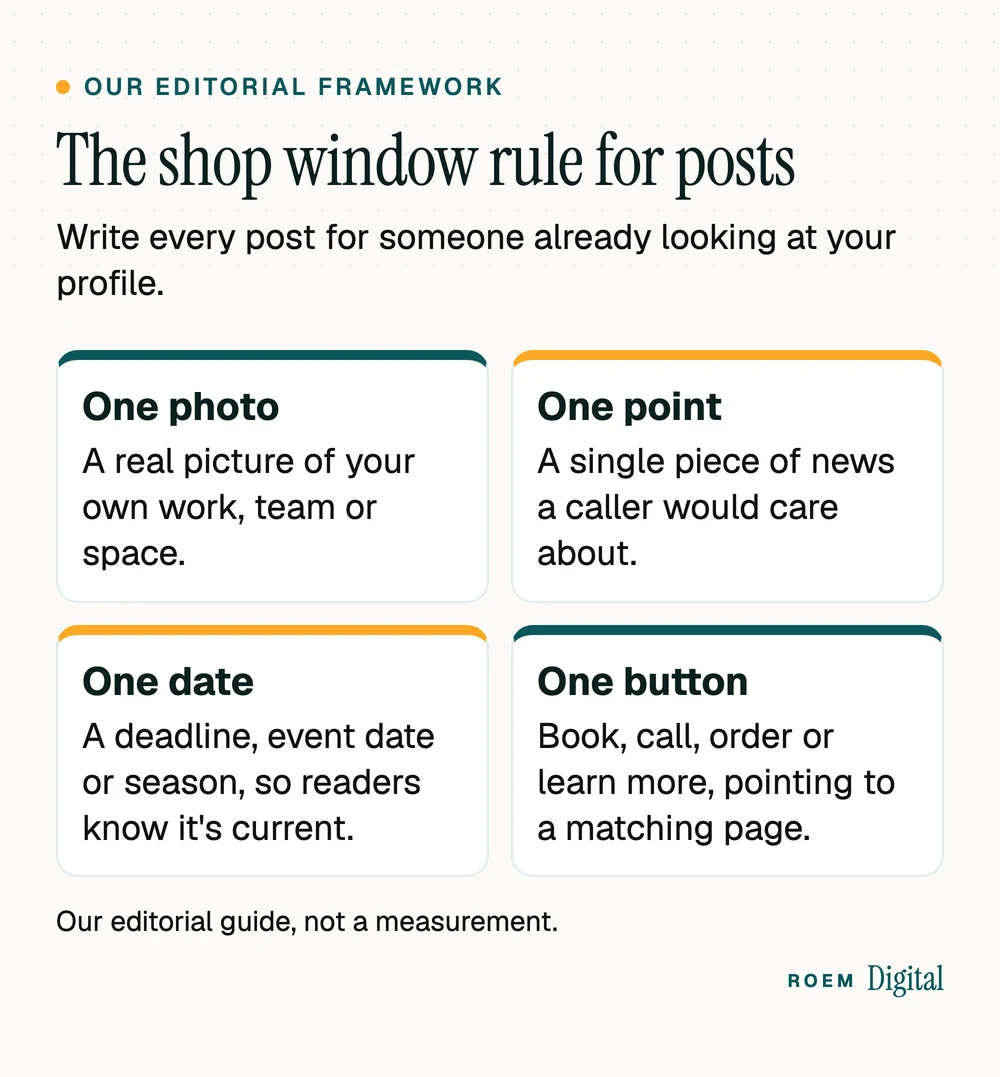
Think of each post as the card you'd tape in a shop window for people walking past. We call this the shop window rule, our editorial framework for Google Business Profile posts:
- One photo. A real picture of your work, your team or your space, taken that week if you can. Customers can tell your job site from a library image.
- One point. A single piece of news a caller would care about. Two offers and a hiring notice in one post means none of them land.
- One date. A deadline, an event date or a season. Google archives posts older than 6 months unless a date range is set, and a date tells readers the post is current.
- One button. Book, Order online, Learn more or Call now, pointing to a page that matches the post. Google's help page says the button should send customers to a site where they can complete the action.
Here's what that looks like for a painting company: a photo of a kitchen cabinet repaint finished that afternoon, two sentences on the color and the prep, a line saying exterior bookings for January are open, and a Book button that goes to the exterior painting page, not the homepage.
The button matters more than most owners think. A Book button that lands on your homepage makes the customer hunt. Send it to the booking page or the service page the post talks about. Our guide to landing pages that match the ad explains the same idea for paid clicks.
GBP post ideas for service businesses, not just shops
Most lists of post ideas are written for restaurants and retailers. A painter, a med spa or a pool service has different news. These ideas come from things that already happen in a normal week:
| Idea | Post type | Button and where it goes |
|---|---|---|
| A finished job, with the general area and the type of work | Update | Learn more, to the matching service page |
| A seasonal reminder: hurricane prep, summer heat, the holiday rush | Update | Book, to your booking page |
| A question customers ask on the phone, answered in two sentences | Update | Learn more, to the FAQ or service page |
| A new service or a new team member | Update | Learn more or Call now |
| Holiday hours or a closure (after you set special hours) | Update | Call now |
| A real, time-limited deal with written terms | Offer | View offer, with terms and a redemption link |
| An open house, class or workshop at your location | Event | Sign up or Learn more |
Service-area businesses that don't host customers will lean on Updates, since Google describes Events as a way to promote an event at your business. You can reuse your social content here too: the finished job photo that worked on Instagram makes a good update. Our guide on what a local service business should post has more ideas you can share in both places.

Planning around a date helps. Small Business Saturday falls on November 28, 2026, and our list of Small Business Saturday ideas works for an Event or Update post as much as for social. Leave discounts out of those posts: American Express's own guidance says not to pair the name with offers.
Offer posts: write the terms before the headline
Offers are the post type most likely to cause trouble later, because a customer will hold you to what it says. Google's guidelines for representing your business say any promotion should clearly link to its terms and provide clear guidelines and qualifications, and that promises given or implied should be kept.
Federal truth in advertising rules apply too. The FTC's advertising guide for small business states that advertising must be truthful and non-deceptive and that advertisers must have evidence to back up their claims. In practice, before you publish an offer:
- Write the terms first: who qualifies, what's included, the end date and any limits.
- Make the title match the terms. If the discount covers one service, don't headline it as a sale on everything.
- Set the offer's start and end dates so it drops off when the deal does.
- Point the link to a page that repeats the same terms.
Some businesses face extra limits. Google's posts content policy says hotels can't create offer posts, and its posts help page says businesses in regulated industries can post but shouldn't include content about the regulated products. Google's list of regulated industries includes pharmaceutical products and health and medical devices, which covers many med spa treatments. In Florida, an ad for a free or discounted service by many licensed health care practitioners must also carry the capitalized statement required by Florida Statute 456.062. If your industry has its own advertising rules, check with your attorney before you post an offer. This is general marketing information, not legal advice. If paid promotion is the next step for an offer, our paid media service builds the landing page and tracking first.
Why Google rejects posts, and how to fix them
After you publish, Google reviews each post against its content policy. The status tells you where it stands: Live means it shows on Search and Maps. Pending means it's still processing or the profile isn't verified. Not approved means it broke a policy, and the question mark next to the status shows which one.
The common causes, drawn from Google's posts help page and content policy:
- A phone number in the text. Posts with a phone number might get rejected if Google can't verify it belongs to the business. Use a Call now button instead, which uses your verified profile number.
- Other unverified contact details. Email addresses and social media handles can also get a post removed.
- Low-quality text. Misspellings, extra characters, auto-generated or distracting content.
- Risky links. Google doesn't allow links that lead to malware, phishing or similar material.
Fix the issue, then edit or delete the post from the Posts section and publish again. If every edit and post you make is being rejected, check whether the profile itself is restricted. Our guide to a Google Business Profile that's been suspended explains how to tell.
A posting rhythm you can keep: schedule, repeat and track
You can plan ahead from the profile itself. As of November 2026, Google's help page describes a Schedule this post option for a future date and time, a Repeats menu for weekly, monthly or custom schedules, and a way to publish one post to several of your profiles at once. Many older guides still say Google can't schedule posts, so check the current tool before paying for a scheduler just for this.
- Pick a rhythm you'll keep. In our editorial judgment, one real post every week or two beats a burst of ten followed by silence. Batch them: take photos as jobs finish, write four posts once a month, schedule them.
- Use Repeats sparingly. A repeating reminder suits something that's true every month. News isn't.
- Post in Spanish if your customers search in Spanish. Google Business Profile posts in Spanish are part of our bilingual marketing work.
- Tag the links. Add UTM parameters to every post button so Google Analytics shows which posts send visitors. Our guide to UTM parameters shows how.
How ROEM handles Google Business Profile posts
Google Business Profile optimization is part of our SEO and content service, and posts fit alongside the content calendar in our social media management. We're a small senior team based in Davenport, Florida, working with businesses across Central Florida and nationwide. We'd rather post one real job photo with a clear button than fill your profile with filler, and you keep ownership of the profile and every account.
Frequently asked questions
How often should I post on my Google Business Profile?
Google doesn't set a required frequency. Posts older than six months are archived unless a date range is set, so a profile with no recent posts can look quiet. A steady rhythm of one real post every week or two is easier to keep than bursts, and Google's scheduling option makes batching simple.
Do Google Business Profile posts help SEO?
Google's help page on local ranking names relevance, distance and prominence as the factors behind local results, and its tips cover verification, complete information, reviews, photos and products. Posts aren't on that list. They help people who already found you decide to call, which is still worth doing.
Why was my Google Business Profile post not approved?
Google reviews every post against its content policy. Common causes are a phone number Google can't verify, other contact details in the text, misspellings or distracting content, and risky links. The question mark beside the Not approved status shows which policy applies. Fix the issue and post again.
Can I schedule posts on Google Business Profile?
Yes. Google's help page describes a Schedule this post option that publishes at a date and time you choose, and a Repeats menu for weekly, monthly or custom schedules. You can also publish one post to several profiles at once if you manage more than one location.
Can I put my phone number in a Google Business Profile post?
It's risky. Google says posts that include a phone number might get rejected if the number can't be verified as connected to the business. Add a Call now button instead. It uses the verified phone number on your profile, so customers can still reach you with one tap.
Are Google My Business posts the same as Google Business Profile posts?
Yes. Google My Business was the earlier name of the product, and many guides still use it. Google's developer documentation still calls its interface the Google My Business API. The posts you create today live under Posts on your Google Business Profile, with the same update, offer and event types.