
Short answer: A rebranding checklist runs in four stages: lock the new name, build the new look and website out of sight, switch your site, redirects and Google profile on the same day, then sweep listings, signs and paperwork. For a local business, the riskiest step is the Google Business Profile, which has its own rules for name changes.
Refresh, rebrand or rename: size the change first
A rebranding checklist depends on how much you're changing. A new logo and colors is a design project. A new name is a design project plus a legal, technical and Google project. Size it before you plan anything:
| What changes | What it touches | Extra work |
|---|---|---|
| Logo, colors or fonts only | Website, social profiles, signs, vehicles, print | New files and a sweep of everything printed |
| Tagline or messaging | Website copy, ads, social bios, Google description | Rewrite pages that rank without losing their substance |
| Small name tweak (dropping Co., say) | Everything above, plus every listing | Google may let you edit the name on your existing profile |
| New name, same domain | Everything above, plus state filings and trademark checks | Google may treat you as a new business |
| New name and new domain | Everything above, plus every URL on your site | Redirects, Search Console's Change of Address tool, keeping the old domain |
If the change is only a new website on the same name, our website redesign checklist is the better guide. This one is for a new name, a new look, or both.
Lock, build, switch, sweep: the order that keeps customers
Most rebranding mistakes are sequencing mistakes. A logo gets designed before anyone checks the name. The new sign goes up while Google still shows the old one. Half the listings change and the other half don't, so customers find two businesses at two names.
Think about a rebrand in four stages. The order is our editorial judgment rather than an industry standard: lock the name, build everything out of sight, switch everything customers search on one day, then sweep the long tail.
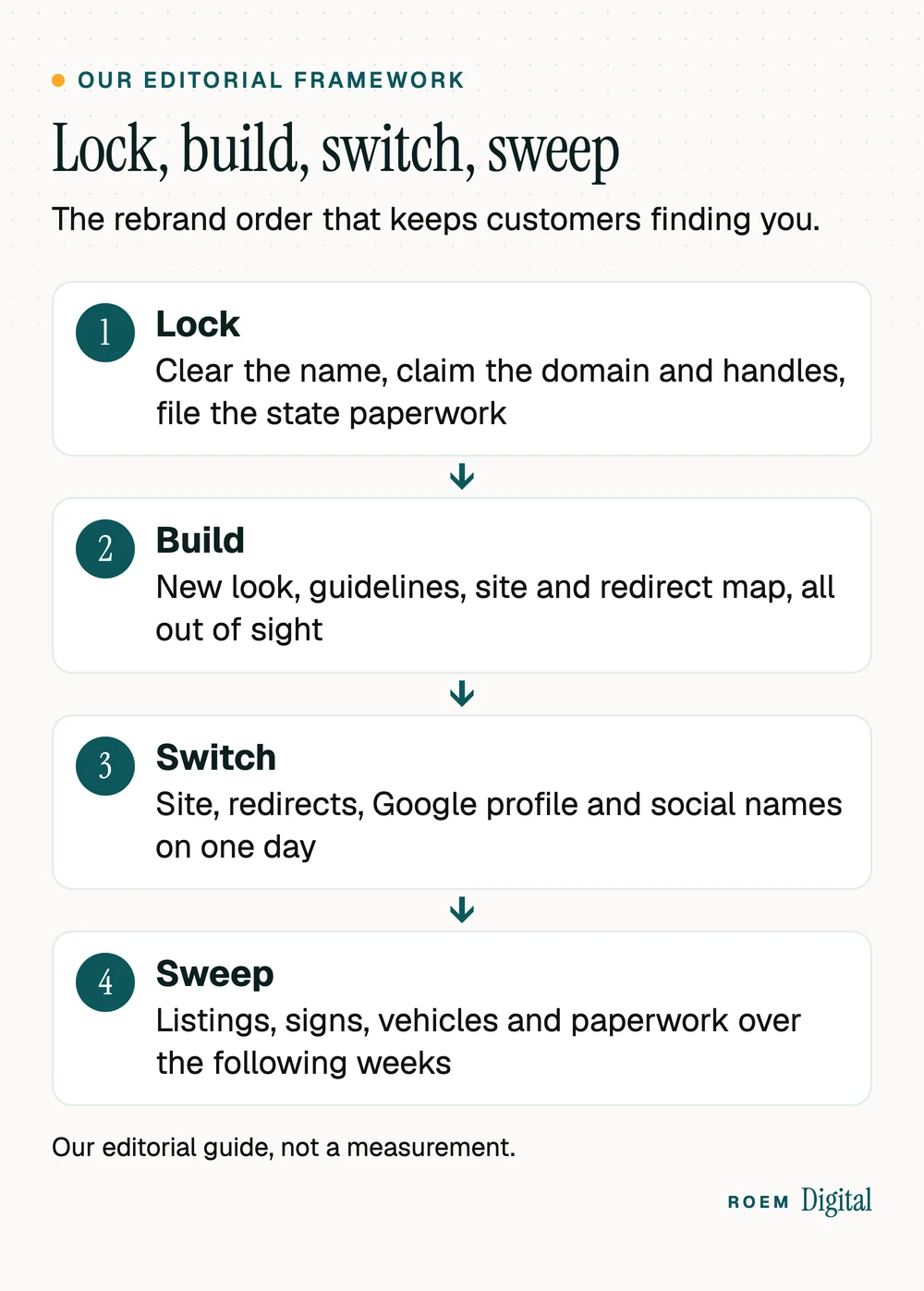
The point of the order is that customers only ever see one business. Before switch day they see the old one, and after it they see the new one everywhere they look first: your site, your Google profile and your social accounts. If you'd like help planning it, see our brand and web services.
Lock: clear the new name before anyone designs a logo
Check the name first, because everything else on your rebranding checklist gets built on it. Do these before you pay for design:
- Search for similar marks in your field. The USPTO's guide to likelihood of confusion explains that trademarks don't have to be identical to be confusingly similar. They can be similar in sound, appearance or meaning, and what counts depends on whether the goods or services are related.
- Search Google and Google Maps for the name in your area and your industry. A business down the road with a near match will cost you calls even if nobody files anything.
- Claim the domain and the social handles before you announce anything, under your business's own logins. Our guide to who owns your website and ad accounts explains why that matters.
- File the state paperwork. In Florida, the Division of Corporations says the Fictitious Name Act requires anyone doing business under a name other than their legal name to register that name before conducting business in the state, and to advertise it at least once in a newspaper in the county of the principal place of business. Outside Florida, check your state's business filing office for its assumed name or DBA rules.
This is general information, not legal advice. The last section covers when to bring in a trademark attorney or an accountant.
Build: make the new look and website before switch day
Build everything customers will see, and keep it out of sight until it's finished. That way nothing goes live half done.
- The new website, built on a private preview address, with the new name in titles, headings, footer, contact details and structured data.
- Brand guidelines for the new look, written as soon as the logo and colors are final. Our guide to brand guidelines covers what to put in them and the files every vendor will ask for.
- A redirect map if the domain or any page address changes: every old URL matched to its new page. Our guide to moving off Wix or Squarespace explains why each one matters.
- Print proofs for signs, vehicle graphics, shirts and cards, ordered so they arrive close to switch day.
- Announcement copy for email, social posts and your Google profile, written now so switch day isn't spent writing.
- A Google decision: whether your change counts as a rebrand on your existing profile or a new business (next section).
Resist changing everything at once. Google's Change of Address help page warns that combining a site move with a redesign of the site's content and URL structure will probably bring some traffic loss while Google relearns the pages. If the name is changing, keep the page structure as close to the old one as you can.
Switch: keep rankings and reviews through a business name change
Your Google Business Profile is where a local rebrand most often goes wrong. Google's Business Profile guidelines treat it as a rebrand when the change is minor: the proper nouns and services in the name stay the same and the business category doesn't change. In that case you edit the name on the profile you already have.
If the change doesn't meet those criteria, the same page says it's considered a new business: you mark the existing profile as closed and create a new one under the new name. Going from Smith Plumbing Co. to Smith Plumbing sounds minor. Going from Smith Plumbing to Blue Wave Home Services sounds like a new business. The page doesn't say your reviews follow you to a new profile, so ask Google's support team before you file anything, as the page suggests if you hit problems.
On switch day, change these together:
- The website goes live with the new name, and every old URL redirects to its new page with a permanent 301 redirect.
- If the domain changed, run the Change of Address tool in Search Console. Google's site move guide says to keep redirects for as long as possible, generally at least one year, and its Change of Address page treats 180 days as the minimum. Keep paying for the old domain for at least a year so nobody else buys it.
- Update the Google Business Profile: the name (if it qualifies), the website link, the logo and the cover photo. Our Google Business Profile checklist covers every other field.
- Rename your social accounts and swap the profile pictures.
- Change the phone greeting, email signatures and voicemail so the first call after the switch hears the new name.
How to announce a rebrand without confusing regulars
Customers who already like you are the ones a rebrand can lose. A good rebrand announcement tells them first, tells them why, and tells them what stays the same: the people, the phone number, the service.

- Staff first. Everyone who answers the phone needs the new name, the reason and a one-line answer to the question they'll hear most.
- Regulars next, by email or in person, a few days before switch day.
- Public on switch day: a post on your Google profile (our guide to Google Business Profile posts covers what works), social posts and a short note on your website.
- Keep a formerly line on your website's About page and footer for a while, so people searching the old name land in the right place and know it's you.
Expect some pushback, especially if you change something people loved. The Cracker Barrel logo story from August 2025 is a big-brand example of how fast regulars notice. If unhappy reviews arrive, our guide on how to respond to negative reviews can help you answer them calmly.
Sweep: the long tail and the rebranding mistakes that show up later
Most rebranding checklists stop at launch day. The old name doesn't. After switch day, work down the list of places it still lives, starting with the ones customers use to find you, then the ones they hold in their hands.
- Directory listings and citations: Apple Maps, Bing, Yelp, Facebook, industry directories. Our guide to business listings and citations explains which still matter.
- Review request links, QR codes on flyers and printed cards
- Vehicles, yard signs, door hangers and shirts
- Estimates, invoices, contracts and receipts
- Ad accounts: business name, ad copy and any sitelinks that use the old name
| Mistake | What happens | Avoid it by |
|---|---|---|
| Designing before checking the name | A logo you can't use | Locking the name first |
| Changing signs before Google | New customers search a name Google doesn't know | Switching the site and profile on the same day |
| Letting the old domain lapse | Someone else can buy it and the redirects die | Paying for it for at least a year, as Google advises |
| Redirecting every old page to the homepage | Visitors and rankings land in the wrong place | Matching each old page to its true replacement |
| Announcing without a reason | Regulars assume new owners or worse service | Saying what changed, why and what stays |
Watch the numbers for the first month
The last item on the rebranding checklist is proof that customers followed you. Compare these with the same weeks before the switch:
- Calls, form fills and bookings from the website and the Google profile. If you don't track them yet, our guide to tracking calls and form fills in GA4 shows where to start.
- Searches for the old name and the new name in Search Console's Performance report, week by week
- Views and calls on the Google Business Profile, especially if you had to start a new one
- Any 404 errors on old addresses in Search Console's Page indexing report
When to call a trademark attorney, an accountant or a marketing team
Talk to a trademark attorney before you commit to a new name, especially if you plan to grow beyond one town or sell products under it. Talk to your accountant or a business attorney about changing the legal entity's name, bank accounts, licenses and tax registrations. This article is general marketing information, not legal or tax advice.
The marketing side is where we help. We're a small senior team based in Davenport, Florida, and our brand and web work covers the identity and the custom-built website, and in a rebuild every old URL gets a permanent redirect. We set up call, form and booking tracking, so you can see whether the new name holds its leads. You own the domain, the website and every account.
“Working with ROEM Digital has been a great experience for my business. From developing our website to guiding us through a complete rebrand, they took the time to understand my vision and bring everything together in a way that truly represents the business. What I’ve appreciated most is their continued support. They’ve remained responsive, reliable, and willing to help whenever needed. That level of commitment goes a long way, especially as a business owner. I’d highly recommend ROEM Digital to anyone looking to establish or strengthen their brand. Having a great website is important, but having the right people behind it makes all the difference.”
Frequently asked questions
What should be on a rebranding checklist?
Check the new name for similar trademarks, claim the domain and social handles, file any state paperwork, write brand guidelines, build the new website with a redirect map, decide how your Google Business Profile will change, switch the site and profile on one day, then update listings, signs, vehicles and paperwork.
Will changing my business name hurt my Google rankings?
It can, mostly through the Google Business Profile and any domain change. A minor name change can be edited on your existing profile, while a bigger change may count as a new business. If the domain changes, use permanent redirects and the Change of Address tool, and keep the old domain.
Can I keep my Google reviews after a rebrand?
If Google accepts your change as a rebrand, you edit the name on the same profile, so the profile you already have stays in place. If the change counts as a new business, Google asks you to close the old profile and create a new one. Ask Google's support team about reviews before you file.
How do you announce a rebrand to customers?
Tell staff first, then regular customers by email or in person a few days before the switch. On switch day, post on your Google profile and social accounts and add a short note to your website. Explain what changed, why, and what stays the same, such as the team and phone number.
How long should I keep redirects from my old domain?
Google's site move guide says to keep redirects for as long as possible, generally at least one year, and its Change of Address help treats 180 days as the minimum. Google also recommends paying for the old domain for at least a year so nobody else can buy it and use it.
Do I need to register a new business name in Florida?
If you do business under a name other than your legal or entity name, Florida's Division of Corporations says the Fictitious Name Act requires registering it before conducting business, with a newspaper notice in your county. Check with an attorney or accountant for your situation. This is general information, not legal advice.