
Short answer: A digital marketing audit checks whether your marketing turns searches into booked customers. For a local service business, a useful version follows one customer's path with free Google tools, from the search to the booked job, then cuts the findings to three fixes and the numbers that should move.
What a digital marketing audit is, and what it should hand you
A digital marketing audit is a structured check of whether your marketing turns searches into booked customers, and where it leaks along the way. You can run a useful one yourself with free Google tools. This guide skips the long channel-by-channel checklist. Instead, you follow one customer's path from the first search to the booked job, note every place it breaks, then keep the three fixes that matter most.
It's written for owners of local service businesses and practices: law and medical offices, schools, churches and home services. You'll need a phone, a computer, some quiet time and access to whatever accounts you already have.
A digital marketing audit reviews how customers find you online, what they see, how they reach you and whether you can measure it. It ends in a short list of fixes, ranked by how much each one is likely to recover.
A marketing audit in the wider sense also looks at pricing, positioning and offline channels. This guide sticks to the digital path, because that's the part most owners can check and fix themselves. A website audit checklist and a local SEO audit both fit inside it: the first checks the site, the second checks how you appear on Google Maps and in local results. If the local side turns up problems, our guide to local SEO for service-area businesses goes deeper.
What the audit should hand you is not a long report. It's a short list: three fixes, an owner for each and the number that should move once it's done. A long PDF that nobody acts on is a cost, not an audit.
Run the audit by following one customer from search to booked job
We call this the one-customer audit path. It's an editorial framework for you to run yourself, not an industry standard. Pick one service you want more of and one place you serve. Then play the customer and walk these seven stops in order, writing down what you see at each. A channel checklist tells you whether each tool is set up. The path tells you whether a customer actually gets through.
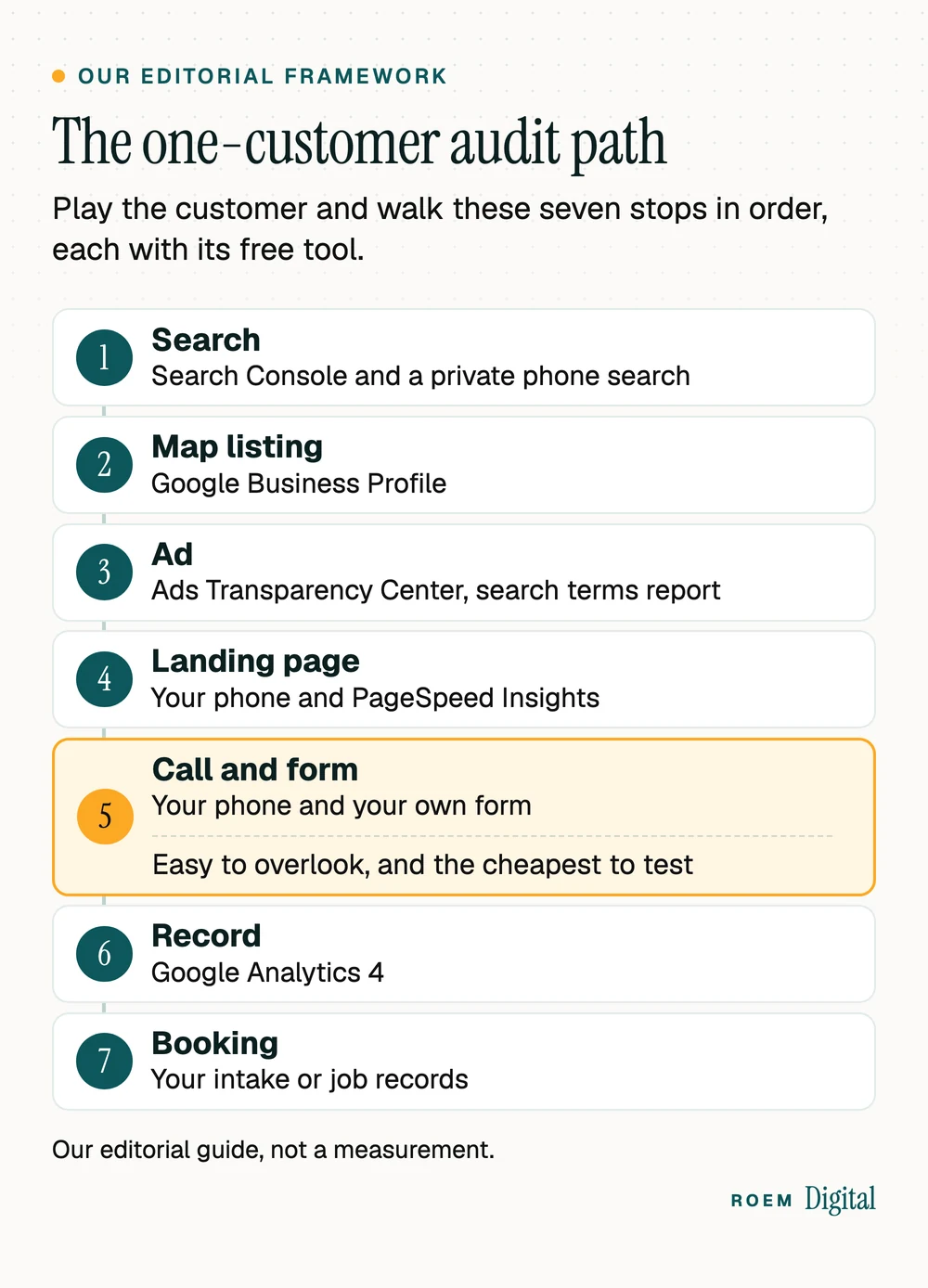
Stop 1: the search
On your phone, in a private window, search the way a customer would: the service plus your town, and the service plus "near me." Note who shows up in the ads, the map and the first results, and where you appear. Then open Google Search Console. Its Performance report "shows important metrics about how your site performs in Google Search results," including the queries that show your site, according to Google's Search Console help. Look for searches that earn impressions but few clicks, or that land on the wrong page.
Stop 2: the map listing
Open your Google Business Profile as a customer would and check the name, hours, phone, website link and category against reality. Google's Business Profile guidelines say your name "should reflect your business's real-world name, as used consistently on your storefront, website, stationery, and as known to customers." If you manage a verified profile, its performance view counts calls, which Google defines in its Business Profile performance help as the number of times a customer clicked the call button on your profile. Our Google Business Profile checklist covers the fixes, and our guide to business listings and citations covers the directories that copy your details.
Stop 3: the ad
If you run Google Ads, look up your own ads in the Ads Transparency Center, where you can search "using the advertiser or website name" and filter by date and location, according to Google's ads transparency page. Inside your account, the search terms report shows how your ads performed "when triggered by actual searches," per Google Ads Help. Searches for work you don't do are money leaving. Our negative keywords guide shows how to stop them.
Stop 4: the landing page
Tap through from the profile and from the ad. In the first screen of the page that loads, can you tell what the business does, where, and how to call? Then run the page through PageSpeed Insights. Google's PageSpeed Insights documentation says field data "is useful for capturing true, real-world user experience," while lab data comes from a simulated load in a controlled environment. On a small site the field section may be thin or missing, since a page "might not have sufficient data if it has been recently published or has too few samples from real users." Then lean on the lab results and your own phone. Our guide to whether a slow website is costing you calls explains the scores.

Stop 5: the call and the form
This stop is easy to overlook, and it's the cheapest to test. Call the number on your profile, your ads and your site from a phone your staff won't recognize. Does it ring through, reach voicemail or hit a dead line? Then submit your own contact form and time the reply. Repeat both after closing time, and listen to the voicemail greeting as a stranger would: does it say who you are and when you'll call back? A site can pass every item on a website audit checklist while its form quietly emails an address nobody reads. Our list of 12 must-haves for a service business website ends with a ten-minute phone check that covers the site side of stops 4 and 5.
Stop 6: the record
Now check whether your test left a trace. In Google Analytics 4, your form submission should appear as a key event. Check the Realtime report straight after your test: Google's Realtime report help says it covers the last 30 minutes, including "Key events by event name." Google's key events help explains that you "create or identify an event that measures the important user interaction and then mark the event as a key event." The Traffic acquisition report then shows which sources brought the sessions behind those key events. Remember that a tap on your number isn't a completed call. Our guides to tracking calls and form fills in GA4 and call tracking for a small business cover both. Medical and law offices: count that a form was sent, never what it says. Keep names and health or case details out of analytics and ad tags, and ask your compliance officer or counsel before adding tracking to an intake form.
Stop 7: the booking
Last, follow your test lead into the business. Did anyone note where it came from? Would it show up as a booked job with a source attached, or only as a name in an inbox? If you can't connect booked jobs to sources, you can't tell which marketing pays. One simple fix is a required source field on every intake or job record, filled in from what the customer says when asked how they found you. It's the same lead log our guide to the five numbers every marketing report should show builds on. While you're signed in to each account, confirm that your business owns it, with our guide to who owns your website and ad accounts.
| Stop | Free tool | It passes when |
|---|---|---|
| 1. Search | Search Console and a private phone search | You appear for the service and town you chose, on the right page. |
| 2. Map listing | Google Business Profile | Name, hours, phone and link match reality and your website. |
| 3. Ad | Ads Transparency Center, search terms report | Your ads show for searches you actually serve. |
| 4. Landing page | Your phone and PageSpeed Insights | What, where and a call button show in the first screen, and it loads fast. |
| 5. Call and form | Your phone and your own form | Someone answers or a clear message plays, and the form reaches a watched inbox. |
| 6. Record | Google Analytics 4 | Your test appears as a key event with the right source. |
| 7. Booking | Your intake or job records | The booked job carries its source. |
Turn your digital marketing audit into a top-three fix list
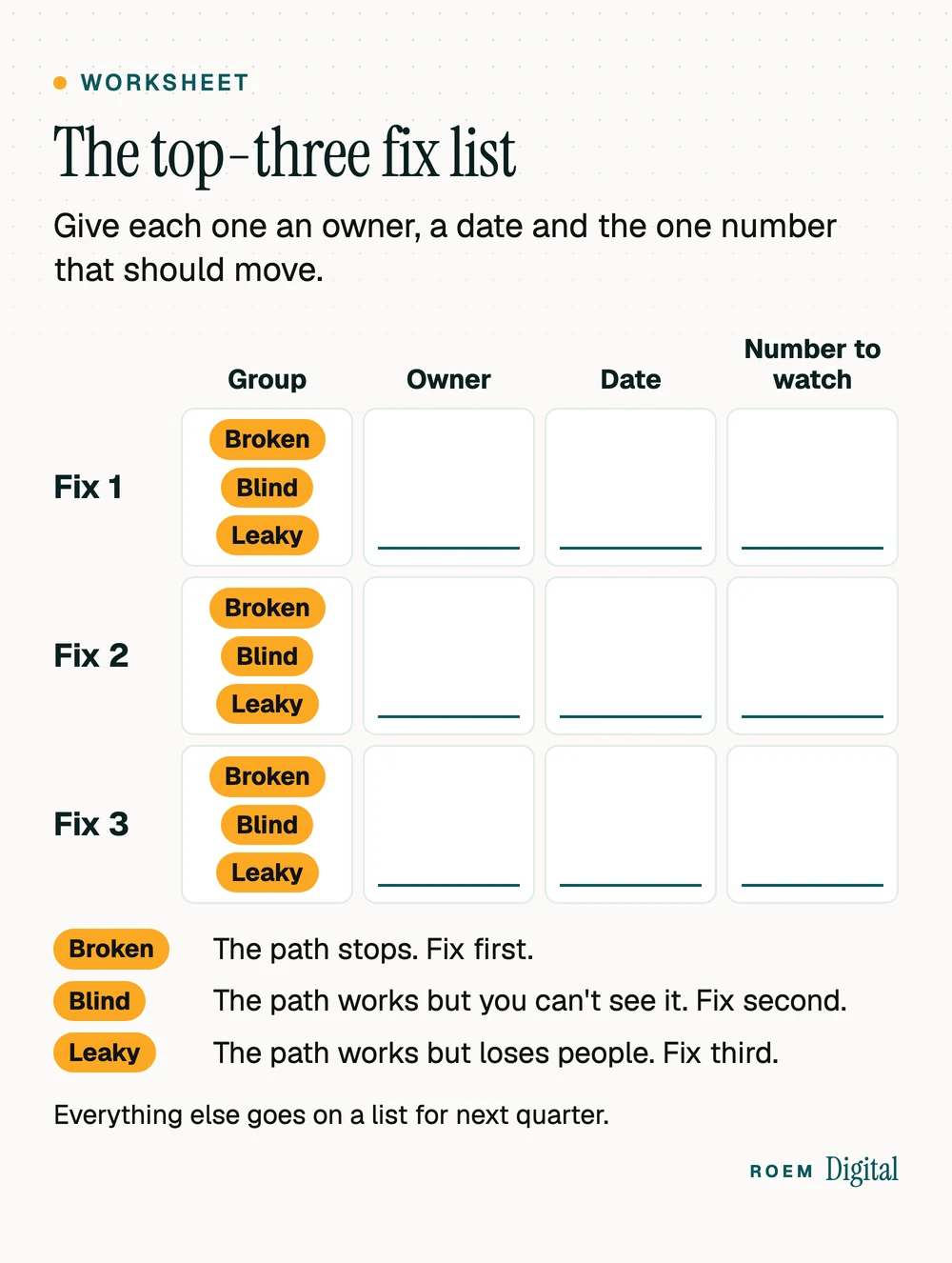
A first audit can turn up more problems than you can fix at once. Sort every finding into one of three groups, then fix in this order:
| Group | What it looks like | When to fix it |
|---|---|---|
| Broken | The path stops: a dead number, a form going nowhere, a suspended profile, an ad that lands on a missing page. | First. Every day it stays broken, customers leave. |
| Blind | The path works but you can't see it: no key events, no call tracking, no source on booked jobs. | Second. Every later decision depends on these numbers. |
| Leaky | The path works but loses people: a slow page, a buried call button, a thin profile, mismatched listings. | Third, starting with the stop the most customers pass. |
Then keep three. Give each one an owner, a date and the one number that should move once it's done. Everything else goes on a list for next quarter.
The numbers to watch after each fix
Match each fix to the number it should move, and compare the same weeks before and after. For a seasonal business, compare with the same weeks last year too.
- Fixed a phone number or profile detail: calls from your Business Profile.
- Fixed a form or added a call button: form and call key events per week in GA4.
- Fixed tracking: key events by source, checked against what your front desk logged.
- Cut wasted ad searches: cost per conversion in your ads account, as long as each conversion is a real lead.
Once the path holds, move to a monthly report built on the five numbers every marketing report should show. Then walk the path again whenever something big changes: a new website, phone system, location or ad campaign.
When a free marketing audit from outside helps
Running the path yourself has one blind spot: you know your business too well to see it like a stranger. A second set of eyes helps when the findings point to a rebuild, when nobody on your team owns tracking, or when you're deciding whether to hire help.
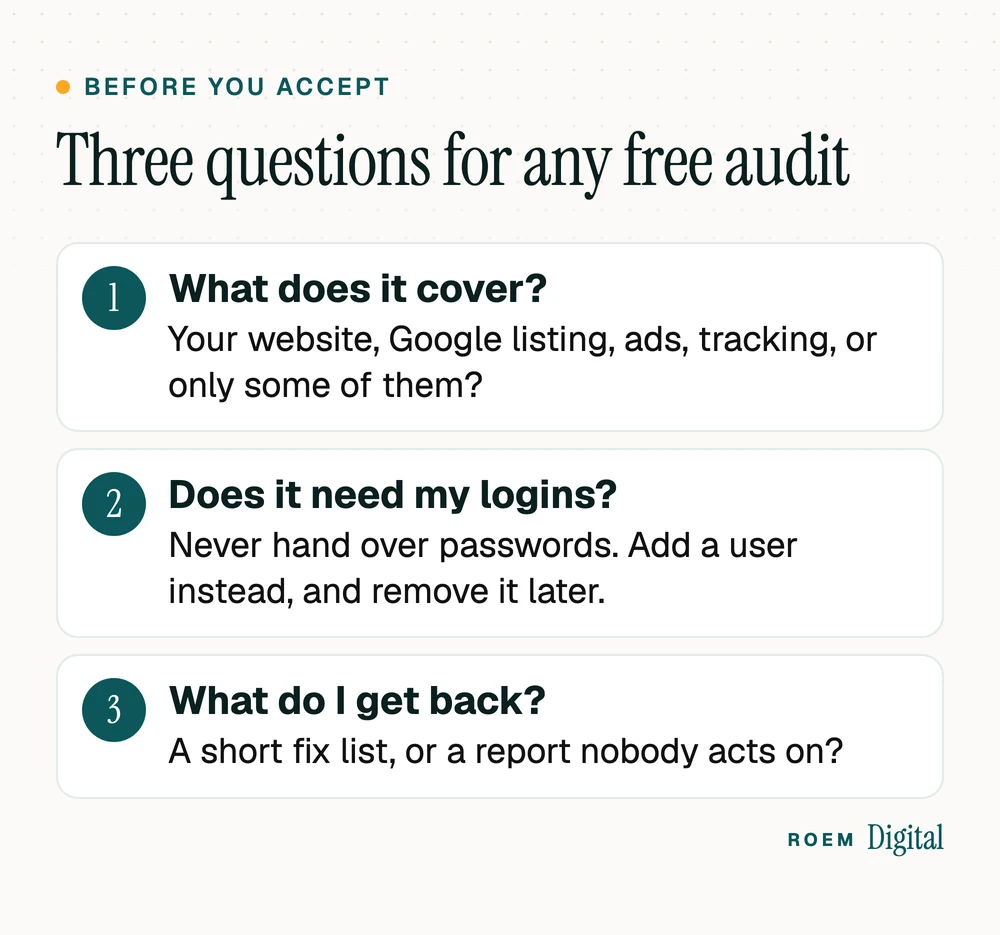
If you ask anyone for a free marketing audit, ask what it covers and what you'll get back. Ours reviews your "Website, Google listing, ads and tracking, from the outside. No logins needed." You get "The few changes most likely to pay off first, in plain English," and a reply within two business days. Every plan we write starts there, and any quote comes after. Never hand over passwords for an audit. Anyone who needs inside access can be added as a user, and removed later.
If you'd rather keep the work in-house with senior help on the plan and the numbers, our consulting and strategy service covers KPI setup and monthly strategy reviews. If you're comparing agencies, start with our questions to ask before hiring a marketing agency.
“I can’t say enough great things about ROEM Digital! They did an amazing job bringing my vision to life with our beautiful website and continue to do a great job with our marketing and ads. They really take the time to understand my brand and what I’m trying to accomplish. They’re creative, professional, responsive, and genuinely care about helping my business grow. As a business owner, having a team I can trust means so much. I’m truly grateful for their work and highly recommend them!”
Frequently asked questions
What is included in a digital marketing audit?
A useful one checks how customers find you in search and on Google Maps, what your profile, ads and website show them, whether your phone and forms reach a person, and whether your analytics record the lead and its source. It should end with a short, ranked list of fixes, not a long report.
How do I do a marketing audit myself?
Pick one service and one town. Search for it on your phone, open your Google listing, check your ads, land on your site, call your number, submit your own form, then confirm the lead shows up in your analytics and your booking records. Write down every break, sort the findings and keep three fixes.
How often should a small business audit its marketing?
Walk the full path at least once a year, and again after any big change: a new website, a new phone system, a move or a new ad campaign. Between audits, watch a short monthly report of leads, cost per lead and booked jobs by source, so problems show up before the next full check.
What free tools can I use to audit my marketing?
Google Search Console for search queries and pages, Google Business Profile for your map listing and calls, the Ads Transparency Center and your Google Ads search terms report for ads, PageSpeed Insights for speed, and Google Analytics 4 for key events and sources. Your own phone covers the rest.
What's the difference between a marketing audit and a marketing report?
A report repeats every month and shows how the numbers moved. An audit is a one-time deep check of the whole path, including things a report never shows, like a dead phone line or a form going to the wrong inbox. Run the audit first, so the monthly report measures something that works.
Is a free marketing audit worth it?
It can be, if it's specific. Ask what it covers, whether it needs your logins and what you get back. A good free audit names a few concrete fixes in plain language that you could act on without hiring anyone. Be wary of one that only produces an automated score.