Short answer: The best church social media ideas answer what a first-time guest wonders and keep members connected between Sundays. Post on a steady weekly rhythm your volunteers can keep, get permission before posting people, and never post identifiable children without a parent's consent.
Church social media ideas that work start with next Sunday's guest
A church's social accounts do two jobs. They show a curious neighbor what Sunday is really like, and they keep members connected between Sundays. The best church social media ideas serve one of those jobs, and the strongest serve both: a post showing the kids' check-in desk helps a nervous parent decide to visit and reminds members that the team needs volunteers.
This guide covers organic posting, meaning what you share from your own accounts for free. For paid church advertising and outreach events, see our church marketing ideas. For how online steps lead to a first visit, read our church growth strategies. And for what we do for churches, see our church marketing page.
Before you post anything, decide where guest posts point. Every post meant for a newcomer should send them to one page: your plan-your-visit page, with service times, parking, kids' ministry and what to expect.

Permission first: posting photos of members and children
Church posts are full of faces, and that's where church social media most often goes wrong. The United Church of Christ's guidance on church liability for photos and videos notes that "No specific federal law prohibits posting a photograph of an individual on a website or a social media page," while state and local laws vary, but that a church can still face claims such as invasion of privacy. Its best practice is plain: churches "should not post photos of individuals on the church's website or social media without the individual's permission."
Children get a stricter line. The same guidance calls it best practice not to post photos or recordings of identifiable children, "even to private Facebook groups," and says a church should never post a child's photo "without first obtaining parental consent." It suggests group distance shots and back-of-head shots as alternatives.
A consent setup a volunteer team can run
- Annual photo consent, collected at membership or registration, with a clear way to say no. UCC notes that someone has to review photos, track who hasn't consented and make sure no photos of visitors are used.
- A no-photo list that whoever holds the camera actually sees, such as a colored lanyard or a sticker on a name tag.
- Parent consent on file for any child who appears identifiably, and a default of hands, backs of heads and wide shots in kids' ministry.
- Livestream notice. UCC advises telling the congregation in advance that a service will be recorded and what will be visible, and limiting how much of the congregation is shown.
- Prayer requests and testimonies only with the person's clear OK. United Methodist Communications' social media guidelines for churches say to make sure a person in need "is okay going public with any sensitive information."
This is general information, not legal advice. Schools face the same question with student photos, which we cover in our school social media ideas.
A weekly posting schedule: a church social media strategy for a small team
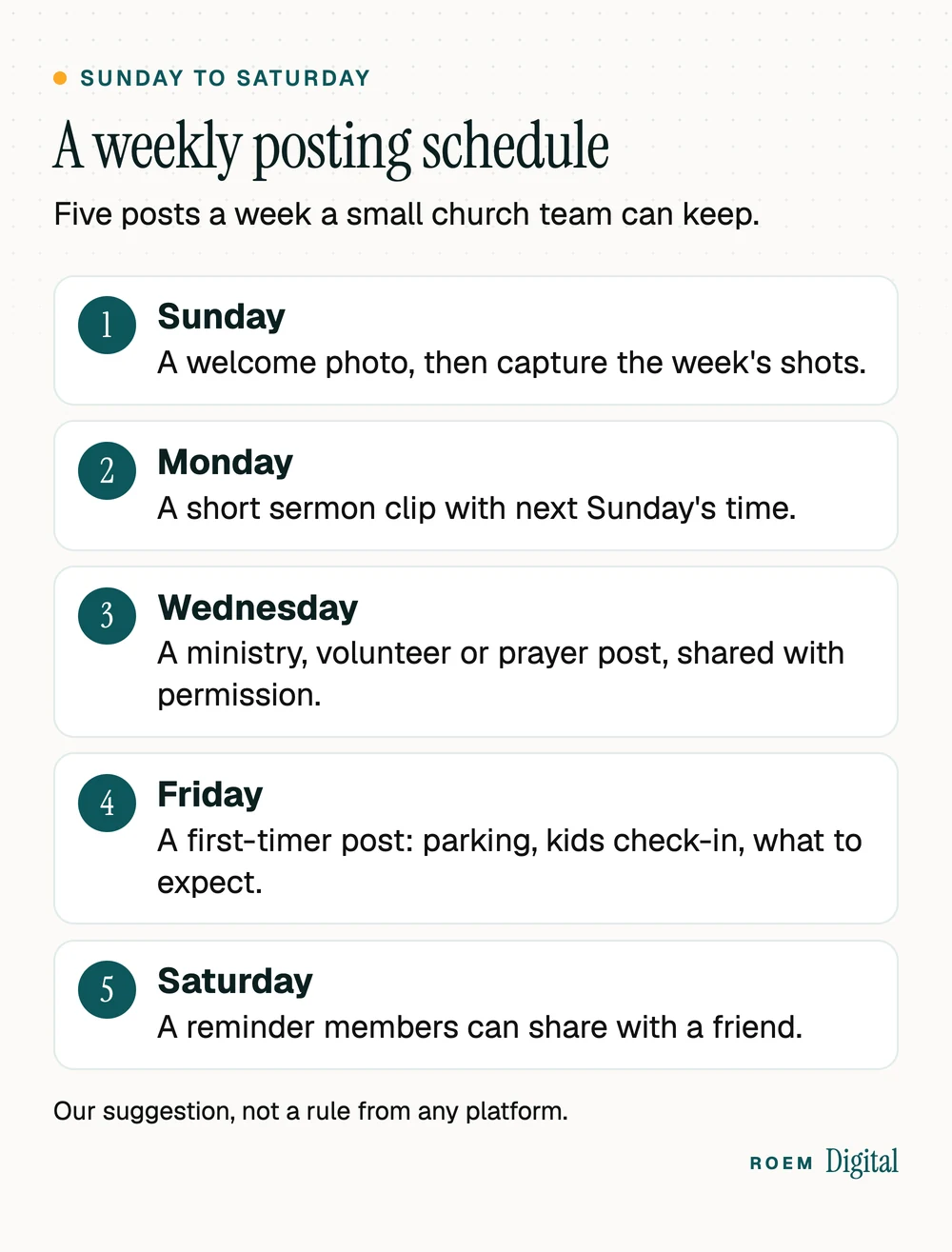
Volunteers burn out on posting when every week starts from a blank page. Try a simple weekly schedule: five posts a week, each with a set job, most of it captured on Sunday. It's our suggestion, not a rule from any platform.
| Day | Post | Its job |
|---|---|---|
| Sunday | A same-day welcome photo of the room, then capture wide shots, the welcome team and adults who agreed to be photographed | Greets the day and gathers the week's material in one morning |
| Monday | A short sermon clip with captions and next Sunday's service time | Carries the message into the week and invites |
| Wednesday | A ministry or volunteer spotlight, or a prayer prompt | Shows the church between Sundays |
| Friday | A first-timer post: parking, kids' check-in, what to wear, how long the service runs | Answers a guest's questions before they ask |
| Saturday | A short reminder members can share with a friend | Makes the invitation easy to pass on |
Plan the big seasons further ahead. Our holiday marketing ideas list dates to work back from, including Christmas Day on Friday, December 25, 2026.
Church Instagram ideas and Facebook posts by ministry
Once the rhythm is set, fill it with church social media ideas from across the church. These church social media posts work on Instagram and Facebook alike:
- Worship and teaching: a one-sentence sermon takeaway on a simple graphic, a short captioned clip, the week's scripture reading.
- Guests: a "what to expect" Story highlight pinned to your profile and updated each season, plus the welcome desk and coffee table shot before guests arrive or with no faces.
- Kids and youth: the check-in process, a classroom before families arrive, a leader explaining how check-in keeps kids safe. No identifiable children without a parent's consent.
- Serving and outreach: food pantry hours, a serve day photographed from behind the volunteers, a thank-you to a team by name if they agree.
- Members' stories: a short testimony or a "why I serve" quote, with the person's written OK.
- Two languages: if your church worships in English and Spanish, plan posts in both. Solid Rock Community Church's site, which we built, runs in both languages, and our bilingual marketing page explains how we approach it.
Repurpose what you already make. The sermon happens every week, the bulletin already lists events, and the announcements already answer guest questions. Our guide to what to post on social media covers the same habit for any organization.
Know which church social media posts bring guests
Likes tell you members enjoyed a post. They don't tell you whether anyone visited. Add UTM parameters to the plan-your-visit link in your profiles and guest posts, so your analytics can separate visits that came from Instagram from those that came from Facebook. Count the plan-your-visit form as a key event, the way our guide to tracking calls and forms in GA4 explains. Then ask on every welcome card how the guest heard about you, because a friend's invitation never shows up in a report.
Worship music, livestream clips and copyright on church social media
Worship clips are some of the most shared church posts, and the music in them is often someone else's copyrighted song. Meta's Music Guidelines say "Use of music for commercial or non-personal purposes in particular is prohibited" unless you have the right licenses, and warn that videos may be "blocked, muted or removed" when the music isn't authorized. They also say content that creates a music listening experience can be blocked, live videos included.
Before you post worship, ask your music licensing provider whether your license covers streaming and social video, not just singing in the building. If a clip's music isn't covered, post the sermon portion, a spoken prayer or a testimony instead. And remember UCC's warning that an unlisted YouTube video can still be shared by anyone who has the link. Our YouTube marketing guide covers setting up a channel the church owns.
Who holds the keys: church accounts should outlast any volunteer
Church social accounts change hands more often than most, because volunteers rotate. Facebook's Page access help says a Page needs at least one person with full control to stay active, and that full control lets someone remove anyone else, including you, or delete the Page.
- Two staff members or elders hold full control, each on their own profile.
- Volunteers get partial control, enough to post and reply.
- A written social media policy covering who posts, how often comments are checked and how prayer requests are handled. United Methodist Communications recommends setting rules for whoever manages the church's presence.
- A handover step when a volunteer steps down: remove their access that same week.
Our guide to setting up a Facebook business page explains these access levels, and the same checks apply to Instagram and YouTube. Our guide to who owns your marketing accounts walks through each platform.
When to ask your denomination or an attorney before posting
Most posts need no one's sign-off beyond your own team. A few deserve a second opinion first:
- Anything involving a child beyond wide shots: a feature, a name, a recording from kids' ministry.
- Recovery, counseling or care ministries, where simply appearing in a photo can reveal something private.
- Your photo release form. UCC suggests churches ask an attorney in their jurisdiction whether the release is enforceable.
- A complaint or a takedown request from someone who appears in a post. Take the post down first, then talk.
- Music licensing questions, which your licensing provider can answer.
Your denomination's safeguarding or communications office is often the first call, and an attorney the right one for anything legal. If you're unsure, leave the photo out: a missing photo never hurt a church, and a post you have to take down can. When you're ready to plan the posts that are safe to share, our church marketing page shows how we work with churches.
How ROEM helps churches with social media
We're a small, senior team based in Davenport, Florida, working with churches and ministries across Central Florida and nationwide. We built Solid Rock Community Church's English and Spanish website in Kissimmee, with plan-your-visit, sermons and live stream, events, ministries, a food pantry and an online Growth Track course.
Our social media management covers the strategy, the content calendar, the creative, the posting and the day-to-day community management, planned around your church calendar. Your church owns every account, and everything in them stays with you.
Frequently asked questions
What should a church post on social media each week?
A simple rhythm works: post a welcome photo and capture the week's shots on Sunday, share a sermon clip on Monday, spotlight a ministry or volunteer midweek, answer first-timer questions on Friday and post a shareable reminder on Saturday. Five posts with set jobs are easier for volunteers to keep up than a blank calendar.
Can a church post photos of children on social media?
Only with a parent's consent, and the United Church of Christ's guidance calls avoiding identifiable children altogether the best practice, even in private Facebook groups, with wide shots and backs of heads instead. Check your denomination's own safeguarding policy and your church's photo release before posting any child.
Do church members need to give permission to be in photos?
It's the safest practice. No specific federal law bans posting someone's photo, but state laws vary and a church can still face claims such as invasion of privacy. UCC notes that some churches collect an annual photo consent. Give people a clear way to opt out, and keep a no-photo list that photographers can check.
Can we post worship songs from our service on Facebook or Instagram?
Only if your licenses cover it. Meta's Music Guidelines prohibit using music for commercial or non-personal purposes without the right licenses, and unlicensed music can get videos muted, blocked or removed. Check what your church's licenses cover for streaming and social video, or post the sermon portion instead.
Who should manage a church's social media accounts?
Two staff members or elders should hold full control of each account, each with their own login, and volunteers should get limited access to post and reply. Facebook requires at least one person with full control for a Page to stay active, so a single volunteer admin is a real risk.
What are good church Instagram ideas for a small church?
Show what a guest will experience: a pinned "what to expect" Story highlight, the welcome desk before guests arrive, the kids' check-in process without identifiable children, a sermon takeaway, a volunteer spotlight and serve-day photos taken from behind. Real photos of your own people, shared with permission, beat polished graphics.