
Short answer: A Facebook business page is the public home for your business on Facebook, created from a personal profile but kept separate from it. Meta's terms say personal accounts are for personal purposes, so run the business from a Page, keep full control with two people inside the business and treat Meta One as optional.
Facebook page vs profile: why the business needs a Page
A Facebook business page is a public presence for a business, brand or organization that people follow instead of friending. You create it from your personal profile, but it has its own name, its own messages and its own list of people who can manage it.
Plenty of owners started with a personal profile in the business's name, or post business news from their own profile. Meta's Terms of Service, effective January 1, 2025, ask each person to "Create only one account (your own) and use it for personal purposes," using "the same name that you use in everyday life." The same terms ask you not to share your password or give others access to your account. A profile named after your company fits none of that, and it can't be handed to a manager or partner without breaking those rules.
Facebook's help page on profiles, Pages and groups describes Pages as the place for "businesses, brands, organizations and nonprofits" to connect with fans or customers, and adds: "You must have a profile to create a Page or help manage one." Think of your profile as the key and the Page as the storefront.
What about professional mode? Facebook calls it "a setting that gives a personal profile creator tools." In our view it suits a creator or a solo professional whose own name is the brand. A business with a team, a shop name or an ad budget belongs on a Page. If you'd rather hand the posting off once the Page is set up, our social media management covers the strategy, the calendar, the creative and the community management.
How to create a Facebook business page, step by step
Facebook's instructions for creating a Page on a computer run like this, in Facebook's order:
- Log in to your personal profile and click Pages on the left.
- Click Create page, select Public page and click Next, then Get started.
- Add the Page name and category.
- Add a bio (Facebook marks it optional) and click Create Page.
- Add information such as contact info, location and hours.
- Add a profile photo and a cover photo, and edit the action button.
- Connect WhatsApp, or click Skip.
- Invite friends to connect, then choose your notification settings.
A few of those fields deserve more thought than the form gives them:
- Name. Use the business's real name, the one on your sign, invoices and Google listing.
- Category. Pick the one a customer would search for, not the most creative one.
- Location. If you work from home and serve customers at their place, add only the contact details you're comfortable making public, and describe your service area in the bio. Our guide to local SEO for service-area businesses explains the same choice on Google.
- Action button. Point it at the one thing you want people to do: call, book or send a message.
- Matching details. Keep the name, phone and hours identical to your Google Business Profile, using our Google Business Profile checklist, so customers see one business everywhere.
Who owns your Facebook business page? Check Page access
A Page answers to whoever holds control of it, and that's where small businesses get burned: a former employee, the relative who set it up, or a past vendor still holds the keys. Facebook's Page access help explains the levels:
| Access level | What Facebook says it allows |
|---|---|
| Facebook access with full control | Everything, including settings and access management. Full control can give others access, remove anyone, including you, or delete the Page. |
| Facebook access with partial control | Content, messages, comments, linked accounts, ads, insights, events, removals and bans, but not settings or access |
| Task access | Work through other tools. Facebook says people with task access "can't switch into the Page or manage the Page on Facebook." |
Two sentences on that page shape everything else. Facebook says "Giving Facebook access with full control to others gives them the same access as you," and "For your Page to remain active, at least one person must have Facebook access with full control." One full-control person is a single point of failure. Full control in an outsider's hands means you can be locked out of your own Page. Our guide to who owns your website and ad accounts covers the Business Portfolio that should sit above the Page.
If you've already lost access to your Page
If you can still log in to Facebook but recently lost access to a Page you manage, Facebook's guide to recovering a hacked Page says "The best thing to do is submit the Facebook Page recovery form." If you can't log in at all, it sends you to facebook.com/hacked from a device you've used with Facebook before. Once you're back in, it asks you to "undo any changes you don't recognize" and to tighten your account security.
A Page held by a former employee or vendor who simply won't hand it back is a different problem. Ask them in writing to give your own profile full control, keep a copy of the request, and set a date. Don't build a second Page while you wait, because two Pages with the same name split your followers and confuse customers.
Who should have Facebook Page access
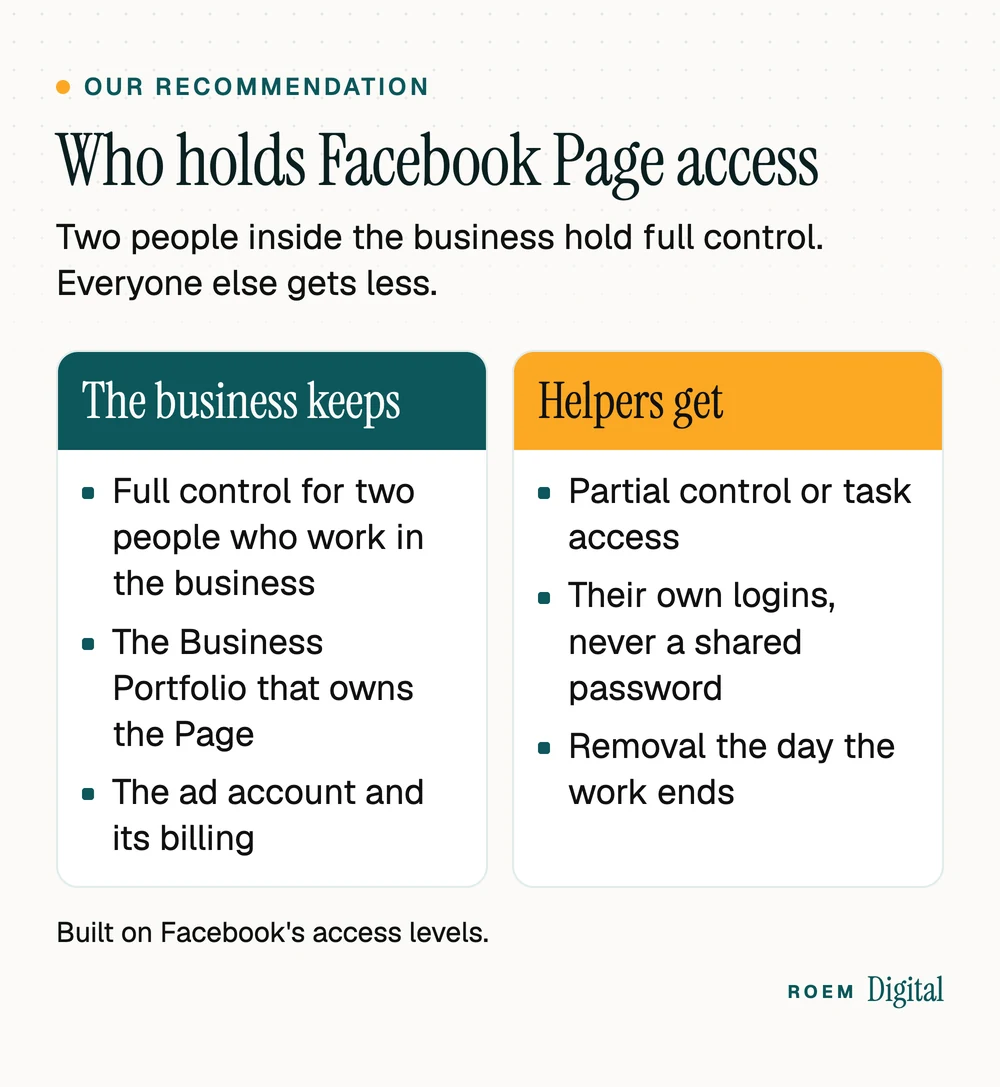
Our recommendation is simple, built on Facebook's access levels above and on the same two-person rule our ownership guide applies to the Business Portfolio:
- Two people who work in the business hold full control, usually the owner and one trusted manager, each on their own profile. If one loses a phone or leaves, the other can still get in.
- Everyone else gets less. Employees, volunteers, freelancers and agencies get partial control or task access, enough to post, reply and run ads.
- Nobody shares a password. Meta's terms already rule it out, and separate logins show who did what.
- Access ends when the work ends. Remove people the day they leave, then review the list every quarter.
The same idea applies on every platform. We cover the equivalents in our guides to TikTok marketing for small business and YouTube marketing for small business.
Meta One and the verified badge: optional for a small business
On September 15, 2026, Meta announced Meta One plans for businesses, paid bundles that build on Meta Verified. They roll out gradually, and Meta says plans, benefits, pricing and availability vary by region, app and account. Plans are priced per profile, so each one covers a single account.
| Plan | Meta's starting price | What Meta says it adds |
|---|---|---|
| Essential | From $14.99 a month | A verified badge and impersonation protection (pending successful verification), plus more Meta Business Agent use on WhatsApp |
| Advanced | From $49.99 a month | Scheduling stories up to 30 days ahead, links in organic posts and reels, exportable analytics, team access to Instagram without sharing a password |
| Expert and Max | From $149 and $499 a month | The highest feature levels, including access to human account support |
Meta's newsroom post on Meta One also says "The core experience across our apps and Meta AI will stay free." Creating a Page, posting, replying to messages and managing Page access cost nothing.
Our view: a verified badge earns its fee when someone is impersonating your business, or when customers book and pay through your messages. For most local businesses, the first dollars are better spent on posting consistently and, when the timing is right, on ads. Our comparison of Facebook and Instagram ads vs Google Ads explains when ads make sense.
What a Facebook page for small business should post first
A new Page with nothing on it looks abandoned. Before you invite anyone, give it the basics:
- A pinned post that says what you do, where you work and how to book, in two or three lines.
- Three to five posts of real work, with photos you took and captions that name the service.
- Your hours and how fast you reply, so nobody waits on a message you'll answer tomorrow.
- A link to the page that books the job, not just your homepage, tagged so you can see what Facebook sends you.

After that, a steady rhythm beats volume. Our guide to what a local service business should post covers the kinds of posts that work. If your neighbors talk on Nextdoor more than Facebook, read our Nextdoor for business guide too.
Answer comments and messages as the Page, not from your personal profile, so the conversation stays with the business when staff change. A quick, friendly reply to a public question is also a post every future visitor reads.
One rule surprises people. Meta's Music Guidelines say "Use of music for commercial or non-personal purposes in particular is prohibited" unless you've obtained the right licenses, and that content may be "blocked, muted or removed" when the music isn't authorized. Keep popular songs out of business videos unless you've licensed them.
How ROEM helps local businesses with their Facebook pages
We're a small, senior team based in Davenport, Florida, working with businesses across Central Florida and nationwide. Our social media management covers the strategy, the content calendar, the creative, the posting and the day-to-day community management, with reports on what's resonating so the plan keeps improving.
You own your Page and every account. If we ever part ways, the Page, its followers and everything on it stay with you.
“Moving to a new city and rebuilding your business isn’t an easy task, so we turned to Robert to help with our business website, run our social media and help get our Google biz profile back up and running! He was extremely thorough and even came on a job site to take photos for our website. What he built in a short amount of time is amazing. We would absolutely NOT have been able to do any of this without him. We would highly recommend for any website building and project management!!”
Frequently asked questions
Can I use my personal Facebook profile for my business?
Meta's terms ask each person to create one account under the name they use in everyday life and use it for personal purposes. A business belongs on a Page, which you create from your profile but run separately, and you can give helpers their own access without ever sharing a password.
Is a Facebook business page free?
Yes. Creating a Page, posting, messaging and managing Page access cost nothing, and Meta says the core experience across its apps will stay free. You pay only if you choose to run ads or subscribe to an optional plan such as Meta One, which Meta lists from $14.99 a month for businesses.
What's the difference between a Facebook page and professional mode?
Professional mode is a setting that gives your personal profile creator tools, so people can follow you. It suits a creator or solo professional whose own name is the brand. A Page is a separate presence for a business, with its own name, its own followers and its own list of people who manage it.
How many admins should a Facebook business page have?
Facebook requires at least one person with full control for a Page to stay active. We suggest two people inside the business with full control, so one lost phone or one resignation can't lock you out, and partial control or task access for employees, freelancers and agencies.
Do I need Meta Verified or Meta One for my business page?
No. Both are optional paid plans. Meta One Essential, announced September 15, 2026, adds a verified badge and impersonation protection, pending verification. It's worth a look if someone impersonates your business or customers pay through messages. Otherwise, spend first on consistent posting and on tracking what brings in calls.
Should my Facebook business page show my home address?
Not if you serve customers at their location and don't want visitors at home. Add only the contact details you're comfortable making public, describe your service area in the bio, and keep your business name, phone and hours consistent with your Google Business Profile.