
Short answer: YouTube marketing for small business works best as a library of short answers to the questions customers ask before they buy. YouTube says its search weighs relevance, engagement and quality, so title each video in the customer's words, set the channel up under the business and measure calls and bookings, not subscribers.
Is YouTube marketing for small business worth it?
It's worth it when your customers have questions they'd rather watch you answer: how a job works, what affects the price, what happens at a first visit. YouTube marketing for small business means building a small library of those answers under your business's name and putting each one where buyers already look. It isn't about becoming a creator, chasing subscribers or earning ad revenue.
YouTube is a search engine as much as a feed. Its help page on how YouTube search works says the system prioritizes "three key elements": relevance, engagement and quality. For relevance it looks at "how well the title, tags, description, and video content match your search query." For quality, it looks for signals of which channels show "expertise, authoritativeness, and trustworthiness on a given topic." It also says YouTube "doesn't accept payment for better placement within organic search results."
That's good news for a local expert. A plain video titled with the exact question a customer types can keep being found long after you post it. Our SEO and content work starts from the same place: the questions people actually search.
Set up a YouTube channel for small business under the business's name
YouTube's guide to creating a channel has a separate path for a channel "with a business or other name" that "can have more than one manager or owner," and it explains you can connect a channel to a Brand Account to use a different name than your Google Account. Use that path. A channel made on the owner's personal account, under a personal name, ties the business's videos to one person.
Then add people instead of sharing a password. If your channel sits on a Brand Account, YouTube asks you to migrate it to channel permissions first. YouTube's channel permissions let multiple people manage a channel "without needing access to your Google Account," which YouTube calls "safer than sharing your password." The main roles:
| Role | What YouTube says it can do |
|---|---|
| Owner | Everything, including deleting the channel and managing permissions. YouTube lists "Can't transfer ownership to other users" among its limits. |
| Manager | View all channel data, manage permissions, edit channel details, and upload, publish and delete content. Can't delete the channel. |
| Editor | View all channel data, edit, upload and publish content. Can't delete the channel or published content, or manage permissions. |
| Viewer | View, but not edit, all channel details and analytics |
Because YouTube says the Owner can't transfer ownership to other users under channel permissions, start the channel from a Google Account the business controls, not a freelancer's or an employee's. Give everyone else Manager, Editor or Viewer. Our guide to who owns your marketing accounts covers the same check for every other platform.
How to build a library of answers on YouTube
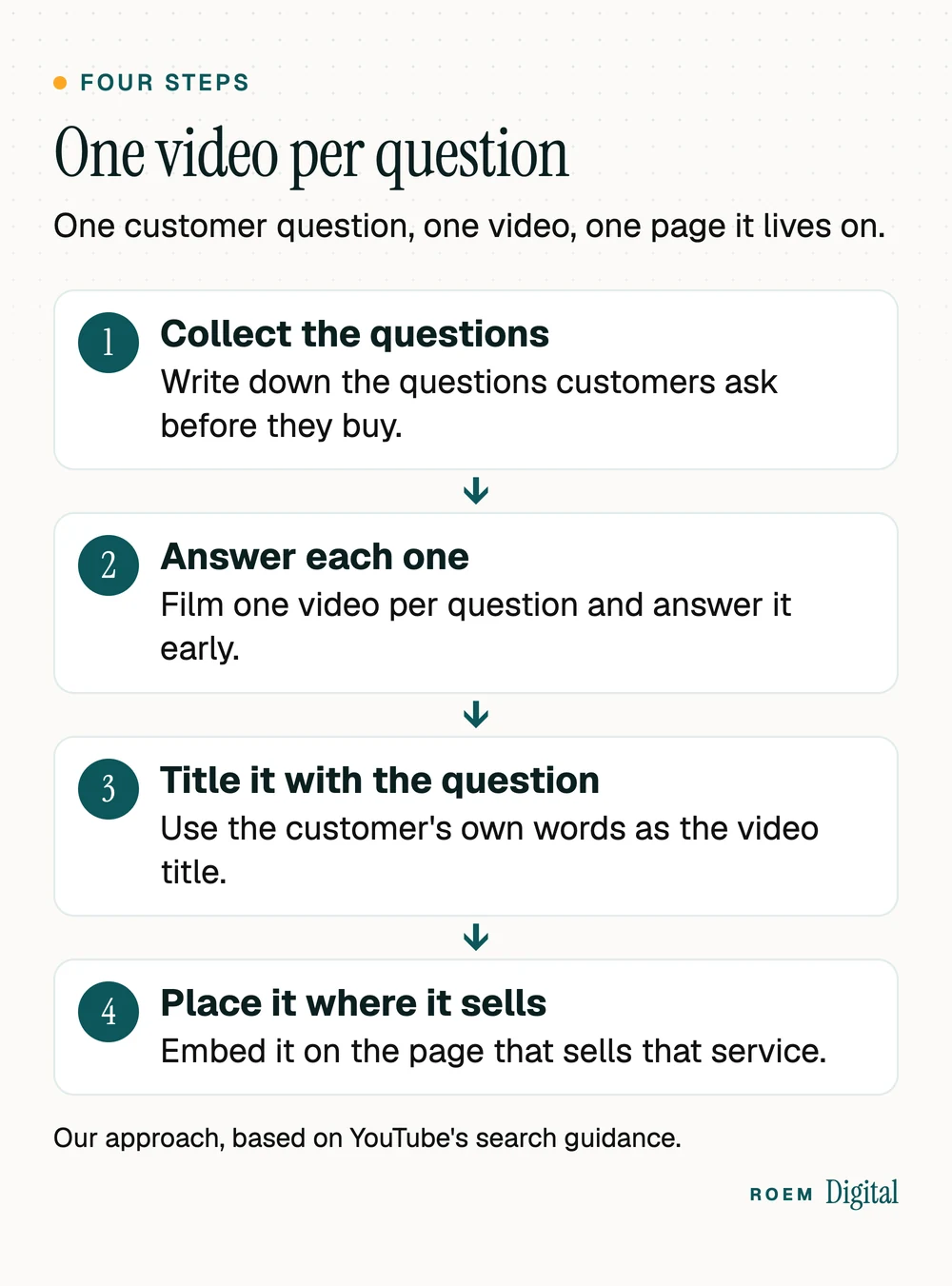
Here's our approach, built on how YouTube says its search works: match the words people search with, and earn watch time by actually answering.
- Collect the questions. Pull them from phone calls, emails, booking forms, reviews and the questions your team answers on the job. Write them in the customer's words, not yours.
- Answer one question per video, and give the answer early. Context and stories come after the answer, not before it.
- Title it with the question. "How long does a water heater replacement take?" beats "Tips from our team." Put the answer in the description too, in plain text, with a link to the matching page.
- Place it where it sells. Embed the video on the page for that service, and share it from your Google Business Profile and social accounts.
Start with 10 answers. Most businesses hear the same handful of questions over and over, and each video becomes something your team can send when that question arrives by text or email. Write titles the way our website copywriting guide suggests for headlines: plain words, the customer's problem first.
| Business | A question customers ask | Where the video lives |
|---|---|---|
| House painter | How long before we can move the furniture back in? | Interior painting page |
| Auto repair shop | What does this dashboard warning light mean? | Diagnostics page |
| Pool service | How often should a pool be cleaned in summer? | Weekly service page |
| Bakery | How far ahead should I order a custom cake? | Custom orders page |
| Private school | What does a morning in the classroom look like? (Film the room and teacher, or students whose families agreed.) | Admissions page |
YouTube Shorts for business: trailers that point to the full answer
Shorts are vertical videos. YouTube's Shorts help page says its creation tools make short-form videos "up to 3 minutes long," and you can record in the YouTube app or upload vertical videos saved on your phone or computer.
For a small business, Shorts work best as trailers. A brief clip shows the moment a customer cares about, then points to the full answer. YouTube's related video feature lets you attach one of your own videos, Shorts or live streams to a Short, and viewers see a clickable link below your channel handle. YouTube notes it's only available with advanced feature access.

The same vertical clips can go to TikTok and Instagram Reels, as long as the music is cleared for business use. Our guide to TikTok marketing for small business explains the music rule that catches many businesses, and the safest soundtrack is still your own voice.
Film YouTube answers without a studio or a crew
You don't need a production company to start YouTube marketing for small business. Most of what makes a business video watchable costs little or nothing:
- Light from the front. Face a window or stand in open shade outdoors. Don't film with a bright window behind you.
- Sound people can hear. A quiet room matters more than a fancy camera, and a clip-on microphone for your phone often makes the biggest difference.
- Horizontal for full answers, vertical for Shorts. Film the long answer sideways and the trailer upright, so neither gets cropped.
- Permission from anyone on camera. Customers, employees and anyone whose face, house number or license plate shows up should agree first, and a parent must agree for any child.
- An answer in the first sentence. Say it, then explain it.
If you hire a videographer for a few cornerstone videos, keep the raw files and the rights in your name, the same way you'd own your website's photos. For everything else, the person who knows the answer is the right person to film. Our guide to what a local service business should post has more ideas you can shoot on a phone.
Put your YouTube videos where buyers already are
A video on YouTube alone only reaches people who are on YouTube. Embed each answer on your website, on the page that sells the matching service, so a visitor deciding whether to call can watch it without leaving.
Google Search has its own rules for video results. Google's video SEO best practices say the page holding a video must be indexed and "performing well in Search" before its video is considered, and that video results and key moments need "a dedicated watch page for each video, if it makes sense for your business." Google gives a blog post that reviews an embedded video as an example of a page that isn't a watch page, because the video complements the rest of the page.
For most local businesses that's fine. The embedded video's job is to help the visitor on your service page decide, while YouTube's own search brings in people who searched there. If you're not sure which pages deserve a video first, start with the ones that already get search traffic, which our Google Search Console guide shows you how to find.
Measure YouTube for business by calls and bookings, not subscribers
Subscriber counts are the wrong scoreboard for YouTube marketing for small business. The YouTube Partner Program, which shares ad revenue with creators, asks for 1,000 subscribers plus either 4,000 qualified watch hours in the last 12 months or 10 million qualified Shorts views in the last 90 days. A plumber or a dentist doesn't need any of that for YouTube to pay off.
The same page notes that YouTube "retains the right to serve ads on all content on the platform," so ads can appear on your videos even when you aren't earning from them. That's one more reason to send interested viewers to your own site, where your page is the only offer in front of them.
- Tagged links in descriptions, built with UTM parameters, so your analytics show visits and form fills from YouTube.
- Calls and bookings from the pages where your videos are embedded, tracked the way our guide to tracking calls and forms in GA4 explains.
- The question on every booking: how did you hear about us? "I watched your video" is the answer you're after.
- YouTube Studio's own numbers on which answers people watch longest, so you know which topics to film next.
How ROEM helps local businesses with YouTube
We're a small, senior team based in Davenport, Florida, working with businesses across Central Florida and nationwide. Our social media management covers the strategy, the content calendar, the posting and the community management on the platforms in your mix, and our SEO and content work makes sure the website pages your videos sit on answer the same questions people search. When a video should run as an ad, our paid media work includes the ad creative itself, in graphics and video.
You own the channel and every video. If we ever part ways, everything stays with you.
Frequently asked questions
Is YouTube good for small business marketing?
It is when your customers have questions you can answer on camera, such as how a job works or what to expect at a first visit. YouTube says its search weighs relevance, engagement and quality, so clear answers titled in the customer's own words can keep being found long after you post them.
Should my business use a Brand Account or a personal YouTube channel?
Use YouTube's path for a channel with a business name that can have more than one manager or owner, which YouTube connects to a Brand Account. Start it from a Google Account the business controls, then add staff and helpers through channel permissions instead of sharing a password.
How long can YouTube Shorts be?
YouTube says its Shorts creation tools make vertical videos up to 3 minutes long, and you can record in the YouTube app or upload vertical videos from a phone or computer. For a business, we'd keep most Shorts brief: show one moment, then point viewers to the full answer with a related video link.
Do I need 1,000 subscribers for YouTube to help my business?
No. The 1,000 subscriber threshold belongs to the YouTube Partner Program, which shares ad revenue with creators. A local business earns from YouTube through calls, bookings and sales, so judge it by tagged website visits, form fills and what customers tell you when they book.
What should a small business post on YouTube?
Answers to the questions customers ask before they buy: how a service works, what affects the cost, what to expect on the day and how to tell whether they need you at all. Make one question per video, title it in the customer's words and write the answer in the description too.
Should I embed YouTube videos on my website?
Yes, on the page that sells the matching service, so visitors can watch without leaving. Google notes that a page where the video only complements other content isn't a watch page for its video results, so expect the embed to help visitors decide rather than win a video listing by itself.