
Short answer: To write alt text, decide what the image is for, then describe only what matters for that purpose in a few words, without "image of" or keyword lists. Give decorative images empty alt text, give linked images their action, and put long details like chart data in the page text.
How to write alt text: six rules that cover most images
Alt text is a short written description of an image, stored in the image's alt attribute. Screen readers read it aloud, browsers show it when the image doesn't load, and search engines use it to understand the picture.
WebAIM, a web accessibility organization based at Utah State University, sums up the job in its guide to alternative text: alt text should be accurate and equivalent in representing an image's content and function, and succinct. Here's how to write alt text that meets that bar:
- Decide the image's job first. Does it show something, do something, or just decorate? The answer changes everything below.
- Describe what matters, not everything. WebAIM says only a few words are typically necessary, and rarely a short sentence or two.
- Skip "image of" and "photo of." Screen readers already announce that it's an image.
- Don't repeat the caption or the sentence next to it. If nearby text already says it, the alt text shouldn't say it again.
- No keyword lists. Google warns that stuffing alt attributes with keywords makes a poor experience and may cause a site to be seen as spam.
- Leave decorative images empty. An empty alt attribute (alt="") marks the image as one to skip. Leaving the attribute out doesn't.
Missing alt text is one of the most common errors automated accessibility checkers find, which is why it sits near the top of the fix list in our ADA website compliance guide.
Alt text examples from a real service business homepage
Rules are easier to see on a live page. GK Painting is a cabinet and painting company in Madison, Wisconsin, and we built its website. Here's the alt text on three of its homepage images, word for word.

| Image | Its alt text | Why it works |
|---|---|---|
| Logo in the header | GK Painting | A logo's job is the company name. WebAIM says the name alone will usually do, without the word logo. |
| Kitchen photo beside the headline | A kitchen with deep navy cabinets, glass upper doors, white stone countertops, and warm oak floors. | The photo is the evidence for the page's promise, so the alt text names what a customer would look at: the finish and the room. |
| Gallery photo of a built-in | A built-in bookcase finished in navy with a wine refrigerator below. | It names the piece, the color and the one detail a customer would notice, in one short sentence, with no city or keyword added. |
Alt text, captions and titles do different jobs. A caption is visible to everyone, so it carries the point. Alt text describes the picture for someone who can't see it. WebAIM's advice for a photo with a caption is that the image still needs alt text, and the two shouldn't repeat each other.
Notice what isn't there: no city name squeezed in, no "best painters" phrase. The page's text already says where GK works and what it does, so the alt text only has to describe the picture. You can see more sites we've built in our portfolio.
What would you put in its place? Four answers for every image
WebAIM offers one question that settles many cases: if you could not use this image, what would you put in its place? Most images get one of four answers, each drawn from WebAIM's guidance:
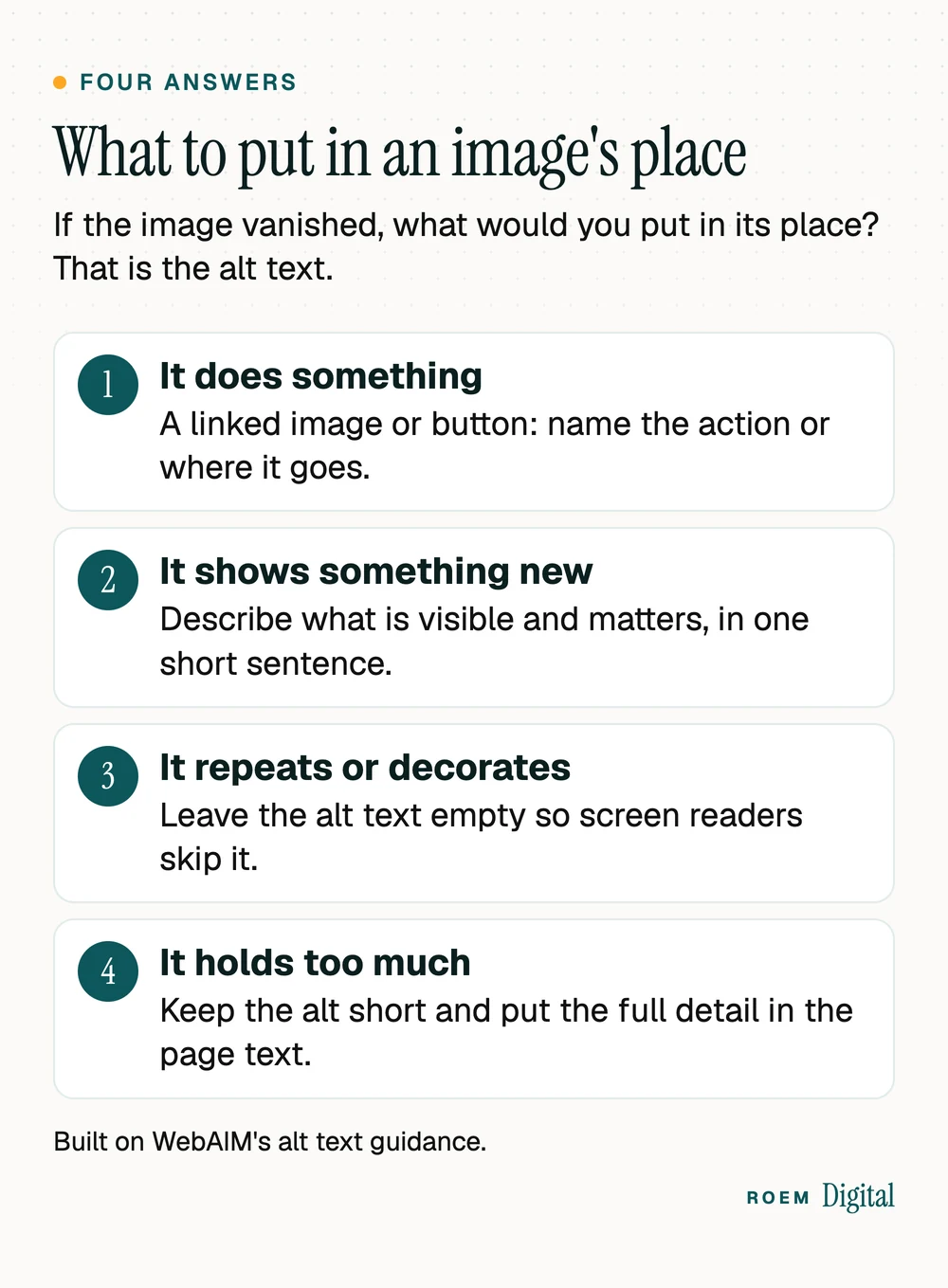
- It does something. A linked image or an image button needs alt text that says what happens. WebAIM's example for a search button image is "Submit Search". For a header logo that links home, the company name is enough.
- It shows something new. Describe what's visible and relevant to this page. The same photo can need different alt text on two different pages, because the point it makes changes.
- It repeats or decorates. Use alt="". WebAIM's example is a handshake photo beside a paragraph about customer service: describing it adds noise, not meaning.
- It holds too much. For charts, maps and menus, keep the alt short (WebAIM suggests something like "Line chart of annual sales data") and put the details in the page text or a table nearby.
Before-and-after photos, team photos and stock photos
Before-and-after pairs need each photo to make sense alone, because a screen reader reads them one at a time, in page order, which isn't always the order you see them. Label the state in each one: "Before: kitchen with cherry stained cabinets and glass front uppers" and "After: the same cabinets refinished in light gray." A listener hears the change in either order.
Team photos follow the same rule as everything else. If a person's name and role sit right beside the photo, the alt text doesn't need to repeat them: describe what they're doing if it supports the page's point, or leave it empty if nothing does. If the name isn't nearby, name people only when they're happy to be shown. Team photos carry the most weight on an about page, and our about us page examples show how to use them.
Stock photos are usually decorative. A stock photo of a smiling stranger next to your reviews adds nothing a listener needs, so empty alt text is the honest choice. If you'd struggle to write true alt text for a photo, ask whether it belongs on the page at all.
Image alt text for SEO: what Google says it uses
Google's image SEO best practices call alt text the most important attribute for giving Google more information about an image. Google uses alt text along with computer vision and the contents of the page to understand what an image shows. When an image is a link, its alt text also works like the link's anchor text.
Google's own example makes the point. For a photo of a puppy, missing alt text is bad, a long string of dog words is bad, "puppy" is better, and "Dalmatian puppy playing fetch" is best. The best alt text for search is the most specific honest description of the picture, which is also the best alt text for a person. Use your page's keyword only when it's true of what's in the photo.
Alt text works alongside the other image signals Google names:
- File names. Google says a file name gives very light clues, and prefers short descriptive names like my-new-black-kitten.jpg over IMG00023.JPG.
- Nearby text and captions. Google extracts information about an image from the page content, including captions, so place photos next to the text they support.
- Real image elements. Google finds images in the HTML image element and doesn't index images set as CSS backgrounds.
- File size. Google's guide also notes that images are often the largest contributor to overall page size. Our guide to whether a slow website is costing you calls shows how to check yours.
Image work is part of the on-page optimization in our SEO and content service. Alt text describes a picture, and the meta description describes the whole page, so write both for the same reader. Our SEO audit checklist shows where both fit in a full review.
Where to add alt text, and the images people forget
Once you know how to write alt text, adding it rarely means touching code. Google's SEO Starter Guide notes that your CMS may have an easy way to add a description to an image when you upload it. Look for a field named alt text or image description in the image settings, and fill it in before you publish.
The hero photo usually gets alt text. These are the images that often don't:
- Gallery and project photos uploaded in a batch, where each one ends up blank or labeled with its file name.
- Icons and graphics used as links, like social media icons or a call now button made from an image. Each needs its action or destination.
- Text baked into images, like a flyer, a menu or a price sheet saved as a picture. A screen reader can't read the words, so put them in the alt text or, better, in real text on the page.
- Logos in the header and footer, which need the business name.
- Images on your Spanish pages, which need alt text in Spanish, not a copy of the English. Our guide to building a bilingual website covers the rest of that setup.
Accessible images are one item on a longer list. Our 12 things every service business website needs covers the others, from the call button to page speed.
Alt text and the ADA: when to bring in an accessibility professional
The Justice Department's March 2022 guidance on web accessibility and the ADA lists missing alt text among the barriers that keep people who are blind from understanding the content and purpose of images. It describes useful text alternatives as short and descriptive.
This is general marketing information, not legal advice. Alt text is one part of accessibility, alongside color contrast, keyboard use, form labels and video captions, and our ADA website compliance guide covers those and the rules that apply to different kinds of organizations. Bring in a professional when:
- You've received a demand letter or complaint about your website. Talk to an attorney before you reply or change anything in a hurry.
- Your site depends on complex images, such as charts, maps, floor plans or course materials, that need long descriptions. An accessibility specialist can test them with screen reader users.
- You're a public school, city or other public entity with federal web accessibility deadlines.
- You need a formal audit of the whole site against the Web Content Accessibility Guidelines (WCAG), not just the images.
For your own photos, asking what you'd put in the picture's place handles most of the work. Start with the pages that bring in calls, then work through the gallery. Alt text is easiest to write at the same time as the page copy, while you still remember why each photo is there. If you're planning a new site, read more about our website and branding service.
Frequently asked questions
What is alt text on a website?
Alt text is a short written description of an image, stored in the image's alt attribute in the page's HTML. Screen readers read it aloud for people who can't see the image, browsers show it when an image fails to load, and search engines use it to understand what the picture shows.
How long should alt text be?
Short. WebAIM says only a few words are typically necessary, and rarely a short sentence or two. Describe what matters for the image's purpose on that page and stop. If an image needs more than a couple of sentences, like a chart, keep the alt brief and put the details in the page text.
Does alt text help SEO?
Yes, as a description, not a keyword slot. Google says it uses alt text along with computer vision and page content to understand what an image shows, and calls alt text the most important image attribute. It also warns that stuffing alt text with keywords is a poor experience and may look like spam.
Should decorative images have alt text?
They should have an empty alt attribute, written as alt with two quotation marks and nothing between them. That tells screen readers to skip the image. Leaving the attribute out is different: WebAIM says every image should have an alt attribute, even if it's empty. Without one, a screen reader may read out the file name instead.
Should I put keywords in my alt text?
Only when the words are true of the picture. Google's own example prefers Dalmatian puppy playing fetch over a list of dog words. If your page is about kitchen cabinet painting and the photo shows painted kitchen cabinets, saying so is accurate. If it shows a smiling team, describe the team.
Can AI write alt text for my website?
It can draft a description, but it can't know why the image is on your page. WebAIM notes that algorithms alone cannot understand what an image means within the context of the overall page. Read every AI draft against the page, cut anything that repeats nearby text, and mark decorative images empty.