
Short answer: Google Ads keyword match types control how closely a search must match your keyword before your ad can enter the auction. Broad match reaches related searches, phrase match reaches searches that include your keyword's meaning, and exact match reaches searches with the same meaning. All three include close variants such as synonyms.
Google Ads keyword match types in one table
Google Ads keyword match types decide how closely someone's search has to match your keyword before your ad can be considered for the auction. There are three: broad, phrase and exact. Broad match is the default, so a keyword typed with no symbols around it is broad.
| Match type | How you enter it | What Google says it can match |
|---|---|---|
| Broad match | water heater repair | Searches related to your keyword, including ones that don't contain its direct meaning |
| Phrase match | "water heater repair" | Searches that include the meaning of your keyword, including more specific forms of it |
| Exact match | [water heater repair] | Searches with the same meaning or the same intent as your keyword |
Those definitions come from Google's page on keyword matching options. It also notes that broader match types cover every search the narrower ones would, plus more. So a broad keyword already reaches what its phrase and exact versions would reach, and exact match gives you the most control but the fewest searches.
The same page warns against padding an ad group with near-duplicates. Google's example is red car and car red: both are recognized as duplicates, only one can match a given search, and you get one bid in the auction either way. Adding every word order of the same keyword adds clutter, not reach.
Google's own broad match example shows how far that reach goes. A broad keyword for a low carb diet plan may show ads on searches like carb free meals and Mediterranean diet books. For a plumber, our illustration: broad water heater repair could reach tankless water heater installation, phrase could reach emergency water heater repair near me, and exact could reach water heater repairs. If those reaches surprise you, check what you're paying for before anything else. A review of a Google Ads account should start there.
Exact match isn't exact: close variants apply to every match type
It's easy to picture exact match as a literal lock. It isn't, and hasn't been for years. Google's close variants definition says all keyword match types are eligible to match close variants by default, and there's no way to opt out. For exact match, close variants can include:
- Misspellings, singular and plural forms, stemmings such as floor and flooring, abbreviations and accents.
- Reordered words with the same meaning, and added or removed words like in, for or the.
- Implied words, synonyms and paraphrases. Google's example: an exact keyword for bathing suits may also show on swimming suits.
- Searches with the same intent. Google's example: an exact keyword for images royalty free may show on free copyright images.
Phrase match changed too. Google's page on changes to phrase match and broad match modifier says broad match modifier, the old +keyword notation, was folded into phrase match in 2021. Since July 2021 you can't add new modifier keywords, and old ones behave as phrase match. If an account still shows plus signs, it's running on phrase match rules. Word order still matters for phrase match when it changes the meaning, so a moving company's keyword for moves from one city to another won't match a search for the reverse trip.
Close variants cut both ways. You don't need to list every plural and misspelling of a service, which keeps keyword lists short. But one exact keyword can now reach several phrasings of the same need, and the ad and the page have to answer all of them. Our guide to landing pages for Google Ads explains why each service needs its own page rather than the homepage.
Broad match and Smart Bidding: Google's advice and the catch
Google is clear about what it wants. Its matching page says it's critical to use Smart Bidding with broad match, and its guide to keyword match types recommends broad match if you use Smart Bidding, with phrase and exact for specific needs such as sensitive industries. Google also says broad match can take into account the searcher's recent search activity, your landing page content and assets, and the other keywords in the ad group.
The catch is that Smart Bidding only knows what you tell it is a conversion. If the account counts phone taps or page views as leads, broad match plus Smart Bidding will go find more taps and page views, across far more searches than you'd ever have typed in. Broad match works when the conversion data is clean. Our guide to Google Ads conversion tracking shows how to check yours before you widen anything.
Budget matters too. Broad match reaches more searches, so a small daily budget gets spread across more of them, and each search gets fewer clicks to prove itself. Google's own matching page notes that a Search campaign limited by budget can lose searches to Performance Max. Our guide to setting a Google Ads budget for a small business shows how to size a test budget that can teach you something.
A weekly match type check in three steps
Here's the weekly routine we use. It's our own approach, not Google's wording. Your match type decides how loosely you'll let Google read your keyword. The search terms report works like a receipt: it shows what people actually typed before you paid. Then you make a change based on what you read.
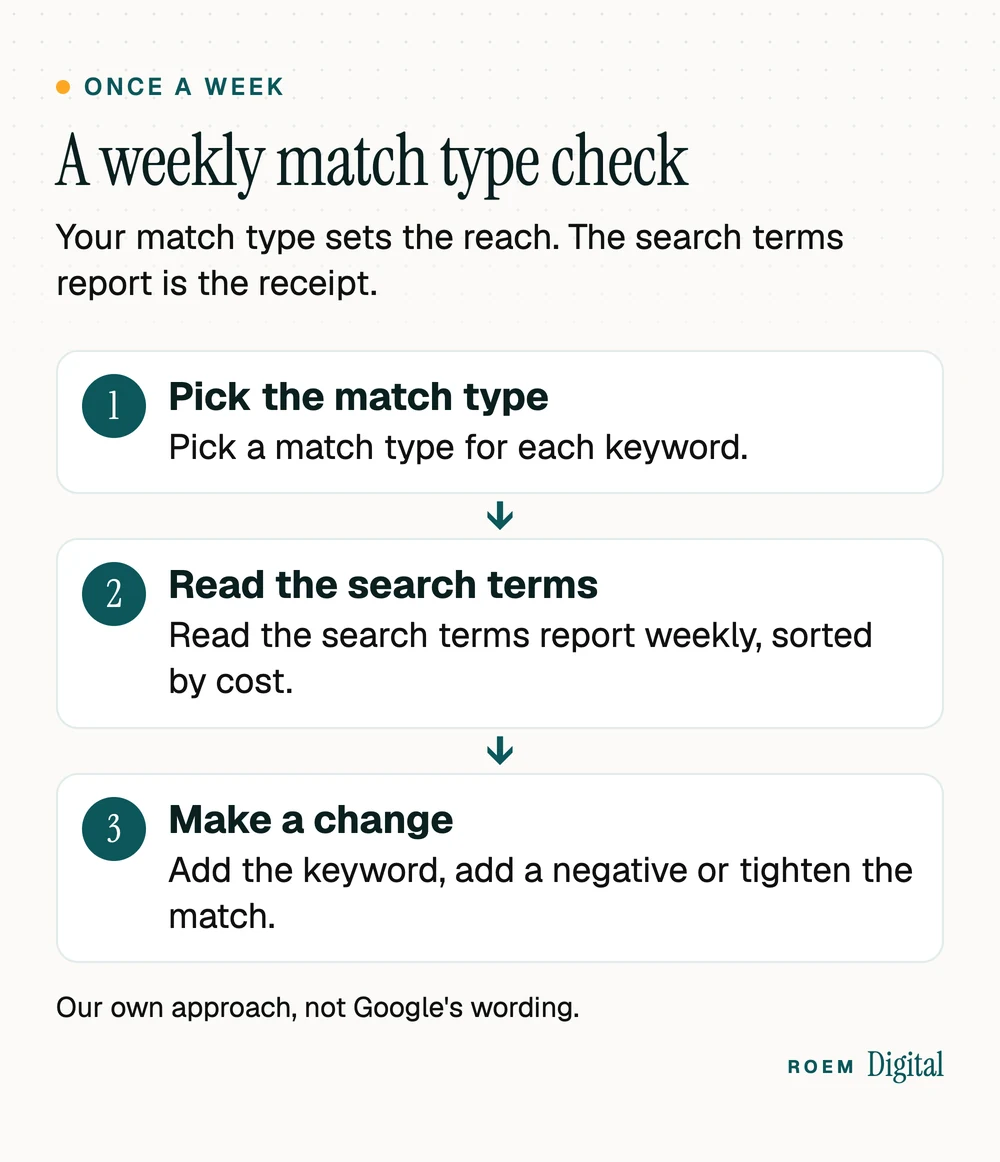
- Pick a match type for each keyword on purpose, based on how much reach you can afford to test.
- Once a week, open the search terms report for the last 7 to 30 days and sort by cost, highest first.
- For each costly search, do one of four things: add it as its own keyword, add a negative, tighten the keyword's match type, or move it to an ad group whose ad and page fit it better. Our negative keywords guide covers where each negative should go.
Read the search terms report like a receipt
A keyword is what you bid on. A search term is what someone typed. Google's search terms report page explains where to find it: Campaigns, then Insights and reports, then Search terms. Two columns make it useful for match types. The Match type column shows how the search related to your keyword, and the Keyword column, which is hidden by default, shows which of your keywords triggered the ad.
| What you see | What to do |
|---|---|
| A search for something you don't sell, with real cost | Add a negative keyword at the right level |
| A good search that converts, matched by a broad keyword | Add it as its own phrase or exact keyword |
| Many loose searches from one broad keyword | Tighten that keyword to phrase match |
| A good search landing in the wrong ad group | Add it as a keyword in the ad group that fits |
| Jobs, training or DIY searches | Add them to a shared negative list |

The report doesn't show everything. Google says some search terms with too little activity are left out to protect privacy, and search terms insights group them into themes instead. So pair the report with a starter list of obvious negatives, and judge each search by leads, not clicks. If you suspect the waste is something worse than loose matching, our guide to click fraud shows how to tell the difference.
Negative keywords follow their own matching rules
Negative keywords have broad, phrase and exact match types too, but they behave differently. Google's page on negative keywords says negatives won't match close variants or other expansions, so you need to add synonyms and singular or plural versions yourself. It also says negatives automatically account for casing and misspellings. A negative for flowers blocks red flowers but not red flower.
Our negative keywords guide covers the starter themes, the three negative match types and where to add each one, from ad group to account level.
When AI Max or Performance Max matches beyond your keyword match types
Two newer features can show your ads on searches your keyword list never asked for. Google's page on how AI Max for Search campaigns works says turning AI Max on turns on search term matching, which uses broad match and keywordless technology to reach more searches, and that you can switch it off in the ad group settings. AI Max also adds its own match type values and source columns to reporting, so you can see why an ad matched.
Performance Max has no keywords at all. When a search is identical to an eligible exact match keyword in a Search campaign, Google gives the Search campaign priority. Our guide to Performance Max explains the rest of that order, and our post on ads in ChatGPT and Google AI Mode covers how match types behave in AI answers.
Which match types to start a new local account with
Google recommends broad match with Smart Bidding, and in a mature account with clean conversion data that can work. For a new local account with thin data, our advice is to start narrower: phrase and exact match on the core service searches, a starter negative list, and a weekly search terms read. Broad match comes in later, keyword by keyword, once tracked leads show the account can tell a customer from a click. Google Ads keyword match types are a setting you revisit every month, not a choice you make once at launch.
We're a small senior team based in Davenport, Florida, working with businesses across Central Florida and nationwide. Robert builds and tracks the campaigns himself, and calls, forms and bookings are tracked before ad spend starts. Read more about our Google Ads and paid media service, or see our Google Ads for small business guide if you're setting up your first campaign.
Frequently asked questions
What is the difference between broad match and phrase match?
Phrase match shows your ad on searches that include the meaning of your keyword, including more specific versions of it. Broad match goes further, to searches Google considers related, even ones that don't contain your keyword's direct meaning. Broad reaches every search phrase would, plus more, which is why it needs clean conversion tracking.
Is exact match really exact in Google Ads?
No. Google says every match type can match close variants, with no way to opt out. For exact match, that includes misspellings, plurals, reordered words, synonyms, paraphrases and searches with the same intent. Exact match still gives you the most control of the three, but it isn't a literal lock.
Should I use broad match on a small budget?
Google recommends broad match with Smart Bidding. On a small budget with little conversion data, our view is to start with phrase and exact match on core services, read the search terms report weekly, and add broad keywords later, once tracked leads give Smart Bidding something real to learn from.
Does broad match modifier still exist?
No. Google folded broad match modifier into phrase match in 2021, and since July 2021 you can't add new keywords with the plus sign notation. Older modifier keywords still run, but they behave exactly like phrase match. If you edit one, Google converts it to phrase match notation when you save.
Why is my ad showing for searches I didn't add as keywords?
Broad and phrase match, close variants and features like AI Max all let Google match searches you never typed in. Open the search terms report, add the Keyword and Match type columns, and see which keyword triggered each search. Then add negatives or tighten the match type on the keywords causing the waste.
Do negative keywords match misspellings and plurals?
Partly. Google says negative keywords automatically account for casing and misspellings, but they don't match close variants such as plurals or synonyms. A negative for flowers blocks red flowers but not red flower. Add the singular, plural and synonym forms you want blocked.