
Short answer: Google Ads for small business works best when you set it up in order: track calls, forms and bookings first, then limit ads to the area and hours you can serve. Start with one tight Search campaign per service, and set a budget you can hold while you read the search terms every week.
Is Google Ads worth it for a small business? Start with the search
Google Ads for small business is worth testing when people already search for what you sell in the area you serve, and someone is there to answer the calls and forms it brings. Search ads show to people who are looking right now. That's the strength. If nobody searches for your service, or leads sit unanswered for a day, more ad spend won't fix it.
Google's own advice for first-time advertisers starts with a goal: decide whether you want customers to call you, visit your store or visit your website. Keep that answer in front of you, because every setting below follows from it. If you're still deciding between ads and search rankings, our comparison of Google Ads vs SEO walks through where the first dollar usually does the most.
Here's how to set up Google Ads, in the order we'd do it:
- Create the account carefully. Google's conversion measurement page warns that the account type, organization or individual, is fixed when you create the account and can't be changed later.
- Set up conversion tracking for calls, forms and bookings, and test each one.
- Create a Search campaign with the Leads objective, one per main service or area.
- Set where and when ads show: locations, location options, ad schedule and networks.
- Build ad groups of closely related keywords, each with its own ads and landing page.
- Set an average daily budget you can hold for a month, then read the search terms weekly.
Track calls and forms before the first dollar goes out
Google won't even let you build a Search campaign without a goal. Its Search campaign setup guide says at least one conversion goal is required, even if you skip the goal guidance. But a goal existing isn't the same as tracking working. An account can carry a goal for months and record nothing, and then every report shows clicks with no idea which ones turned into customers.
For many service businesses, three actions count as a lead: a phone call, a completed form and an online booking. Google tracks calls from your ads through call reporting and Google forwarding numbers, calls from your website through a tag, and forms through the Google tag or an import from Google Analytics. Our guide to Google Ads conversion tracking covers each method, and tracking calls and forms in GA4 covers the analytics side.
Expect a new conversion action to show as Unverified or Inactive at first. Google says that's normal until it records the first conversion or a test event. So submit a test form and make a test call before launch, and confirm both land where they should.
Set up a first campaign in order: tracking, area, keywords, then budget
Many setup guides start with keywords and a budget. We start with tracking and the service area. That's our view, built on Google's own rule that a Search campaign needs a conversion goal: if the account can't tell a lead from a click, nothing else in it can be judged.
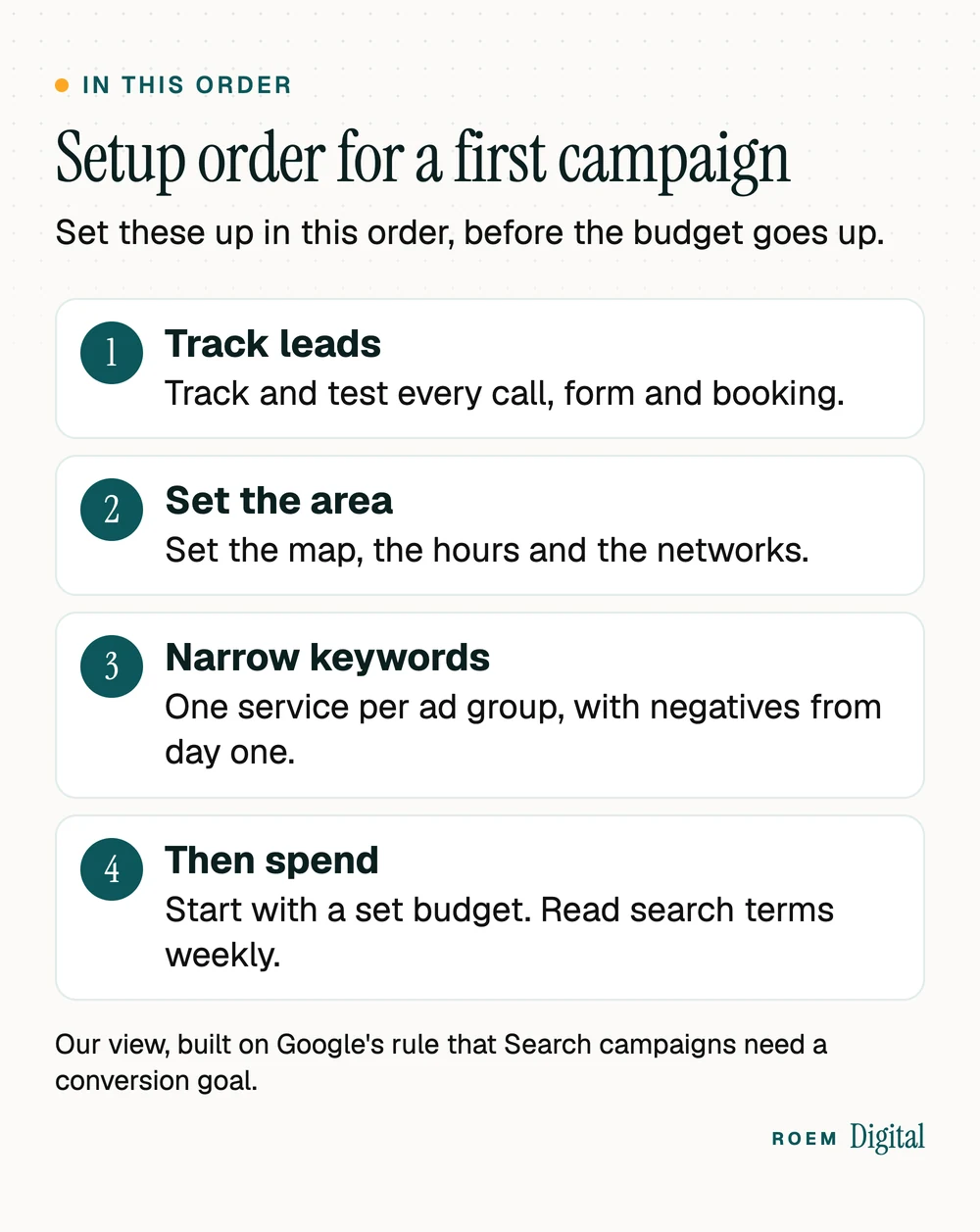
- Calls, forms and bookings are tracked and tested, so every click can be judged by what it produced.
- The campaign shows only in the area you serve, during the hours you answer, on the networks you chose on purpose.
- Each ad group covers one service, with ads and a landing page written for it, and a starter list of negative keywords blocks job seekers and DIY searches from day one.
- The budget goes in last, at a level you can hold long enough to learn something, and it grows only when the search terms and leads say it should.
Google Ads location targeting: show ads only where you work
Google Ads location targeting has two parts: the places you pick and the location option that decides who counts as being there. The second part catches many new accounts, because the default reaches further than owners expect.
| Setting | What Google says it does | What to check |
|---|---|---|
| Presence or interest (the default) | Reaches people in or regularly in your locations, plus people who've shown interest in them | Fits businesses that serve visitors, such as a venue or a vacation rental |
| Presence | Reaches people who are likely to be in, or regularly in, your locations | Usually the choice when you can only serve people who are actually in your area |
| Location exclusions | Keep ads from people likely to be in the areas you exclude | Carve out the towns inside a radius you don't serve |
| Ad schedule | Sets the days and times your ads can run | Match it to the hours someone answers the phone |
| Search partners and Display Network | Two checkboxes in setup that extend ads beyond Google search results | Decide each one on purpose and judge it by leads, not clicks |
Google's page on advanced location options calls Presence or interest the default and recommended option, and lists the case for Presence plainly: when you only want people in specific locations, not people elsewhere who are interested in them. Its location targeting overview adds two caveats. Google may also show your ad in nearby, closely related areas, and location targeting is a best effort, not 100% accurate. Clicks from outside your area aren't automatically fraud, which our guide to click fraud explains.
Google Ads call only campaign: when a call campaign fits
What people still search for as a Google Ads call only campaign, Google now calls a call campaign, built with call ads. According to Google's call campaign overview, these ads show only on mobile devices that can make calls. Leave the final URL blank and the ad allows only clicks to call, so you're bidding for calls instead of website visits. Google says your bid should then match what a phone call is worth to you, and that a tap on the number costs the same as a headline click.

A call campaign fits when the phone is the sale: emergency repairs, same-day services, anything a customer wants to settle in one conversation. It's a poor fit when callers need to see your work first, or when nobody can answer during the day. Two setup rules matter. Google asks for a verification URL that shows the same phone number as the ad, and you can set numbers to appear only when the business can take calls.
If you want both calls and website visits, a regular Search campaign with a call asset adds a call button to your ads, and it can follow its own schedule. Either way, count only calls that last long enough to be real conversations. Our guide to call tracking for small businesses shows how to tie calls back to the ad that earned them.
Your first campaign structure: one service, one ad group, one page
Google's setup guide uses a furniture store as its example: a Couches ad group with keywords like leather couches and sofas, ads about couches, and a link to the couches section of the site. Copy that pattern. One ad group per service keeps the keyword, the ad and the page talking about the same thing, and Google recommends at least three ads per ad group.
- Keywords: a short list per service, with match types chosen on purpose. Keywords are broad match by default, which our guide to Google Ads keyword match types explains.
- Landing pages: one page per service, not your homepage. Our guide to landing pages for Google Ads shows what that page needs.
- Assets: sitelinks, callouts and a call asset at minimum.
- Campaign type: a standard Search campaign. Google says Smart campaigns can show across Search, Maps, YouTube, partner websites and the Display Network, and that opting out of those networks may mean contacting support.
In our view, Performance Max is a poor first campaign for most small accounts, because it steers by conversion data that a new account doesn't have yet. We explain why in our guide to Performance Max. Local Services Ads are a separate option for some trades, and they're changing: Google's transition page says Local Services Ads are moving into Performance Max campaigns with pay-per-lead goals, starting in August 2026 for select U.S. home and storefront services. Our comparison of Local Services Ads vs Search ads covers how they differ from Search.
Your budget and the first 30 days: what to watch before adding money
Treat the first month of Google Ads for small business accounts as a paid test, not a launch. You set an average daily budget, not a monthly bill. Google's daily budget page says that for most campaigns, spend can run above it on busy days, up to twice the daily average, but the month won't exceed 30.4 times the daily figure. Our guide to a Google Ads budget for a small business works backward from what a customer is worth to a budget that can teach you something.
- Week 1: confirm conversions are recording, every call is answered and every form reaches a real inbox. A Learning status on a new campaign or bid strategy can last up to seven days, so don't judge it yet.
- Weeks 1 to 4: read the search terms report every week. Add negatives for searches you'd never sell to, and add good searches as keywords.
- Week 4: compare leads and booked jobs with spend. Raise the budget only for the campaigns that brought real customers.
Make sure the account is yours from day one. Your business should own the Google Ads account and its billing, with any agency added as a user. Our guide to who owns your marketing accounts shows how to check.
How we set up Google Ads for small businesses
We're a small senior team based in Davenport, Florida, working with businesses across Central Florida and nationwide. Robert handles the builds, the ads and the tracking, so the person who sets up your campaigns is the person who checks the calls behind them. Calls, forms and bookings are tracked before any ad spend starts, and you own the ad account, the website and the analytics.
Every plan starts with a free audit, and the quote comes after. Read more about our Google Ads and paid media service.
“I can’t say enough great things about ROEM Digital! They did an amazing job bringing my vision to life with our beautiful website and continue to do a great job with our marketing and ads. They really take the time to understand my brand and what I’m trying to accomplish. They’re creative, professional, responsive, and genuinely care about helping my business grow. As a business owner, having a team I can trust means so much. I’m truly grateful for their work and highly recommend them!”
Frequently asked questions
How much does Google Ads cost for a small business?
You choose the cost. You set an average daily budget for each campaign, and Search ads charge per click. Google says spend can reach twice the daily budget on a busy day, but a month won't exceed 30.4 times the daily figure for most campaigns. Work backward from what a customer is worth before you pick a number.
Can I run Google Ads for my small business myself?
Yes. Google Ads is self-service, and a single Search campaign is manageable if you set up conversion tracking first and read the search terms report every week. Wasted spend often comes from skipped setup steps, such as broad keywords with no negatives, a default location option and forms that are never tracked.
Should a small business use Smart campaigns?
Smart campaigns are simpler, but they give you less control. Google says Smart campaign ads can show across Search, Maps, YouTube, partner websites and the Display Network. A standard Search campaign lets you choose keywords, match types, networks and location options yourself, which makes it easier to see where the money goes.
What is the difference between Presence and Presence or interest in Google Ads?
Presence or interest, the default, reaches people in or regularly in your locations plus people who've shown interest in them. Presence reaches only people likely to be in, or regularly in, those locations. A local service business that can only serve people in its area usually picks Presence.
Do call only ads still exist in Google Ads?
Google now calls them call campaigns, built with call ads. They show only on mobile devices that can make calls, and if you leave the final URL blank, the ad allows only clicks to call. You need a verification URL showing the same phone number, and you can limit the number to business hours.
How do I know if my Google Ads are working?
Judge them by leads and booked jobs, not clicks. Confirm calls, forms and bookings are recording as conversions, then compare each campaign's spend with the customers it produced. Read the search terms report weekly to see what people actually typed, and cut the searches that never turn into work.