
Short answer: Bing Places for Business is Microsoft's free tool for your listing in Bing search and Bing Maps, now at bing.com/forbusiness. Claim or create the listing, verify it, then allow 7 to 12 days to publish. Importing from Google is fastest, but Bing says Google-linked listings can then be edited only in Google.
Bing Places for Business in 2026: what it is and where it moved
Bing Places for Business is Microsoft's free tool for creating and managing your business listing in Bing search results and Bing Maps. Since October 2025 it lives at bing.com/forbusiness, and old bingplaces.com accounts moved there automatically.
Microsoft announced the rebuild on its Bing blog on October 3, 2025. The post says existing users and their listings migrate to the new account, that the Google import flow is faster and better at keeping names, hours and contact details intact, and that a new Recommendation Tool suggests missing photos and details. It also lists deeper integrations with Bing Maps and Copilot among Microsoft's plans, so treat those as plans rather than features you can count on today.
For most local businesses, Bing is a short job worth doing once and checking twice a year. It belongs on the same short list as Google, Apple and Yelp in our guide to the business listings and citations that still matter.
How to claim or create your Bing business listing
Bing's guide to managing your listing starts with a search, because many businesses already have a Bing listing built from outside data. Work through it in this order:
- Sign in at bing.com/forbusiness with the account your business will keep long term.
- Search Bing for your business, choosing the right country and entering your name and location.
- Claim it if it's unclaimed. If someone else already claimed it, use the Request Access option so the owner can grant you permission.
- Report duplicates if you see more than one listing for the same business.
- Create a new business only if no listing exists.
- Complete the basics: name, address, phone, website, hours, category and open status, all marked required.
You can pick up to 10 categories, one primary and nine more, and add up to 100 photos of at least 480 by 360 pixels. Bing also says it won't accept SEO tricks such as keywords stuffed into a business name, so use the name on your sign. Copy the exact details from your website and your Google profile. If you need a clean master version first, our Google Business Profile checklist covers every field worth settling.
For photos, Bing suggests two of the outside of your business so customers recognize it as they drive by, a few of the inside, and some of specific services, each tagged with a label such as exterior, interior or logo. A business with no storefront can show finished work and the team instead. Bing also lets you post announcements for offers, events and other timely news, and asks you to keep permanent details such as hours out of them.
Bing Places verification and the 7 to 12 day publish cycle
Nothing you change goes live until the listing is verified. Bing sends a PIN by phone, mail, email or text, though it says some options won't be available to every business:
| Option | When it's offered | What to watch |
|---|---|---|
| Phone | Only if the existing listing already shows your business phone and that number hasn't been edited | Answer the line yourself when the call comes |
| Postcard | Mailed to the listed address | About 5 to 6 business days in the US. Bing suggests waiting at least 12 days before contacting support |
| Email or text | Shown after you claim, depending on the listing | Use an email inbox you'll still control next year |
| Google import | Listings already verified in Google Business Profile | Bing verifies them automatically, then the normal publish cycle starts |
Once verified, Bing says publishing typically takes 7 to 12 days in North America. Here's the catch owners miss: every edit restarts that clock, because each version goes back through the publish cycle. Make your changes in one sitting, then leave the listing alone until they show. Before verification, Bing allows only limited editing, so verify first and polish second. Bing's frequently asked questions add that a listing still unpublished after 12 calendar days may need a support review.
If your PIN fails, Bing says a former agency or another user may have started verification from a different account, and the PIN only works in that account. Google's process differs again, as our Google Business Profile verification guide explains.
Sync from Google or manage in Bing: decide who controls your listing
The biggest decision in Bing Places for Business isn't a field on the form. It's whether Google or Bing holds the pen. Going by how Bing's help pages describe the Google import, you have two choices:
- Syncing from Google means importing from your Google Business Profile and letting updates flow weekly, every two weeks or monthly. Setup is quick, and a Google-verified listing is verified on Bing automatically. In exchange, you edit only in Google.
- Managing in Bing means editing the listing inside Bing. It's more upkeep, but you choose the categories and the website link yourself and decide when to make changes, though Bing still checks core details against outside data before it publishes them.
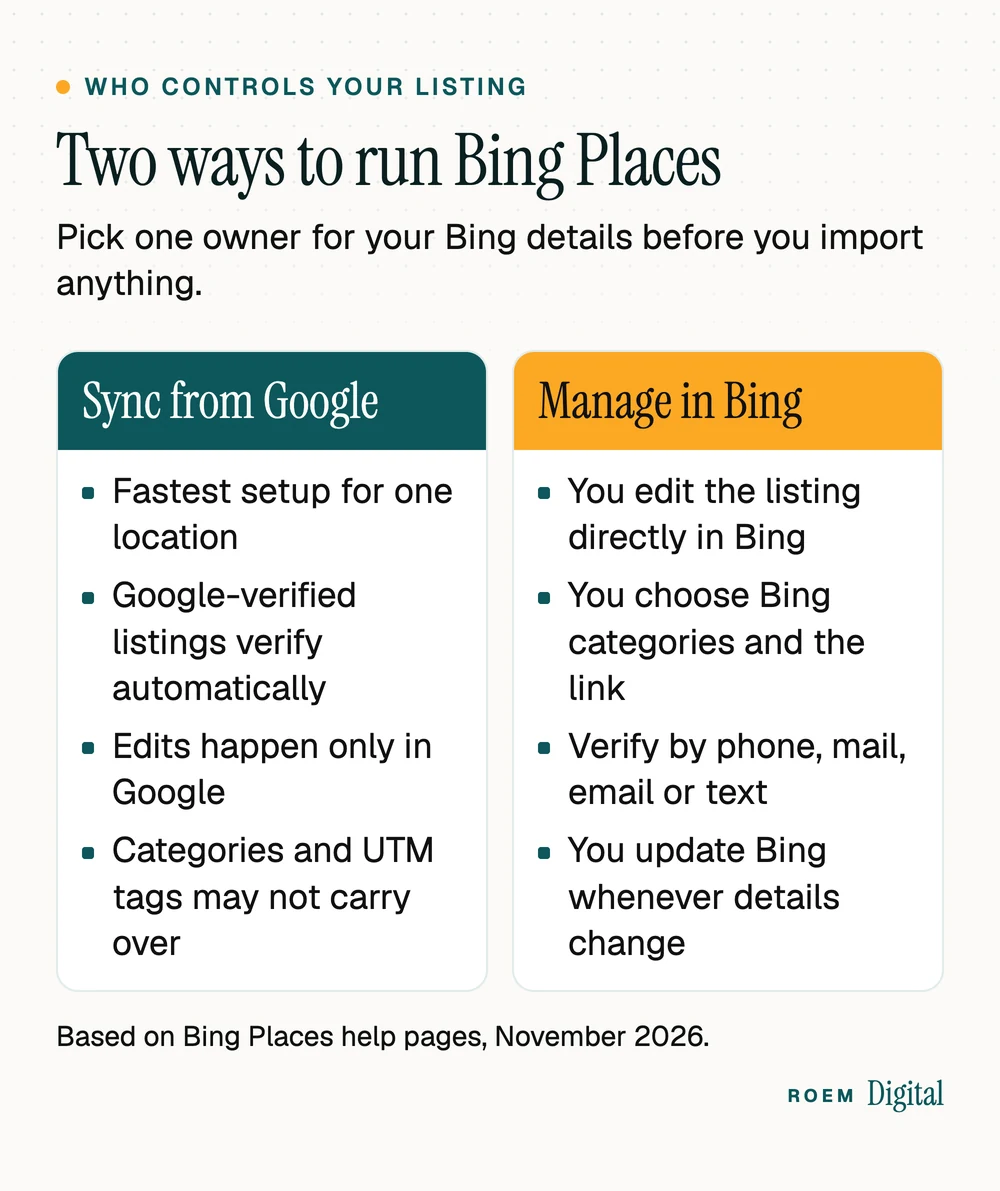
Syncing suits a single-location business whose Google profile is accurate and rarely changes. Managing in Bing suits a business that tags its Bing link to measure visits, needs categories that don't map cleanly, or already has duplicate Bing listings to untangle. Either way, decide before the first import. Our guide to running a local SEO audit shows how Bing fits into a full listings review.
Import Google Business Profile to Bing: four sync traps
Bing's Google sync help page makes importing look like four clicks: choose Import from your Google Business Profile, pick weekly, biweekly or monthly syncing, sign in to Google, and import the listings it finds. The same page lists the trade-offs:
- The edit lock. Bing says direct editing isn't available for listings linked to a Google Business Profile. You update Google, then wait for the sync.
- Fields that don't match. Bing warns that some fields may not sync exactly, naming categories and Google UTM tags. If you label your website link with UTM parameters to see Bing visits in analytics, check the link on Bing after every sync.
- Duplicates. Syncing may create duplicate listings, especially when the business already exists on Bing.
- No picking. You can't choose which listings import. Bing pulls every eligible listing it detects in your Google account.
Turning sync off doesn't unlink the two accounts. Bing says it only stops future updates. If a duplicate appears, Bing disables editing on the copy marked Duplicate and asks you to claim the published listing instead, or request access from whoever already claimed it.
Service areas, hidden addresses and moved businesses on Bing
Bing handles businesses without a storefront better than Apple does. You can hide your address, but only after you enter a complete address, pick a category and add service areas. Bing allows up to 20 service areas by city, region or ZIP code, and still keeps your address privately for verification. PO boxes aren't accepted, and Bing says service areas show only for selected categories.

Moving is where Bing breaks from Google. Bing's help pages say not to update an old listing with a new name or address, because the old listing stays tied to outside data sources and the conflicts can stop your changes from showing. Instead, create a new listing and mark the old one closed. Bing says a closed listing gradually loses visibility and is removed after about six months. That's the opposite of the usual advice for Google, where our listings guide recommends updating the existing profile so your reviews stay with you. Before you move, write down which Bing listing you'll close and which you'll create, so nobody edits the old one by mistake.
Apple's help pages describe no hide-address option, as our Apple Business guide covers. For the bigger picture on ranking without a storefront, see local SEO for service-area businesses.
Why your Bing listing shows details you didn't enter
Bing is candid about this. It builds each listing from many internal and external data sources, and Bing Places is only one of them, even if a preferred one. Its help page says other sources can take priority when their information is fresher, giving the example of Bing Places data that hasn't been updated for more than six months, or when they conflict with yours. Many of those sources appear in a Data from line at the bottom of your listing.
Bing also runs your core details (name, address, phone, website, hours, category and status) through automated validation. It says changes are applied only if they align with trusted external data, and may not publish or may be overwritten if they don't. So when an old phone number keeps coming back, the fix usually isn't on Bing:
- Update Bing at least every six months, even with a small change, so your data stays the freshest source.
- Read the Data from line to see which outside sources Bing is using for your listing.
- Fix those sources first, including the data companies that feed maps and directories, covered in our guide to data aggregators.
- Fill in the contact details section with your Facebook, Yelp and other profiles. Bing says it doesn't publish them but uses them to connect your listing to other sources.
How ROEM keeps Bing in step with your other listings
Listing cleanup on Bing, Apple and the main directories, alongside your Google profile, is part of our SEO and content service. You own every listing and login. We're a small senior team based in Davenport, Florida, working with businesses across Central Florida and nationwide.
Frequently asked questions
Is Bing Places for Business free?
Yes. Microsoft describes Bing Places for Business as a free online platform for creating and managing listings that appear in Bing search results and Bing Maps. Claiming, verifying and editing your listing costs nothing. Since October 2025 it lives at bing.com/forbusiness, and older bingplaces.com accounts moved there automatically.
How long does Bing Places verification take?
It depends on the method. Bing says postcards usually take 5 to 6 business days in the US and suggests waiting at least 12 days before contacting support. After verification, publishing typically takes another 7 to 12 days in North America, and every edit restarts that wait.
Can I import my Google Business Profile to Bing?
Yes. In Bing Places, choose Import from your Google Business Profile, pick weekly, biweekly or monthly syncing, and sign in to Google. Google-verified listings are verified on Bing automatically. After that, Bing says you edit those listings only in Google, and categories and UTM tags may not sync exactly.
Why can't I edit my Bing Places listing?
Usually for one of three reasons. The listing is linked to your Google Business Profile, so Bing only accepts edits made in Google. It's marked Duplicate, which disables editing until you claim the published copy. Or it's still pending verification, when Bing allows only limited edits until you enter your PIN.
Can I hide my address on Bing Places?
Yes, if customers don't visit your location. Enter your complete address and a category, add the cities, regions or ZIP codes you serve (up to 20), then turn on the option to hide your address. Bing keeps the address privately for verification. PO boxes aren't accepted as a business address.
How do I update my Bing listing after moving?
Bing says not to edit the old listing with your new address. Create a new listing with the new details and mark the old one as closed, because the old listing stays tied to outside data sources. Bing says closed listings fade from results and are removed after about six months.