
Short answer: Apple Business Connect is now Apple Business, a free platform Apple launched on April 14, 2026. You claim your Apple Maps place card at business.apple.com, verify your organization with two proofs within 60 days, then keep your name, hours and categories matching your website. Existing Business Connect listings moved over automatically.
Apple Business Connect is now Apple Business: what changed in 2026
Apple Business is Apple's free platform for managing how your business looks in Apple Maps and across Apple apps. It replaced Apple Business Connect on April 14, 2026, along with Apple Business Essentials and Apple Business Manager.
Apple announced the change in its March 24, 2026 newsroom post. The same post says existing Business Connect data, including claimed locations, place card details, photos and account details, moved to Apple Business automatically at launch. If you claimed your listing years ago, it's still there. You now sign in at business.apple.com.
For a local business, the Maps side works much as it did under Apple Business Connect:
- Place cards: photos, hours, categories and contact details that show in Apple Maps, Safari, Spotlight and other Apple apps.
- Showcases and actions: time-limited offers on your place card, plus buttons such as order or reserve that open your website or app.
- Location insights: how people find and use your card in Maps, including searches, views and taps.
- Brand features: your logo in the Mail app and on the Tap to Pay on iPhone payment screen.
Apple Business also bundles device management, business email and calendars, which matter more to IT than to marketing. This guide sticks to the Maps side. For where Apple sits among all your listings, start with our guide to the business listings and citations that still matter.
Four things to gather before you claim your Apple Maps listing
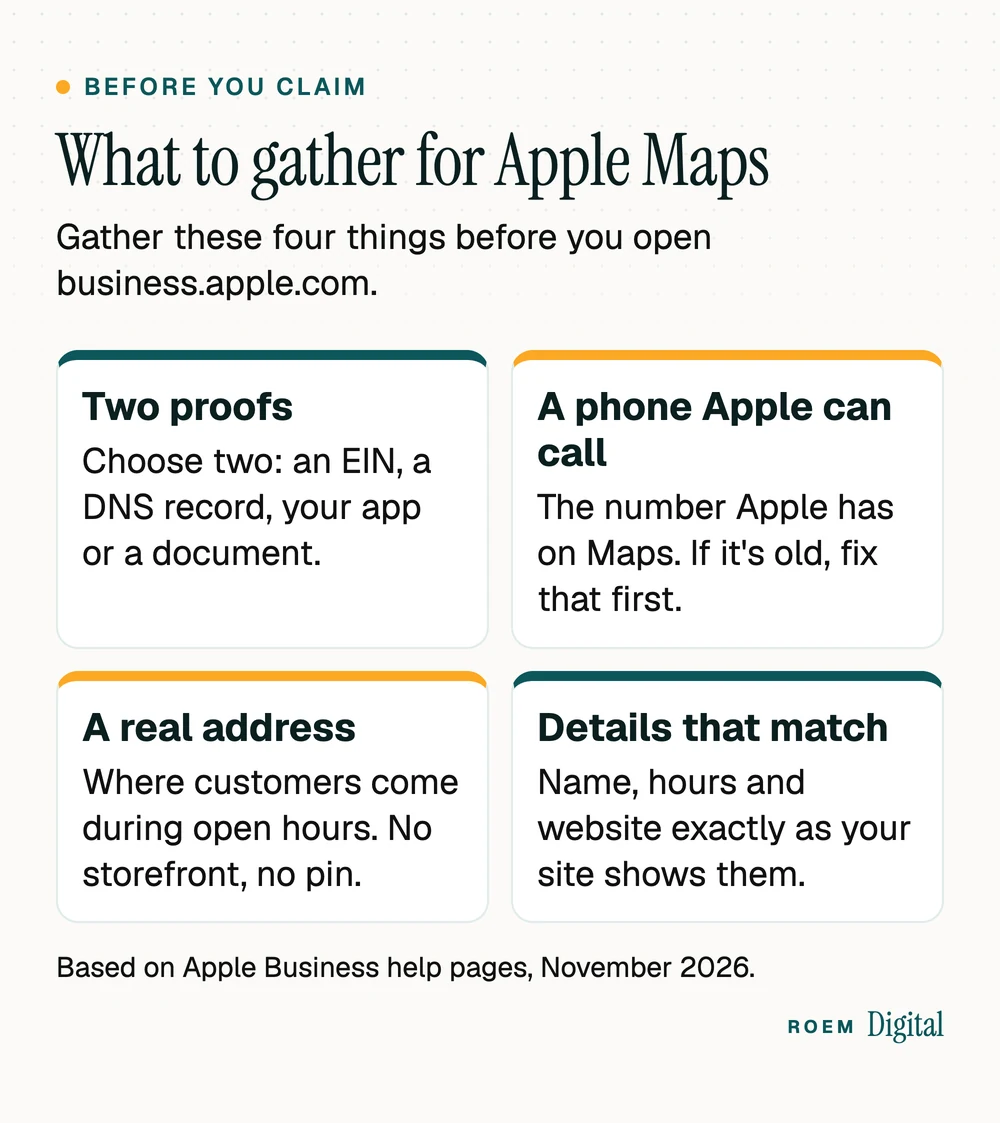
Apple's sign-up takes minutes. Verification is where owners get stuck, because it asks for proof most people don't keep at hand. This checklist is built from Apple's own help pages. Gather all four before you open business.apple.com:
- Two proofs of your business. Apple accepts a D-U-N-S Number or EIN, a TXT record on your domain's DNS, an App Store app, or an official document such as a business license or utility bill. You need two.
- A phone number Apple can reach. For a place already on Maps, Apple may call the number it has on record and read you a four-digit code. If that number is old, contact Apple Business support before you start.
- An address customers actually visit. Apple's address rule is strict, as the section on businesses without a storefront explains. No storefront usually means no Maps pin.
- Details that match your website. Apple asks for a display name that matches your signage or website, hours that match your site, and your own website (or your Facebook, Instagram or TikTok page) rather than a third-party directory.
The fourth item does more than speed up approval. When Apple, Google, Bing and the data companies behind them all see the same name, phone and hours, a wrong detail has fewer places to come back from. Our guide to data aggregators explains that supply chain.
How to add a business to Apple Maps, step by step
These steps follow Apple's guide to adding a single location, current as of November 25, 2026:
- Search Apple Maps for your business first. If a place already exists, you'll claim it instead of creating a duplicate.
- Sign up at business.apple.com. Enter your organization's name, website and address, then your own legal first and last name. Apple sends back names like "IT Coordinator" for correction. Leave the agency checkbox empty: it's for listing companies that manage other brands.
- Enter the email and phone codes, then agree to the terms.
- Add the location under Brands, then Locations. If another organization already manages it, add it anyway and request a transfer with a business license or utility bill. Apple says that review can take up to five business days.
- Place the pin on top of your building, not on the road, the sidewalk or the parking lot entrance.
- Fill in the basics: one primary category (plus up to 19 more), a phone number with the country code, your website, and hours.
- Verify, either your whole organization or, for an existing Maps place, by phone when Apple offers it.
Already on Apple Business Connect? Sign in with the Apple Account you used before. Apple's sign-up guide says you can keep a personal Apple Account, but then you get only the brand and location features. Creating an Apple Account for Work opens the full set.
Two small things trip people up. Apple's guide says phone extensions aren't supported, so list a direct number. And Apple asks you to let mail from apple.com through your filters, or verification messages can disappear. If an agency helps you, keep the organization in your name and share access afterward. Our guide to who owns your marketing accounts explains why that matters.
Apple Business verification: two proofs within 60 days
This is the step to plan for. Apple's verification guide gives every new organization 60 days to verify, requires two verification methods, and says the review can take up to five business days, longer when volume is high. If your organization isn't approved in that window, Apple deletes the organization and its data. Start verification the day you sign up.
| Method | What Apple asks for | A good fit if |
|---|---|---|
| Business ID | A D-U-N-S Number or an Employer Identification Number (EIN) | You can find your EIN or D-U-N-S Number on file |
| Domain validation | A TXT record added to your domain's DNS | You or your web team can log in where the domain is managed |
| App Store Connect | The app your organization publishes | Your business has its own app in the App Store |
| Official document | A business license, sales tax permit, food, health or alcohol permit, lease or property agreement, or utility bill | Your business name and address appear on a current document |
For most small businesses the easiest pair is the EIN plus either the DNS record or a document. The DNS record needs a login wherever your domain is managed, so find it now if a former web designer set it up. Keep your business name consistent across those documents too. Google verifies differently and picks the method for you, as our Google Business Profile verification guide explains.
No storefront? Apple Maps has no hide-address option
This is where Apple differs most from Google. Apple's guide to location attributes says your address must be where customers can get goods or services during open hours, the address officially listed on your website, and the one customers use to find you. As of November 25, 2026, we found no setting in Apple's help pages to hide an address or draw a service area.
Google takes the opposite approach. Its service area help page tells businesses that don't serve customers at their address to remove it, and allows up to 20 service areas. Bing lets you hide the address once you add service areas, as our Bing Places for Business guide covers.
So for a plumber, painter or mobile groomer working from home:
- Don't put your home on Apple Maps just to get a pin. Apple's rule is about where customers come, and a home address on a public map is hard to take back.
- Use the brand features instead. Apple's introduction to Apple Business says it also serves a business without a physical location that provides a service, through features like Branded Mail and Tap to Pay on iPhone.
- Lean on your website and Google profile for local search. Our guide to local SEO for service-area businesses covers what works without a storefront.
- Pin a real office or shop if customers visit one, even by appointment. Apple says appointment-only locations list the hours when appointments can be made.
Apple Business vs Google Business Profile: you need both
Apple Business doesn't replace your Google Business Profile. They feed different apps, and an iPhone owner can meet either one depending on which app they open. Here's how they compare on the points that matter to a local business:
| Question | Apple Business | Google Business Profile |
|---|---|---|
| Cost | Free | Free |
| Where it shows | Apple Maps, Siri, Safari, Spotlight, Wallet and Mail | Google Search and Google Maps |
| How you verify | Your organization, with two methods, within 60 days | A method Google chooses, such as phone, video call or postcard |
| Review time | Up to five business days | Up to five business days |
| No storefront | No documented way to hide an address | Remove the address and list up to 20 service areas |
| Paid placement | Ads on Maps in the US and Canada, from a claimed location | Google Ads and Local Services Ads |
Google's verification help page says its methods are set automatically and can't be changed, which is why owners can't simply pick the easiest one there. If you can only do one listing this week, do Google first, using our Google Business Profile checklist. Then copy the same name, hours, categories and photos into Apple. Matching details beat clever wording on both.
Ads on Apple Maps, and the place card fields to check by hand
Apple added ads to Maps in 2026. Its guide to promoting your business on Apple Maps, published August 14, 2026, says ads on Maps run in the United States (excluding American Samoa and the Northern Mariana Islands) and Canada, for advertisers with business locations and an organization address there. You claim and verify your locations first, then set a monthly budget maximum. Apple says some organizations may get a one-time $150 sign-up credit, with eligibility limits. Choose your currency and time zone carefully: Apple says they can't be changed later.
Before you pay to send people to your place card, make sure the card is right. Apple's guide says place cards can show content from the Apple ecosystem and related partners, so not every detail on yours came from you. Check these by hand after you claim:
- Good to Know attributes: the payment methods you accept, contactless payment, parking and accessible parking.
- Holiday hours: temporary hours for closures such as Christmas Day, Friday, December 25, 2026, and New Year's Day, Friday, January 1, 2027.
- Categories: Apple says it recently expanded its category list, so recheck that your primary category is still the closest match.
- Buttons you didn't add: Yelp's product updates page says its Request a Quote button has appeared on Apple Maps business pages since December 2024. Our Yelp for Business guide explains what that means for service businesses.

After that, check location insights for searches, views and taps on your actions, and record them with the rest of your monthly numbers. Our guide to the marketing report numbers that matter shows which ones to keep and which to ignore.
How ROEM handles Apple Business for local clients
Listing cleanup, including Apple, Bing and the main directories alongside your Google profile, is part of our SEO and content service. You own every account we touch. We're a small senior team based in Davenport, Florida, working with businesses across Central Florida and nationwide, and we meet by video by default, or in person across Central Florida on request.
Frequently asked questions
Is Apple Business Connect still available?
No. Apple retired Apple Business Connect when Apple Business launched on April 14, 2026. Existing Business Connect data, including claimed locations, place card details and photos, moved over automatically. Sign in at business.apple.com with the same Apple Account to keep managing your Apple Maps listing, or create an Apple Account for Work for the full feature set.
Is Apple Business free?
Yes. Apple says Apple Business is a free service in the US and more than 200 other countries and regions. Claiming and editing your Apple Maps place card costs nothing. Paid extras include ads on Apple Maps, extra iCloud storage and AppleCare+ for Business, and you need none of them to manage a listing.
How long does Apple Business verification take?
Apple says organization verification can take up to five business days once you submit two verification methods, and longer when volume is high. You have 60 days from sign-up to get verified, or Apple deletes the organization and its data. Submit both proofs on the day you sign up to leave time for follow-up questions.
Can I hide my address on Apple Maps?
Apple's help pages, as of November 2026, describe no option to hide an address or set a service area. Apple asks for the address where customers get goods or services during open hours. If customers never visit you, skip the Maps location and use the Apple Business brand features, such as Branded Mail, instead.
Do I need Apple Business if I have a Google Business Profile?
Yes, if your customers use iPhones. Apple Maps, Siri and Spotlight show Apple's place card, not your Google profile. Claim both, then keep the name, phone, hours and categories identical on each. Matching details keep customers from calling an old number or arriving after you've closed for the day.
How do I add my business to Apple Maps?
Sign up at business.apple.com, then open Brands, then Locations, and add a single location. Search for your business first so you claim the existing place instead of creating a duplicate. Place the pin on your building, fill in category, phone, website and hours, then verify your organization with two proofs.
Can I advertise on Apple Maps?
Yes, in the United States and Canada. Apple's guide says ads on Maps are created inside Apple Business after you claim and verify your locations. You set a monthly budget maximum and can pause the campaign at any time. Apple says some new advertisers may qualify for a one-time $150 credit, subject to its terms.