
Short answer: A CRM for small business is one shared record of every lead and customer: where they came from, where they stand, the next step and its date, who owns it, and what the job was worth. Move off a spreadsheet when follow-ups depend on memory, and keep the account and the export in the business's name.
What a CRM for small business actually does
A CRM (customer relationship management system) is one shared record of every lead and customer, with each conversation, the next step and the outcome attached. In a small business its job is plain: no lead waits, and nobody has to ask around to find out what happened.
Most owners already have a CRM. It's just spread out: a spreadsheet, a stack of sticky notes, a text thread, the voicemail box and whatever the person who answered the phone remembers. A CRM for small business pulls those into one place, so the answer to "did anyone call her back?" takes seconds instead of a staff meeting.
Almost every product on the market is built from the same parts:
- Contact records: one card per person or company, with every call, email and note on it.
- A pipeline: the stages a lead moves through, from new inquiry to won or lost.
- Tasks and reminders: the next step, with a due date, assigned to someone.
- History: what was said and sent, so anyone can pick up where a colleague left off.
- Reports: how many leads came in, from where, and how many turned into paying work.
The software matters less than what you put in it. The rest of this guide covers what to track first, how leads get in without retyping, and the question most CRM guides skip: who owns the data when a vendor, an employee or an agency leaves. If your biggest problem is replying slowly rather than losing track, start with our guide to speed to lead, because a CRM only helps once someone answers.
CRM vs spreadsheet: when the sheet stops working
A spreadsheet is a fine CRM for one person with a short list who updates it every day. It starts failing when more than one person works the leads, or when leads arrive from more places than the sheet can see. The signs are practical, not a number of rows:
| What you notice | Why a spreadsheet struggles |
|---|---|
| Two people call the same lead, or nobody does | A sheet has no owner field anyone enforces and no alert when a lead sits untouched. |
| Follow-ups happen only when someone remembers | A row can't remind anyone. Due dates live in a column nobody sorts. |
| Calls never make it into the sheet | Phone leads depend on someone typing them in after the call, which is when they get lost. |
| You can't say which marketing brought in paying work | The source column is blank or says "Google" for everything. |
| Copies of the file disagree | Downloads, email attachments and old versions drift apart. |
| A departing employee took the list with them | Anyone with the file has every customer's details. |
The third row matters most for local service businesses, where the phone is often the biggest lead channel and the least recorded. Our guide to call tracking for small businesses explains how to count calls by source, so they can land in a CRM with the source already attached.
If only the first two rows sound familiar, you can tighten the spreadsheet first: add an owner column, a next-step date and a weekly review. If three or more fit, it's time to move the list into a CRM.
Five fields a small business CRM should track first
Most CRMs fail in a small business because they're set up with too many fields, not too few. Staff skip the forms, the data goes stale and the owner goes back to the notebook. Start with these five fields. They're our suggestion, not an industry standard, and they work in any CRM or even a spreadsheet.
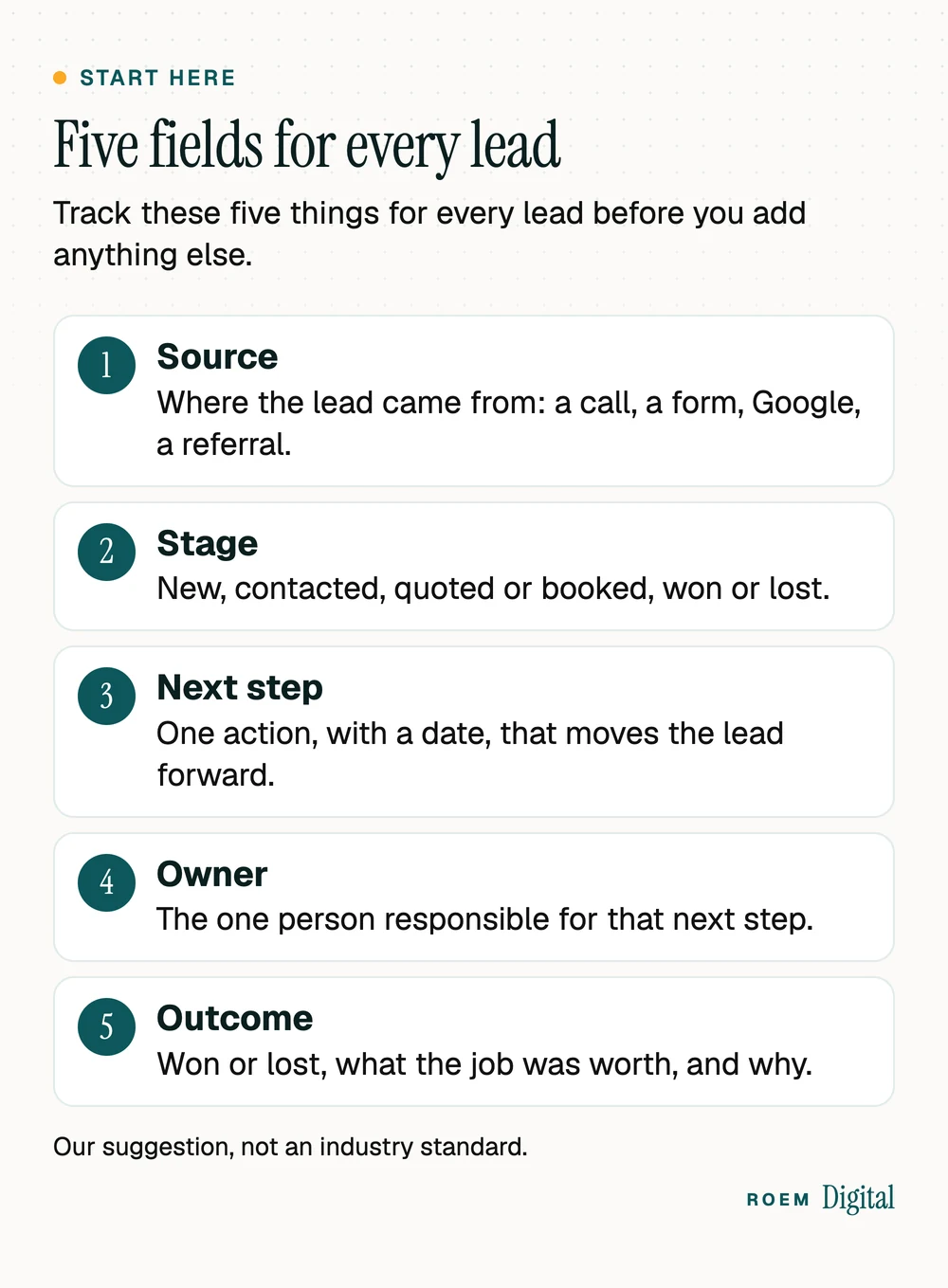
- Source: where the lead came from, captured when it arrives, not guessed later. Use a short fixed list (phone call, website form, Google Business Profile, referral, repeat customer, social media) so reports add up.
- Stage: a handful of stages that match how you actually sell. For most service businesses that's new, contacted, quoted or booked, won and lost.
- Next step and its date: one action, with a date, on every open lead. A lead with no next step is a lead you've stopped working without deciding to.
- Owner: one person per lead. Shared ownership means nobody follows up.
- Outcome and value: won or lost, what the job was worth, and a short reason for a loss (price, timing, chose someone else, never reached).
Everything else can wait: lead scoring, custom fields, automated drip emails, dashboards. Once the five fields are filled in reliably for a month, you'll know which extras are worth adding. The outcome field also feeds the numbers that matter most in a marketing report, which our guide to the marketing report numbers worth reading walks through.
Get every lead into the CRM without retyping it
A CRM for small business fills up reliably only when leads arrive in it on their own. Every lead that has to be retyped from an email, a voicemail or a sticky note is a lead that can go missing. Work through your channels in this order, starting with the busiest:
- Website forms: send each submission straight into the CRM as a new lead, with the page it came from and the source recorded.
- Phone calls: use call tracking numbers by source, and log missed calls as leads too. A missed call is still someone who wanted you.
- Online booking: if customers book themselves, each booking should create or update a contact. Our guide to online booking systems for small businesses covers what to check before you choose one.
- Google Business Profile calls: give the profile its own tracking so you can see what it brings in. Since July 31, 2024, Google says the profile no longer keeps a call history or chat of its own, so your tracking is the only record.
- Referrals, walk-ins and social messages: these usually need a quick manual entry, so make the form short enough to fill in on a phone.
Then make sure your analytics count the same leads the CRM does. Our walkthrough on tracking calls and form fills in GA4 shows how to set up the website side.
The payoff comes when the CRM's outcomes go back to your ad accounts. Google Ads, for example, can measure qualified and converted leads, which Google describes as leads further qualified or closed offline, in your CRM system. That lets an ad account learn which clicks became paying customers, not just which ones filled in a form. Our guide to Google Ads conversion tracking covers the ad side in detail.
Who owns the data in your small business CRM
This is the next problem almost every owner hits, usually at a bad moment: an office manager leaves, a vendor raises prices, or an agency relationship ends and the customer list goes with it. Your customer records are one of the most valuable things the business owns. Treat the CRM account the way you treat the bank account.
- The account is in the business's name, billed to the business, with an owner or partner as the top administrator. Staff, contractors and agencies get their own logins, never the owner's.
- You can export everything (contacts, history, notes and stages) in a common format, and you've actually tried it once.
- Each person has their own login. The SBA's guidance on strengthening your cybersecurity says to make sure each employee has a separate user account with a strong password, and to perform access audits regularly so former employees are removed from your systems.
- Multi-factor authentication is on. The same SBA page suggests checking with your vendors to see if they offer it for your accounts.
- People see only what their job needs. A technician may need a customer's address and job notes, not the full customer list.
The FTC's guide Protecting Personal Information: A Guide for Business is built on five principles that map neatly onto a CRM: take stock of what personal information you have, scale down to keep only what you need, lock it, pitch what you no longer need, and plan ahead for security incidents. It also advises putting your security expectations in writing in contracts with service providers. In practice that means no full card numbers or Social Security numbers in CRM notes, a rule for deleting old records, and a contract that says the data is yours.
Medical, legal and financial practices carry extra rules for client records, so bring your compliance officer or attorney in before you choose a system. Our guide to who owns your website and marketing accounts applies the same ownership checks to your domain, ads and analytics.
Off-the-shelf CRM or something built around how you work
When you choose a CRM for small business use, a standard off-the-shelf product is the right start for most owners. Contacts, pipelines and reminders work the same way in a plumbing company and a law office, and a mature product handles them well. We don't resell any CRM, so we won't tell you which brand to buy. Choose on the five fields, the lead plumbing and the ownership questions above, then try it with real leads for a few weeks before you commit.
Custom software starts to make sense when the CRM isn't really the whole problem. If your customers book, approve quotes, sign forms and check on their job, and your team copies the same details between four tools to make that happen, the fix may be one system built around your process. Our guide to custom software vs off-the-shelf tools lays out how to tell, and our custom software and platforms service explains what we build.

Whichever way you go, set a fifteen-minute weekly review of every open lead with no next step. That one habit does more for a small business CRM than any feature on a pricing page.
How we set up lead tracking before the first ad runs
We're a small senior team based in Davenport, Florida, working with businesses across Central Florida and nationwide. On every account, calls, forms and bookings are tracked before ad spend starts, so each lead arrives with its source attached. You own your domain, website, ad accounts and analytics, and we'd say the same about your customer records.
Where an off-the-shelf CRM fits, the calls, forms and bookings we track can arrive with their source already attached. Where it doesn't, we build software around how your business runs, including ROEMer, our online booking platform, and ROEMedu, our school SIS and LMS. Start with our custom software service page or the free audit below.
Frequently asked questions
What is a CRM for small business?
A CRM is one shared record of every lead and customer: their contact details, each conversation, the next step and the outcome. For a small business, its main job is making sure no lead waits and nobody has to ask around to find out what happened with a customer or a quote.
Do I need a CRM or is a spreadsheet enough?
A spreadsheet works for one person with a short list who updates it daily. Move to a CRM when two or more people work the same leads, follow-ups depend on memory, calls never get logged, or you can't say which marketing brought in paying work. Those are signs the sheet is costing you leads.
What should a small business track in a CRM first?
Start with five fields for every lead: where it came from, its stage, the next step with a date, the one person who owns it, and the outcome with the job's value. Fill those in reliably for a month before adding scoring, custom fields or automated emails, so the extras rest on clean data.
Who owns the data in a CRM?
Your business should. Put the account in the business's name with an owner as the top administrator, give every employee and contractor a separate login, turn on multi-factor authentication, and test a full export of contacts, history and notes before you rely on the system. Read the vendor contract for what happens to data when you leave.
Can a CRM track phone calls from my ads?
Yes, if you set it up. Call tracking numbers by source can create a lead in the CRM for each call, including missed calls. When the CRM later marks a lead as won, some ad platforms, including Google Ads, can import that outcome so the ad account learns which clicks became customers.
Should a small business build its own CRM?
Usually not at first. Standard CRMs handle contacts, pipelines and reminders well. Custom software makes sense when your process spans booking, quotes, approvals and customer updates that no single product covers, and your team is copying the same details between tools. Even then, own the code, the data and the accounts.