Short answer: An online booking system for small business lets customers pick an open time, join a class or request a quote without calling. Choose one that fits how you sell, lets you export your customer records, links from your website and Google Business Profile, and shows each completed booking in your analytics.
What an online booking system does for a small business
An online booking system for small business is software that shows customers your real availability and lets them book, join or request a time on their own, day or night. Your team sees every booking on one calendar instead of chasing calls, texts and sticky notes.
The payoff is simple: fewer missed calls turning into missed jobs, fewer double bookings, and customers who can book at the moment they decide. The catch is that booking tools are built around different kinds of businesses. A system made for hair appointments can feel wrong for a yoga studio, and painfully wrong for a contractor who needs photos before quoting.
So the first decision isn't which brand. It's which shape of booking your customers need. That's where most comparison lists skip ahead, and it's the part this guide spends the most time on, along with adding booking to your website and Google profile and tracking it once it's live. If you're weighing booking as part of a bigger build, our page on custom software and booking platforms shows how we approach it.
Match online scheduling to how you sell: the four booking shapes
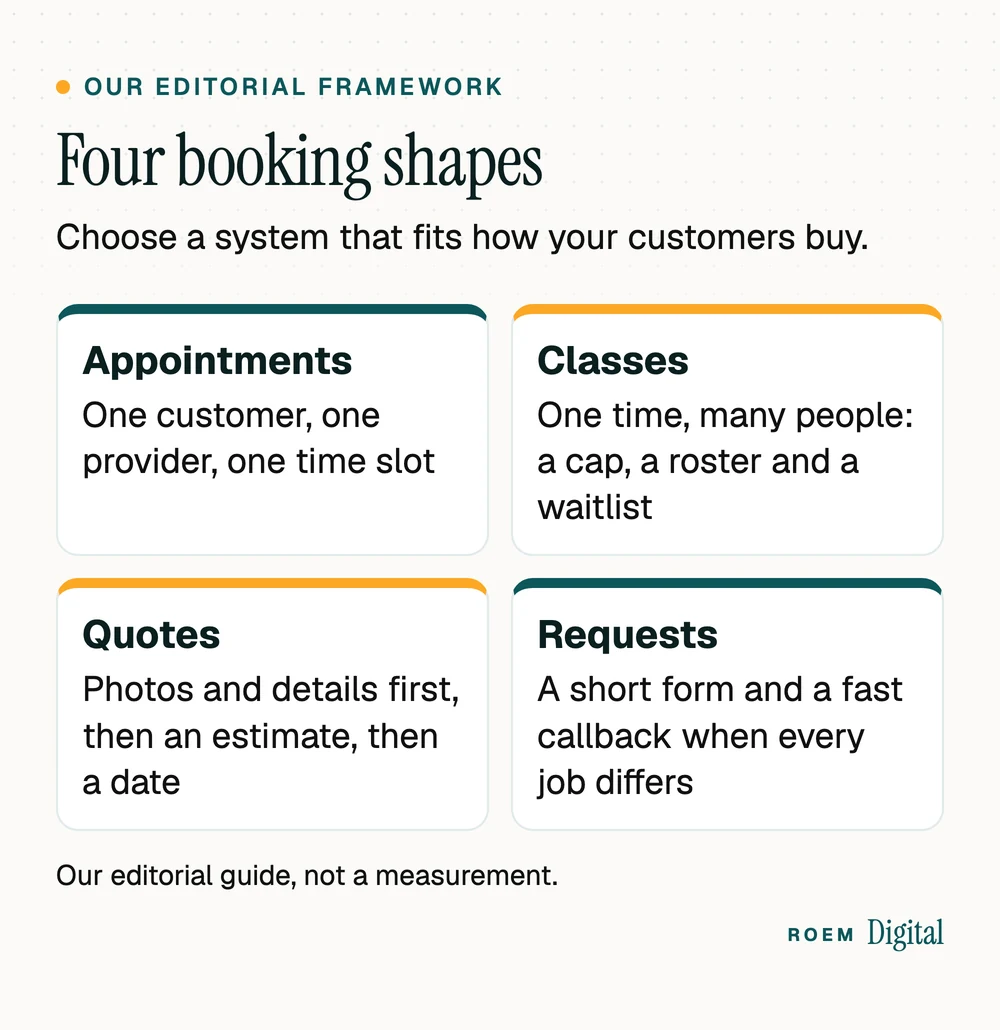
We sort businesses into four booking shapes. It's our editorial framework, not an industry standard, but it saves owners from buying a tool built for someone else's day.
| Booking shape | Typical businesses | What the system must handle |
|---|---|---|
| Appointments | Salons, barbers, spas, consults, in-shop repairs | Services with set lengths, each provider's hours, and a calendar that never gives one time slot to two customers |
| Classes | Fitness studios, workshops, group lessons | A cap per class, a roster for check-in and a waitlist that fills a spot when someone cancels |
| Quotes | Painters, contractors, auto and device repair | Photos and details from the customer, an estimate they can approve, then a scheduled job |
| Requests | Custom or high-value work where every job differs | A short form and a fast callback, not a calendar |
Mixed businesses are common: a med spa books appointments and runs the occasional class, and a painting or handyman business takes quote requests but books small jobs straight onto the calendar. List the shapes you need before you look at a single tool. If your shape is requests, speed matters more than software, and our post on speed to lead covers the follow-up.
Set your booking rules before customers see the calendar
Most headaches with a new online booking system for small business come from rules nobody set. Decide these before you publish a single open time:
- Buffer time. Add minutes between appointments for cleanup, travel or notes, so the calendar matches real life rather than a perfect day.
- Booking window. Choose how far ahead customers can book and how close to the present moment. Same-day booking suits some businesses and swamps others.
- Which services go online. Put simple, predictable services online first. Keep complex or high-value work as a request until you know how long it really takes.
- Cancellations and no-shows. Write a plain cancellation policy, show it before the customer confirms, and apply it the same way every time. If you plan to charge fees or take deposits, have an attorney review your terms first.
- Who can change the calendar. Give each staff member their own login with only the access their role needs, so you always know who moved what.
- The phone still rings. Some customers will always call. Keep answering, and count those calls too, as our guide to call tracking for small businesses explains.
Write the rules down where your whole team can see them. A booking system enforces whatever you set, including the mistakes, so a confusing rule becomes a confusing calendar.

How to add booking to a website and your Google profile
A booking system only works if customers can find the button. Put it where they already are:
- Add a Book button to your website header so it shows on every page, and repeat it on each service page next to the service it books. Our list of must-haves for a service business website covers what else belongs near that button.
- Choose embed or link. An embedded booking widget keeps customers on your site. A link to the vendor's booking page is simpler to set up. Either works if it's fast on a phone.
- Add the link to your Google Business Profile. Google's help page on local business links says you can add up to 10 links per category for actions like booking an appointment, and set one as Business preferred when you have more than one.
- Check for links you didn't add. The same Google page notes that booking links can appear on your profile automatically through third-party partners, and that removing one means contacting that provider.
- Test the whole path on a phone: search your business, tap Book, pick a time, finish, and confirm the booking lands on your calendar.
Make the booking form usable for everyone. The Justice Department's guidance on web accessibility lists inaccessible online forms among its examples of website accessibility barriers, including fields without labels that screen readers can announce, missing instructions and missing error messages. This is general information, not legal advice. For the rest of your profile, our Google Business Profile checklist walks through each field.
Track every online booking like a lead
Whichever online booking system for small business you choose, a booking is the most valuable thing your website does, so count it. Google Analytics describes a key event as an event that measures an action that's particularly important to the success of your business. A completed booking is exactly that.
- Ask where the booking finishes. If customers complete it on the vendor's page rather than yours, ask the vendor how you'll see completed bookings in your own analytics.
- Separate started from finished. A tap on Book isn't a booking. Count the confirmation, or you'll overstate what your ads and pages produce.
- Tag the Google profile link so bookings from your profile show up as their own source.
- Watch the drop-off. Many starts and few finishes usually means too many steps, a slow page or a form that's hard to use on a phone.
If you run a health or wellness practice, ask your compliance lead or attorney before any analytics or ad tag runs on your booking pages, because booking details can count as health information.
Our walkthrough on tracking calls and form fills in GA4 shows the setup. On our own projects, calls, forms and bookings are tracked before any ad money is spent, so the first report already shows what each source brought in.
After the first month, compare three numbers: bookings started, bookings finished and bookings that actually showed up. The gap between the first two points to the booking page itself. The gap between the last two points to reminders, policies and how far ahead people are booking.
Seven questions to ask before you choose appointment booking software
Feature lists for appointment booking software all look alike. These questions separate the tools that fit from the ones you'll be stuck with:
| Ask | Why it matters |
|---|---|
| Can I export my customer list and booking history at any time? | Your customer records are a business asset. If you can't take them with you, you can't switch tools later. |
| Who can see my customers? | Other businesses on the same platform shouldn't see your customers, and your staff should see only what their role needs. |
| Which features are ready today, and which are planned? | Buy what works now. A good vendor tells you plainly what's still coming. |
| Does it handle my booking shape? | Appointments, classes, quotes and requests need different tools. Check yours is built in, not bolted on. |
| How do bookings show up in my analytics? | Without it, you can't tell which ads or pages bring in customers. |
| Does it work in the languages my customers use? | If customers book in Spanish, every screen and message should be in Spanish too. |
| Who holds the money for deposits or payments? | Know where funds go, when they arrive and what fees apply before you turn payments on. |
Ownership deserves the most weight. Our guide to who owns your marketing accounts explains why every account should sit in your business's name. If you run a health or wellness practice, also ask your compliance lead or attorney what your booking form may collect before it goes live. Reminders matter too: our post on appointment reminder texts covers templates and the rules for sending them.
Where ROEMer, our own booking platform, fits
We build software as well as websites. ROEMer is our online booking platform for local businesses that run on appointments, classes or quotes. On bookroemer.com, as of November 15, 2026, these are marked ready now:
- A booking page at your own link with your services, prices and team, showing only times that are really open.
- A team calendar by person or by room that never lets two people take the same time.
- Classes with a cap, a roster for check-in and a waitlist that moves the next person in when someone cancels.
- Quote requests with photos, and estimates customers approve and sign from their phone.
- Every screen in English and Spanish, with each person's choice remembered.
The same site marks other features, such as email and text reminders and online payments, as coming soon, and we'd rather you know that up front. When a business needs something no booking product does, such as a portal built around its own process, that's the custom software we build for clients. If your customers book in two languages, our post on building a bilingual website covers the website side.
Frequently asked questions
What is the best online booking system for a small business?
The best one fits how your customers buy. Appointment businesses need provider calendars, studios need class caps and waitlists, and trades need quote requests with photos. After that, check that you can export your customer records, that bookings show in your analytics, and which features are ready today versus planned.
How do I add online booking to my website?
Add a Book button to your site header and to each service page, then either embed the booking widget or link to the booking page. Test the full path on a phone, from tapping Book to seeing the booking on your calendar, and track each completed booking as a key event in Google Analytics.
Can I add a booking link to my Google Business Profile?
Yes. Google lets you add links for actions such as booking an appointment, up to 10 per category, and set one as Business preferred. Booking links from third-party partners can also appear on their own, and Google says removing those means contacting the provider that added them.
Do I need a website to use online booking?
Not strictly. Many booking tools give you a booking page at its own link that you can share on social media and your Google profile. A website still helps, because it answers questions before customers book and lets you track which pages and ads bring them in.
Is online scheduling worth it for a very small business?
Usually, if customers book a time with you at all. Online scheduling takes calls off your plate, books customers when they decide instead of when you can answer, and stops double bookings. If every job needs a conversation first, a short request form with a fast callback may serve you better.
What should I look for in appointment booking software?
Look for your booking shape built in, provider or room calendars that prevent double booking, customer records you can export, clear role permissions for staff, analytics you can trust, the languages your customers use, and honest labels on which features are ready now and which are still coming.