
Short answer: A 301 redirect is a permanent redirect: it tells browsers and Google that a page has moved for good and sends visitors to the new address. Use it when a URL changes for good, point each old page straight to its closest replacement in one hop, and keep the redirects for at least a year.
What is a 301 redirect?
A 301 redirect is a server response that tells browsers and search engines a page has moved permanently to a new address, and sends visitors there automatically. The number is the HTTP status code, and its name is Moved Permanently.
The HTTP standard, RFC 9110, defines a 301 as meaning the page has been assigned a new permanent address and future references to it ought to use the new one. Google reads it the same way. Its guide to redirects and Google Search says a permanent redirect shows the new target in search results, and recommends a permanent server-side redirect whenever possible when you change a URL.
Google lists the situations where redirects help most:
- You moved to a new domain and want people and links to follow.
- One page answers at several addresses, such as with and without www, so you pick one and redirect the others to it.
- You merged two websites and want old links to land on the right pages.
- You removed a page and want to send visitors to a new one.
A rebuild usually hits all four. When we rebuild a site, every old URL gets a permanent redirect to its new home, because those addresses are what Google, your customers and your printed materials already know. That work is part of our website and branding service.
301 vs 302 redirect, plus the 307 and 308 codes
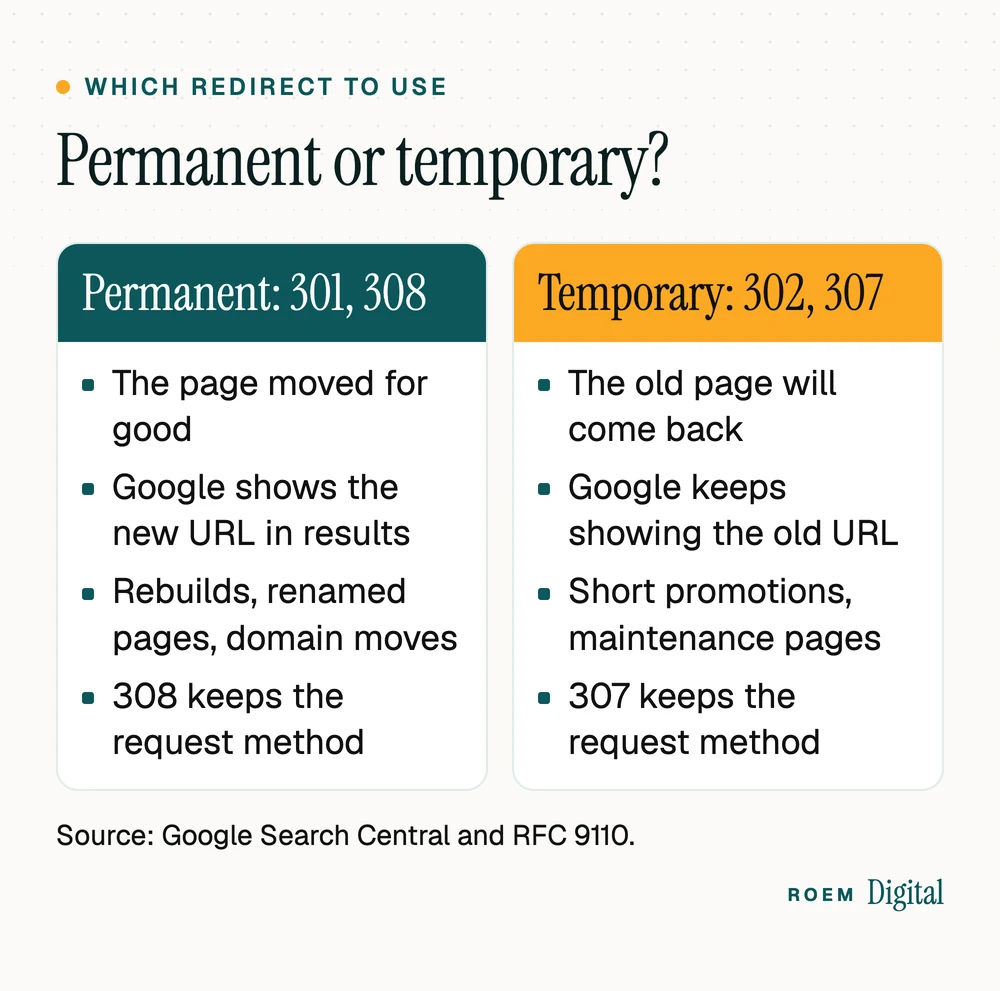
Visitors can't tell redirects apart. Google can, and the choice depends on how long the move lasts. Google's guide puts it simply: permanent redirects show the new target in search results, temporary redirects show the original page.
| Code | What it means | Use it when |
|---|---|---|
| 301 Moved Permanently | Permanent. Under the HTTP standard, a browser may switch a form submission from POST to GET when it follows one. | A page or whole site has moved for good. |
| 308 Permanent Redirect | Permanent, and the request method must stay the same. | The same as a 301, when a form or app posts to the old address. |
| 302 Found | Temporary. The original address should keep being used. | A page is briefly unavailable or a short promotion sends people elsewhere. |
| 307 Temporary Redirect | Temporary, with the request method kept the same. | The same as a 302, for forms and apps. |
Google's documentation on HTTP status codes and crawling says Google treats a 301 as a strong signal that the redirect target should be processed and a 302 as a weak one. It treats 308 like 301 and 307 like 302, but adds that the codes are semantically different, so use the one that's right for other browsers and search engines too.
Two fallbacks exist when you can't set a server redirect. Google reads an instant meta refresh as a permanent redirect and a delayed one as temporary. A JavaScript redirect is the last resort: Google says to use it only if you can't do server-side or meta refresh redirects, because if rendering fails, Google might never see it. A custom-built site can set proper server redirects for any URL, which is one of the quieter reasons to own your platform.
How to avoid redirect chains
A redirect chain is a redirect that leads to another redirect before reaching the page. Google's site move guide says Googlebot can follow up to 10 hops, but advises redirecting to the final destination directly. If that isn't possible, it suggests keeping chains low, ideally no more than 3 and fewer than 5, because chains add delay for users and not all browsers support long ones.
Chains rarely happen on purpose. They pile up, one rebuild at a time. An old address like example.com/services.html first gets forced to https, then to the www version, then to a new folder, then to a renamed page. Each step made sense when someone added it. Together they're four hops.
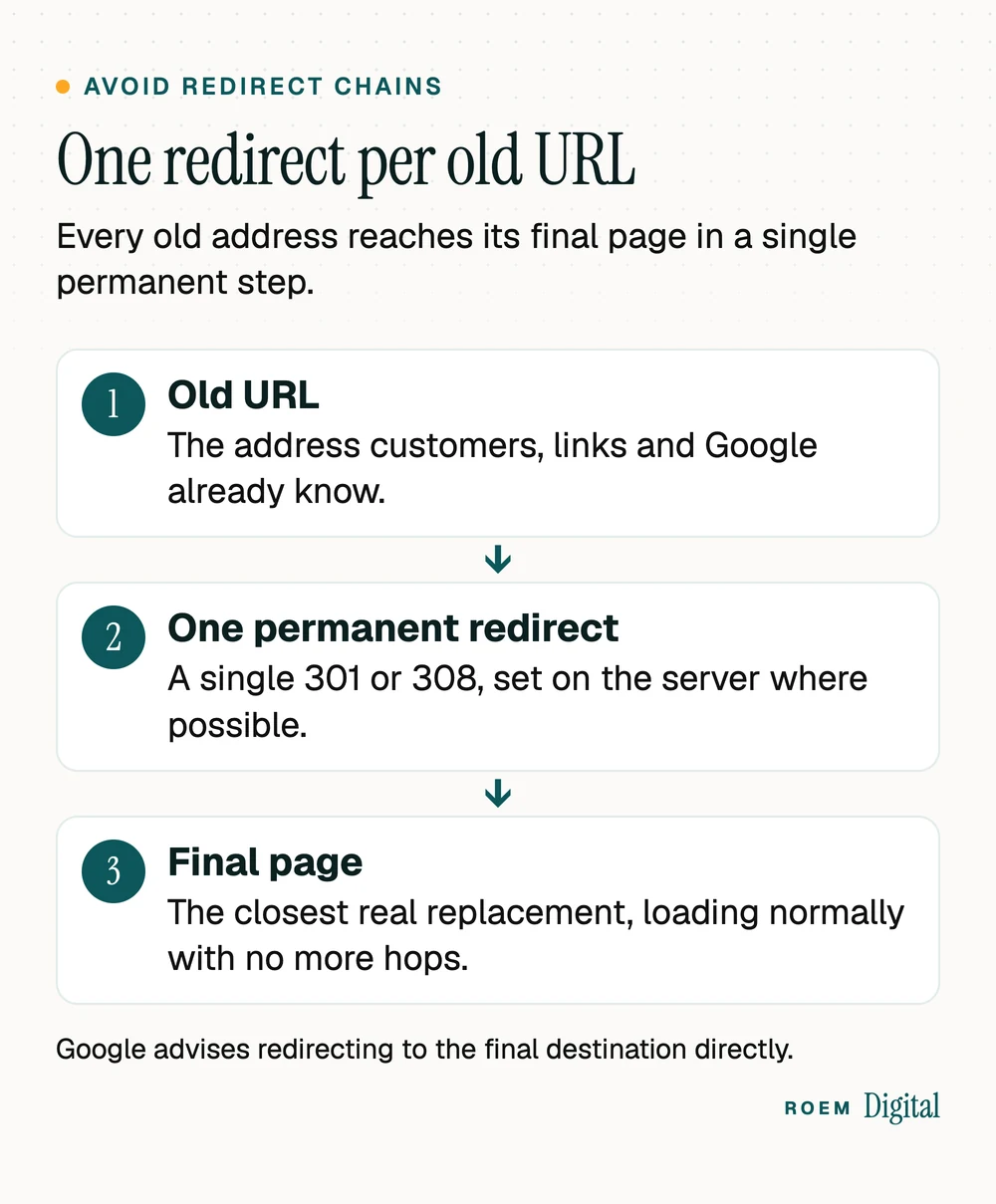
The fix follows Google's advice: every old URL reaches its final live page in a single permanent redirect. To get there, keep a redirect map with four columns:
- Old URL. Every address the site has ever used that still gets visits or links. Our guide to moving off Wix or Squarespace shows how to build the full list from your sitemap, Search Console and analytics.
- Final URL. The closest real replacement, not the next stop in a chain.
- Status code. 301 or 308 for anything that has moved for good.
- Hops. Test the old URL and count. Anything above one gets flattened so the original points straight at the final page.
Then fix your own links. Google's site move guide notes that redirects are slow for users and suggests updating your own links, and high-volume links from other sites, to point to the new URLs.
How to redirect an old website to a new website
A full move has more steps than redirects, and our website redesign checklist covers them from planning to the first 30 days. For the redirects themselves, Google's site move guide comes down to five rules:
- Don't send everything to the homepage. Google says redirecting many old URLs to one irrelevant page, such as the new homepage, can confuse users and might be treated as a soft 404. Merging several pages into one new page is fine.
- Let dead pages end honestly. If old content has no replacement, Google says those URLs should return a 404 or 410.
- Use Change of Address only for a new domain or subdomain. Google says you need Search Console's tool when moving from one domain or subdomain to another, not for http to https, www changes or new paths on the same domain.
- Keep redirects for at least a year. Google says to keep them as long as possible, generally at least one year, and from a visitor's point of view, consider keeping them indefinitely.
- Expect some movement. Google says a small to medium-sized site can take a few weeks for most pages to move, and visibility may fluctuate during the move.
Redirects carry an old page's address forward, but the new page still has to earn its place. Keep the content, headings and title of any page that ranks today. Our guide to writing a meta description covers the snippet that goes with it.
Where to set up a 301 redirect on your platform
Server-side redirects are the ones Google is most likely to interpret correctly. Where you create them depends on where the site lives:
- Hosted platforms such as Shopify, Wix and Squarespace. Google notes that platforms like Shopify may already have built-in redirect tools, and suggests searching your platform's help for redirects.
- WordPress and other self-hosted sites. A redirect plugin, or rules in the server's configuration, such as the .htaccess file on Apache, which Google's guide shows examples for.
- Custom-built sites. Redirect rules in the hosting or server configuration, managed with the rest of the code.
- The domain itself. Pick one version of your address, with or without www and always https, and redirect the others to it.
One trap catches people changing platforms. Redirects set up inside a hosted builder live on that builder's servers. Once your domain points to the new site, they stop working, so every redirect has to be rebuilt on the new platform before launch. Our website launch checklist lists the checks for launch day.
How to test a 301 redirect, and why your browser can fool you
Browsers remember redirects. The HTTP standard says a 301 response is heuristically cacheable, so your own browser may keep sending you to an old destination after you've fixed it. Test the way a stranger would see it:
- Open the old URL in a private window or a browser you don't normally use, and confirm it lands on the right page.
- Check the status code and the hops in your browser's developer tools (the Network tab) or a redirect checker. You want one 301 or 308, then the final page loading normally.
- Use URL Inspection in Search Console on the old URL and on the new one. Once Google has recrawled them, the old URL should show as Page with redirect and the new one as indexed or ready to index.
- Read the Page indexing report. Google's Page indexing help says old URLs that redirect show as Page with redirect and won't be indexed, which is expected. Redirect error means a chain that's too long, a loop or a bad URL in the chain.
Repeat the checks a few weeks after a move. A growing list of Not found (404) pages usually means a missing redirect. Our Search Console guide shows where these reports live, and our post on how long SEO takes explains what to watch while Google catches up.
Redirects in a rebuild: what you should expect from your web team
If someone else is building your new site, ask to see the redirect map before launch, not after. It should list every old URL, its final destination and the status code. Ask how they'll test it, and who checks Search Console in the weeks after launch. A good answer is specific. A vague one is a reason to slow down.
You should also own the domain and the website, so redirects never depend on a vendor you've stopped working with. That's how we work: clients own their domain, website and accounts, and we hand-build sites rather than adapting templates. If your current setup leaves you unsure who controls what, our guide to who owns your marketing accounts shows how to check.
Frequently asked questions
What is a 301 redirect in simple terms?
A 301 redirect is a permanent forwarding address for a web page. When someone, or Google, asks for the old URL, the server answers that the page has moved for good and sends them to the new one. Google then shows the new address in results, though old URLs can still appear for a while.
What is the difference between a 301 and a 302 redirect?
A 301 says a page has moved for good, so Google shows the new URL in search results. A 302 says the move is temporary, so Google keeps showing the original URL. Use a 301 for rebuilds, renamed pages and domain changes, and a 302 only when the old page will come back.
Do 301 redirects hurt SEO?
A correct 301 is how you protect SEO when a URL changes. The problems come from mistakes: chains of several redirects, sending every old page to the homepage, redirecting to pages that don't match, or removing redirects too soon. Google advises keeping them for at least a year and redirecting straight to the final page.
How long should I keep 301 redirects?
Google's site move guide says to keep redirects as long as possible, generally at least one year, so Google can transfer signals and recrawl links that point to old URLs. From a visitor's point of view it suggests considering keeping them indefinitely, which matters for printed QR codes, old emails and bookmarks.
Should I redirect deleted pages to my homepage?
Usually not. Google says sending many old URLs to one irrelevant page, such as the homepage, can confuse visitors and might be treated as a soft 404. Redirect a deleted page to its closest real replacement. If nothing replaces it, let it return a 404 or 410 instead.
How do I redirect an old domain to a new domain?
Map every old URL to its matching page on the new domain and set permanent server-side redirects, one hop each. Then use the Change of Address tool in Search Console for the old domain, submit the new sitemap, update your own links and keep the redirects in place for at least a year.