
Short answer: A Google core update is a broad change to how Google ranks results, announced several times a year. In 2026 core updates began on March 27, May 21 and November 10, the last still rolling out on November 16. If your traffic moves, change nothing that ranks, rule out other causes, then compare the right weeks.
What a Google core update is
A Google core update is a broad change to the systems Google uses to rank search results. Google announces several a year. It doesn't target particular sites, so some pages rise and others fall as Google reassesses what deserves to rank.
Google's own core update guidance says "Several times a year, Google makes significant, broad changes to our search algorithms and systems," and that these changes "don't target specific sites or individual web pages." It also offers some reassurance: "most sites don't need to worry about core updates and may not even realize one has happened." A page that slips isn't necessarily doing anything wrong. In Google's analogy, restaurants that move down a top-20 list "aren't necessarily 'bad'; there are just other restaurants that make your top 20."
A spam update is different. Google's spam update page describes those as improvements to its spam-detection systems, and tells sites that see a change afterward to review its spam policies. If your traffic moved, the dates tell you which kind of update you're dealing with, and that changes the fix. Reading those dates and the data behind them is part of the monitoring in our SEO and content service.
The 2026 Google core updates: March, May and November
Google lists the ranking updates it considers relevant to website owners on its Search Status Dashboard. These are the three core updates to Google Search in 2026 so far, with the dates Google posted (US Pacific time):
| Update | Started | Finished |
|---|---|---|
| March 2026 core update | March 27, 2026 | April 8, 2026 (12 days, 4 hours) |
| May 2026 core update | May 21, 2026 | June 2, 2026 (11 days, 21 hours) |
| November 2026 core update | November 10, 2026, 10:06 a.m. PST | Still rolling out on November 16, 2026 |
Google's posts about these updates are short. For March and May, the dashboard says Google released the update and that "The rollout may take up to 2 weeks to complete." For November, it adds that the update "applies globally and to all languages." None of the three posts says what changed, and they point back to the same general guidance. Be wary of anyone who claims to know exactly what a 2026 update targeted.
The dashboard shows other 2026 ranking updates that are easy to confuse with a core update: a March 2026 spam update that ran March 24 to 25, just before the March core update, plus spam updates in June, August and September. A February 2026 Discover core update applied to Discover for English-language users in the US, not to regular search results. If your drop doesn't line up with any of these dates, it probably isn't an update at all, and our SEO audit checklist is the better place to start.
After a Google core update: hold, check, compare, decide
Most advice about a core update jumps straight to recovery. For a local business, the first two weeks are mostly about not making things worse. We use a four-step sequence we call hold, check, compare, decide (our editorial framework, built on the steps in Google's own guidance). It keeps you from rewriting pages that were fine, and from blaming Google for a problem on your own site.
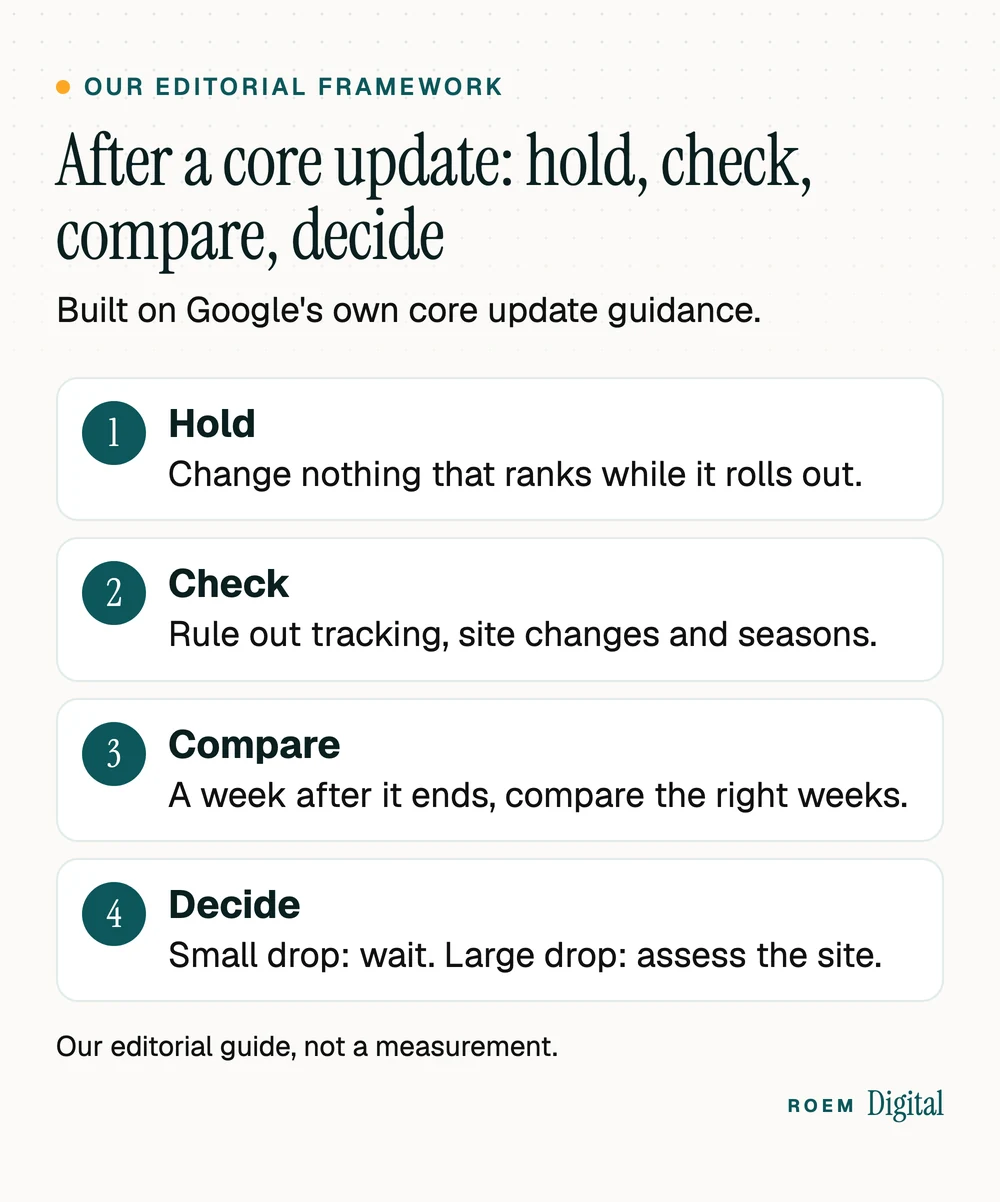
Judge the outcome by leads, not by a single ranking. A page can slip two places and still bring in the same calls. Our guide to the five numbers every marketing report should show explains which ones to watch.
While it rolls out: hold steady and rule out other causes
- Write down the start date from the dashboard. Google's dashboard help page says that when a ranking update is noted, "Often, there's no action needed," and you can subscribe to its RSS feed to hear about the next one.
- Leave pages that rank well alone. Google's core update guidance warns against "quick fix" changes, like removing a page element because you heard it was bad for SEO.
- Rule out the causes that have nothing to do with Google, using the table below.
- Keep notes: what you saw, on which dates, and anything you changed on the site.
| What you see | More likely cause | Check first |
|---|---|---|
| The drop started the day you launched a redesign or moved platforms | Missing redirects, a leftover noindex tag or lost tracking | Search Console's Page indexing report and URL Inspection |
| Search clicks are steady, but calls and forms fell | A broken form, phone link or tracking tag | Submit a test form and tap every call button on a phone |
| The same dip shows up in the same weeks last year | Seasonal demand | Compare year over year, not just week over week |
| Map listing calls fell, website traffic didn't | A Business Profile problem | Your profile's status, hours and categories |
| Clicks fell across many unrelated pages during the rollout dates | The core update | Wait, then compare the right weeks (next section) |
A sudden problem with your Google listing is its own emergency, with its own fix: our guide to a suspended Google Business Profile covers that one.
Just as important is what not to do while you wait. Don't change URLs, don't delete pages in bulk and don't buy links to fight back. Google's spam update page warns that when its systems remove the effect of spammy links, "any ranking benefit the links may have previously generated for your site is lost." If the dip is costing you calls in a busy season, a short search ad campaign can cover the gap while you wait, because paid results don't depend on organic rankings. Our paid media and lead generation service sets up call and form tracking before any ad spend starts.
After it finishes: compare the right weeks, then decide
Google's guidance is specific about timing. First, "Confirm that the core update has finished rolling out" on the dashboard. Then: "We recommend waiting at least a full week after a core update completes before analyzing your site in Search Console. After a week, try comparing this week with a week before the core update started rolling out."
- Review your top pages and queries in the Search Console Performance report, before and after.
- A small drop needs no drastic action. Google's example is a page going from position 2 to 4, and it recommends "avoiding making changes to content that's already performing well."
- A large drop calls for a deeper look. Google's example is position 4 to 29.
- Check search types separately: web search, Google Images, video and news can move differently.
How to set up the comparison in Search Console
- Open the Performance report and click the date filter, then choose Compare.
- Set the two ranges: the latest full week, once at least seven days have passed since the rollout finished, against the week before it began.
- Sort the Pages tab by the difference in clicks. Google's comparison help explains that "the results table will display a Difference column to compare values in each row."
- Repeat on the Queries tab, then switch the search type filter to check images, video and news.
- Write down the pages that lost the most. Those are the pages to assess, and the ones to leave alone if they barely moved.

For the November 2026 core update, the calendar adds a wrinkle. Google said the rollout may take up to 2 weeks from November 10, and the week you'd measure after it falls around Thanksgiving and Small Business Saturday on November 28. Holiday weeks distort traffic for many local businesses, so compare against the same holiday week last year too. And don't let the rollout pull your attention from holiday promotions: our Small Business Saturday ideas will do more for your December than rewriting pages mid-rollout.
Core update recovery: what helps after a large drop
If the drop is large and sustained, Google points you to a self-assessment of whether your site, as a whole, offers "content that's helpful, reliable, and people first." Its helpful content questions ask, for example, whether a page provides "original information, reporting, research, or analysis." Look hardest at the pages that lost the most.
For a local service business, start with the pages written for search engines rather than customers. City pages that only swap the town name are one example, and our guide to local SEO for service-area businesses explains what a useful city page includes instead. Blog posts produced in bulk with little first-hand detail are another, which our post on AI slop and Google's rules for AI content covers.
- Improve in meaningful ways. Google suggests rewriting or restructuring content so it's easier to read and navigate.
- Delete only as a last resort. Google calls deleting content "a last resort," to consider only if it "can't be salvaged."
- Expect a slow return. Google says some changes take effect in a few days, but it "could take several months" for its systems to confirm a site has improved, and that sometimes means waiting for the next core update.
- Watch for quieter gains. Google also makes smaller core updates it doesn't announce, which can lift improved content between the big ones.
Google is also clear that "there's no guarantee that changes you make to your website will result in noticeable impact in search results." Anyone who promises a recovery date is guessing. The same clear, first-hand content also decides whether AI answers cite you, as our guide to showing up in AI search explains.
When to get a second opinion
Get help when the drop is large, when it doesn't match any update date, or when your site changed around the same time and you can't tell which caused what. We're a small senior team based in Davenport, Florida, working with businesses across Central Florida and nationwide. Our SEO and content service includes technical SEO, content work and monitoring with plain reports on what moved. You own your domain, your website and your analytics accounts.
Frequently asked questions
What is a Google core update?
A core update is a significant, broad change Google makes to its search ranking systems several times a year. It doesn't target specific sites or pages. Google says most sites don't need to worry about core updates, and a page that moves down isn't necessarily bad: other pages may simply be judged more helpful.
When was the latest Google core update?
The November 2026 core update began on November 10, 2026, according to Google's Search Status Dashboard, and was still rolling out on November 16. Google said the rollout may take up to two weeks. Before it came the May 2026 core update, which ran from May 21 to June 2, 2026.
How long does a Google core update take to roll out?
Google usually says a core update may take up to two weeks. In 2026, the dashboard shows the March core update took 12 days and 4 hours, from March 27 to April 8, and the May core update took 11 days and 21 hours, from May 21 to June 2.
How do I know if a core update hurt my site?
Wait until the dashboard shows the update finished, then wait at least a full week. Compare that week with a week before the update started in Search Console. A small slip, such as position 2 to 4, needs no drastic action. A large drop, such as 4 to 29, calls for a deeper look.
How do you recover from a Google core update?
There's no quick fix. Use Google's self-assessment questions on the pages that lost the most, improve them in meaningful ways for readers, and treat deleting content as a last resort. Google says recognition can take several months and sometimes waits for the next core update, with no guarantee of a set result.
Should I change my website during a core update?
Not pages that already rank well. Google warns against quick fixes and recommends avoiding changes to content that's performing well. Use the rollout to rule out other causes, such as broken forms, missing redirects or seasonal demand, and fix those right away, because they have nothing to do with the update.
Do Google core updates affect the local map pack?
Google's core update guidance talks about web search, images, video and news, and doesn't single out Maps. Google says local results are mainly based on relevance, distance and popularity, and its local ranking advice centers on your Business Profile. Check your profile's performance separately from website traffic, so you know which one actually moved.