
Short answer: A student information system (SIS) is a school's official record of each student: enrollment, contacts, attendance, schedules and grades. A learning management system runs classwork. A small private school should choose software that keeps one record per child, limits what each person sees, fits the school year, reaches families by phone and exports everything.
What a student information system does
A student information system (SIS) is the software a school uses as its official record of each student: enrollment, family contacts, attendance, schedules, grades and the documents families sign. Staff work from it every day, and families usually see their part through a portal.
The National Center for Education Statistics' Forum Curriculum glossary describes an SIS as a data system schools use to keep track of student demographic, enrollment and schedule information, and calls it typically the largest source of student data. That's why the choice matters: whatever holds those records shapes how admissions, the front office, teachers and families work for years.
This guide covers the SIS vs LMS question, a five-point test for choosing SIS software, what private schools should know about FERPA, and how to move off spreadsheets without losing a school year. If you run a small private school, our page on private school marketing covers the enrollment side.
SIS vs LMS: the official record versus the classroom
An SIS keeps the official record. A learning management system (LMS) runs the learning: lessons, assignments, classwork and feedback. Schools mix them up because many products now do a little of both, and because both can have a gradebook.
| Question | SIS | LMS |
|---|---|---|
| Main job | Official records and school operations | Teaching, assignments and classwork |
| Main users | Office staff, administrators and families | Teachers and students |
| Typical contents | Enrollment, contacts, attendance, schedules, report cards, documents | Lessons, assignments, submissions, feedback |
| How often it changes | Every enrollment, every day's attendance, every term | Every lesson and assignment |
| What breaks without it | Nobody trusts the numbers or the contact list | Classwork scatters across email, paper and apps |
The names vary. NCES's glossary lists SIS and SMS (student management system) as two of many terms for the same kind of system, and you'll also see school management system. Admissions tools, parent portals and gradebooks are often parts of an SIS or plug into one, so ask which jobs a product actually covers rather than trusting the label.
Does a small private school need both? It needs the SIS jobs done no matter what. Whether it needs a separate LMS depends on how much classwork happens on screens. A combined SIS and LMS means one sign-in for families and staff and no copying data between systems, which matters most when one person runs the front office. ROEMedu, the system we built, is an SIS and LMS in one: more on it below and on our custom software page.
The five R test for choosing SIS software
Feature lists for SIS software run long and look alike. We use five questions instead. It's our editorial framework, not an industry standard, and it works for any system you're considering, including ours.
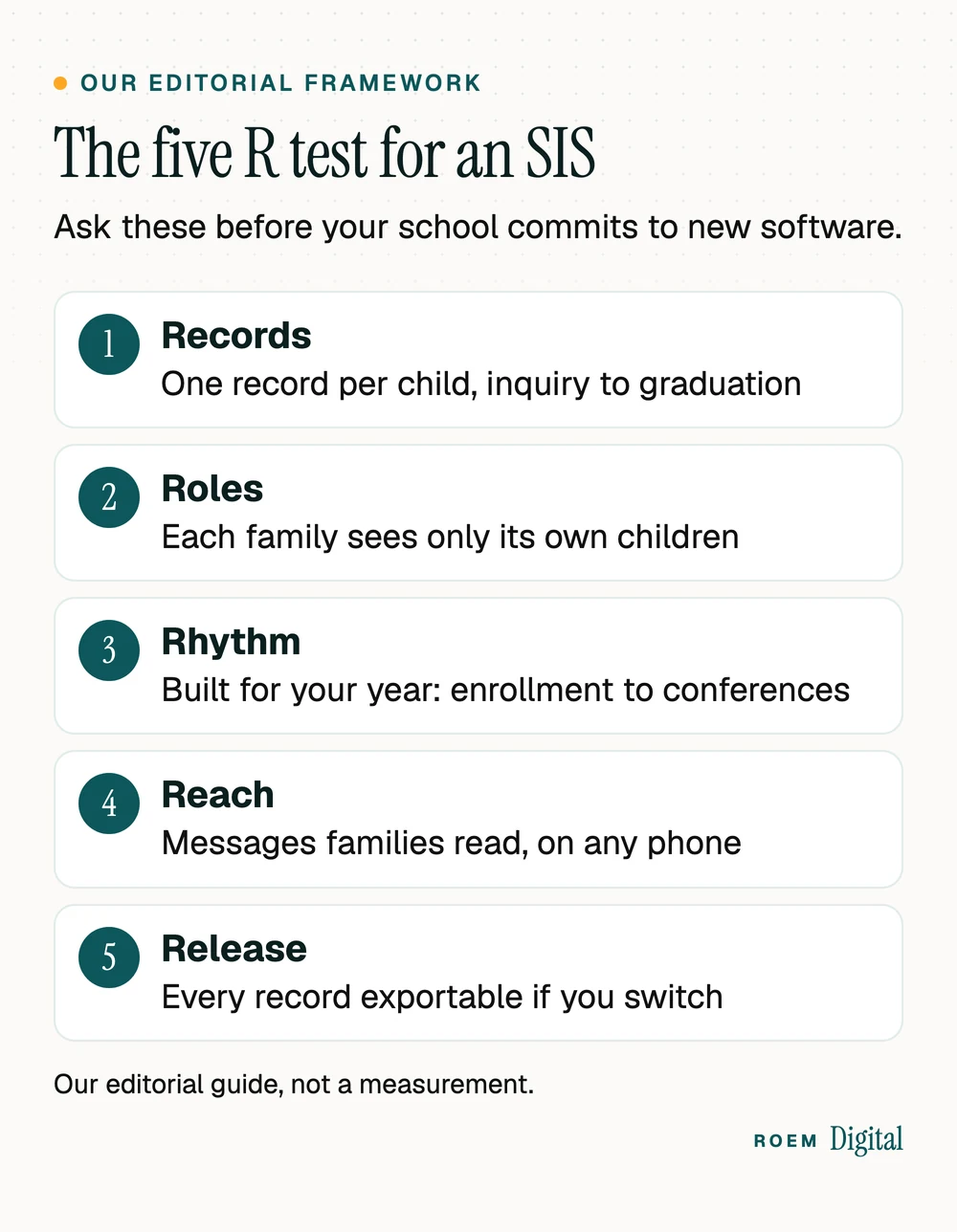
- Records: does each child have one record from first inquiry through enrollment, re-enrollment and graduation? Re-typing an admissions form into a second system is where errors start.
- Roles: does each person see only what they should? A parent sees their own children, a teacher sees their class, and the front office sees what it needs to run the day.
- Rhythm: does it follow your school year? Re-enrollment season, report cards, conferences and the first week of school should be routine, not workarounds. Conference sign-ups are a scheduling job, and our guide to online booking systems explains the booking side.
- Reach: will families actually read what you send? Messages, announcements and forms need to work on a phone, in the languages your families use. If many families read Spanish, see our guide to building a bilingual website.
- Release: can you export every record, in a usable format, whenever you want? If leaving is hard, everything else gets harder too.
Questions to put to every SIS vendor, in writing
| Ask | Why it matters |
|---|---|
| Who owns our student data, and can we export all of it? | The school should own its records and be able to leave with them. |
| What may your company do with our data? | The answer belongs in the contract, not just the sales call. |
| Who on your side can see our records, and when? | Support access should be limited to what's needed to help you. |
| How do families sign in, and what do they see? | A parent should see only their own children, on any phone. |
| What happens at re-enrollment and year-end rollover? | The busiest weeks of the year should be the smoothest. |
| Who cleans and imports our existing records? | Know who does the work, when, and how you'll check it. |
A student information system for private schools: what FERPA does and doesn't cover
The Family Educational Rights and Privacy Act (FERPA) is a federal law that, as the Department of Education explains on its page about what FERPA is, gives parents the right to access their children's education records, to seek to have them amended, and to have some control over the disclosure of personally identifiable information from them.
Here's the part many private schools don't know. The Department's answer on which schools FERPA applies to says it covers institutions that receive funds from programs the Department administers, and that private and parochial elementary and secondary schools generally don't receive such funding and are therefore not subject to FERPA.
Generally isn't always, and being outside FERPA isn't permission to be careless. Families trust you with addresses, custody details, health notes and grades. The Department's 2014 guidance on online educational services points out that FERPA and PPRA aren't the only laws protecting student information, and its best practices make sense for any school:
- Keep an inventory of every app and online service that holds student information.
- Approve new services through one process, and treat free tools the same as paid ones.
- Use a written contract or agreement with each provider, so the school keeps control of its students' data.
- Tell families plainly how you collect, share, protect and use their children's information.
This is general information, not legal advice. The same ownership rule we apply to marketing applies here: records and admin logins belong in the school's name, as our guide to who owns your accounts explains.
When to talk to an attorney before choosing a system
Most of choosing an SIS is practical, not legal. Bring in an attorney who works with schools when any of these apply:
- Your school takes part in a U.S. Department of Education program, or you aren't sure whether it does.
- You'll keep health, medication, custody or special education records in the new system.
- A vendor's contract lets it use student data for anything beyond running your school's system.
- You're moving records between systems and need to decide what to keep, and for how long.
An attorney can tell you which federal and state rules apply to your school specifically. If your school belongs to an association, ask whether it offers guidance too. The same care applies to marketing: our private schools page explains why student photos go public only with each family's permission.
Moving from spreadsheets to an SIS without losing a school year
Most small schools start a new student information system from a pile of spreadsheets, paper forms and single-purpose apps. The move goes smoothly when the cleanup comes first:
- List what you have: every spreadsheet, paper form and app that holds student or family information, and who updates each one.
- Clean the family records first. Merge duplicates and confirm guardians, authorized pickups and contact details before anything moves.
- Decide roles before accounts. Write down who should see what, then create logins to match.
- Pilot one process, such as daily attendance, with one class before switching everything.
- Switch at a natural break, such as summer or between terms, never in the middle of report cards.
- Keep the old files read-only for a while, then archive them where only the right people can open them.

After the first term, check whether it worked. Ask the office how often they still re-type information, ask teachers whether attendance and report cards take less effort, and ask a handful of families whether they found what they needed without calling. Fix what they tell you before re-enrollment season.
Plan the family side as carefully as the office side. A one-page guide at drop-off or a short help session does more for adoption than any feature. On our own software projects, we build in short rounds you can try and move a client's real data in only once they're happy with the system, as our custom software page describes.
ROEMedu: the SIS and LMS we built, live at a Kissimmee school
ROEMedu is our school SIS and LMS, live at Still We Rise Excellence Academy, a Christ-centered Montessori school in Kissimmee, Florida. We also built the school's public website, and what a website project with us looks like is written up in our Resources.

Working on both the public website and the portal shows us something that's easy to miss from either side alone: the experience after enrollment is part of the marketing. Families who feel informed and connected re-enroll, refer friends and write the reviews that bring the next family in. That's why we treat the student information system and the enrollment website as one job.
If you'd like to know whether ROEMedu could fit a school like yours, ask us.
“ROEM is a first class all systems partner. Their expertise extends from organizational infrastructure, communications, and digital marketing, to web design, graphic design, IT support, and so much more. Still We Rise Excellence Academy is better because of ROEM!”
Frequently asked questions
What is a student information system used for?
A student information system is a school's official record of each student. Schools use it for enrollment and re-enrollment, family contacts, attendance, schedules, grades and report cards, and documents. Staff use it every day, and families usually see their own children's information through a portal on a phone or computer.
What is the difference between an SIS and an LMS?
An SIS keeps the official record: who's enrolled, who's present, contacts, schedules and final grades. An LMS runs the learning itself: lessons, assignments, submissions and feedback. Some products combine both, which gives families and staff one sign-in and avoids copying the same data into two systems.
Does FERPA apply to private schools?
Generally not at the elementary and secondary level. The Department of Education says FERPA applies to institutions that receive funds from its programs, and that private and parochial K to 12 schools generally don't. Other laws can still apply. This is general information, not legal advice, so ask an attorney about your school.
What should a small private school look for in SIS software?
Look for one record per child from inquiry to graduation, permissions so families and staff see only what they should, tools that follow your school year, messages families read on their phones, and full data export. Ask every vendor the same questions, and get the answers about data use in writing.
Can one system be both an SIS and an LMS?
Yes. Some systems handle official records and classwork together. For a small school, that can mean one sign-in for families, one place for teachers to work and no copying between systems. A larger school with heavy online coursework may still prefer a separate, specialized LMS connected to its SIS.
When is the best time for a school to switch student information systems?
At a natural break, such as summer or between terms, and never in the middle of report cards or re-enrollment. Clean your family records first, pilot one process with one class, train staff before families, and keep the old files read-only until you're sure nothing was missed.