
Short answer: Good school website design gives two audiences their own path: prospective families deciding whether to tour and apply, and current families and staff looking for today's calendar, menu or form. Build both paths, test them on a phone, give every page an owner and build accessibility in from the start.
Good school website design starts with two front doors
A school website has two jobs that pull in different directions. It has to convince a family who has never visited that your school is worth a tour, and it has to help a family who enrolled three years ago find this week's early release notice in seconds. Good school website design gives each audience its own front door, tests both on a phone, and makes the site easy for your office to keep current.
Below you'll find a page map for both doors, a quick test any staff member can run, the patterns the best school websites share, and what the ADA asks of public, charter and private schools. For the questions parents ask before they call, see our private school marketing page.
A two-front-door site gives prospective families and current families separate starting points from the homepage, each with its own menu, tone and first pages. Neither audience should have to wade through the other's content to finish a task.
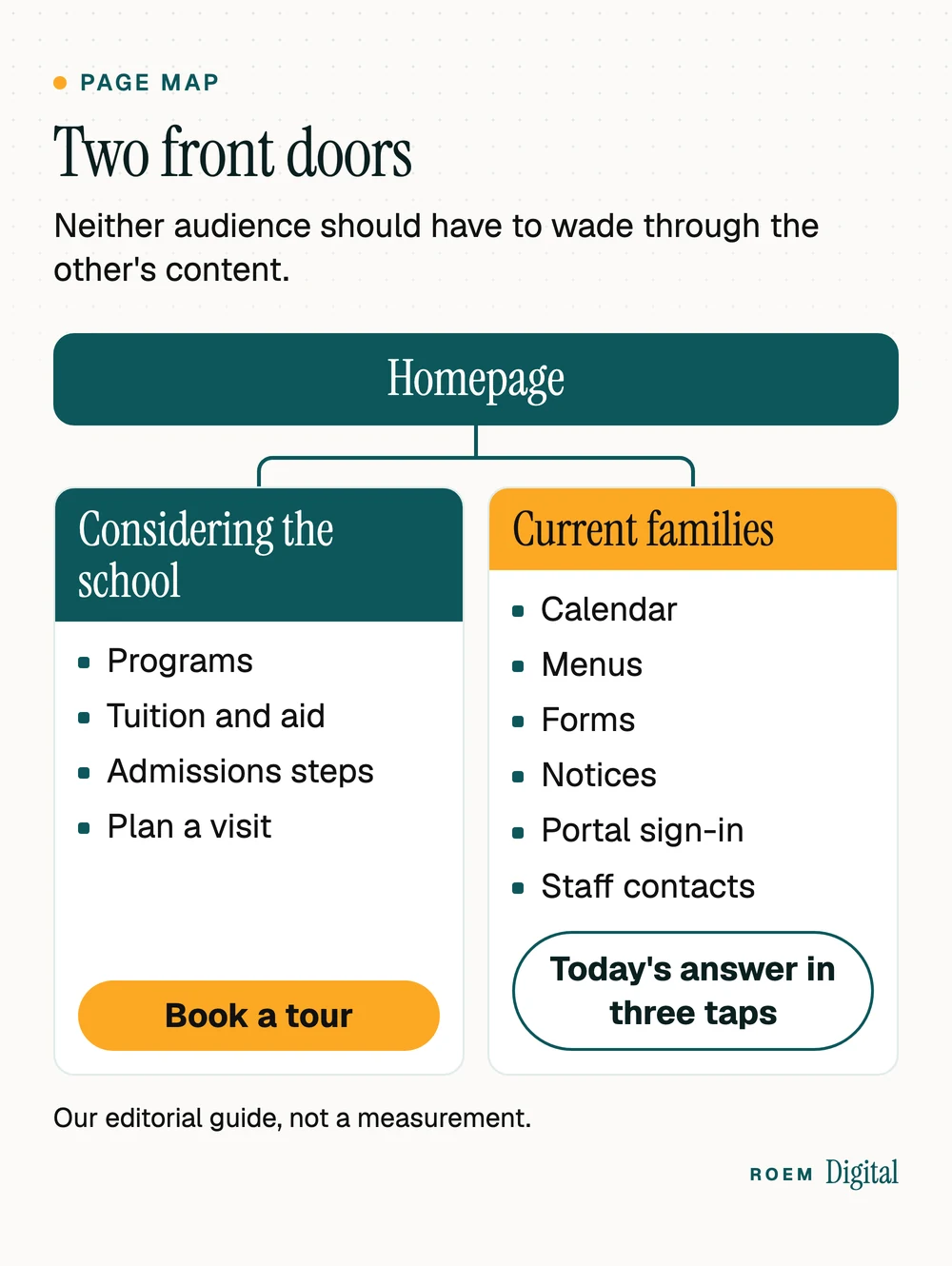
Many school sites grow from an org chart instead, with current-family pages scattered under About, Academics, Athletics and Resources. That makes sense to staff and to almost nobody else. A parent who wants the lunch menu has to guess whether it lives under Parents, Students or Resources, and a prospective family has to dig past board minutes to find tuition.
| Question | Prospective-family door | Current-family door |
|---|---|---|
| Who walks through | Parents comparing schools, often on a phone, often for the first time | Enrolled families, staff and sometimes students, several times a week |
| What they need first | Proof the school fits their child, what it costs and how to visit | Today's schedule, the calendar, menus, forms and how to reach a teacher |
| Main action | Book a tour or request information | Find it, read it, sign it or pay it |
| Tone | Warm and specific, written for outsiders | Short and dated, written for insiders |
| Pages behind the door | Programs, tuition and aid, admissions steps, plan a visit | Calendar, menus, forms, supply lists, notices, portal sign-in, staff contacts |
| How you know it works | The first-visit test | The Tuesday morning test |
On the homepage, the two doors can be as simple as two clearly labeled paths near the top: one for families considering the school and one for current families. In the main menu, give current families one item ("Families" or "Parents") that opens straight onto their pages, instead of scattering them across five menus. If the map means a rebuild, our guide to what to expect from a website project walks through the steps.
The first-visit test for the prospective door
Hand a phone to someone who has never seen your site and ask them to find three things: the grades you teach, what a year costs after any aid, and how to book a visit. Watch where they tap. Every hesitation is a page or a label to fix.
The Tuesday morning test: today's answer in three taps on a phone
The current-family door is judged on one thing: how fast a parent reaches the answer, usually on a phone, usually in a hurry. We call our check the Tuesday morning test. It's an editorial rule of thumb, not a measurement:
- Pick up a phone, not a laptop, and open your homepage.
- Try to reach today's lunch menu, this week's calendar and the latest early release or weather notice.
- Count the taps for each. More than three, or a PDF that needs pinching and zooming, is a fail.
- Repeat with the phone's text size turned up, then once more starting from a Google search instead of your homepage.
Common culprits are menus nested three levels deep, calendars embedded from another service that load slowly or break on small screens, and notices posted as scanned PDFs.
Speed counts here too. Google's Core Web Vitals guide on web.dev sets a good experience, measured at the 75th percentile of page loads, at a Largest Contentful Paint within 2.5 seconds, an Interaction to Next Paint of 200 milliseconds or less and a Cumulative Layout Shift of 0.1 or less. And Google's mobile-first indexing guide says Google uses the mobile version of a site's content for indexing and ranking, so the phone version of each page is the one Google indexes. Our guide to checking whether a slow website is costing you shows how to test your own pages in five minutes.
Private school website design: the first screen and the form handoff
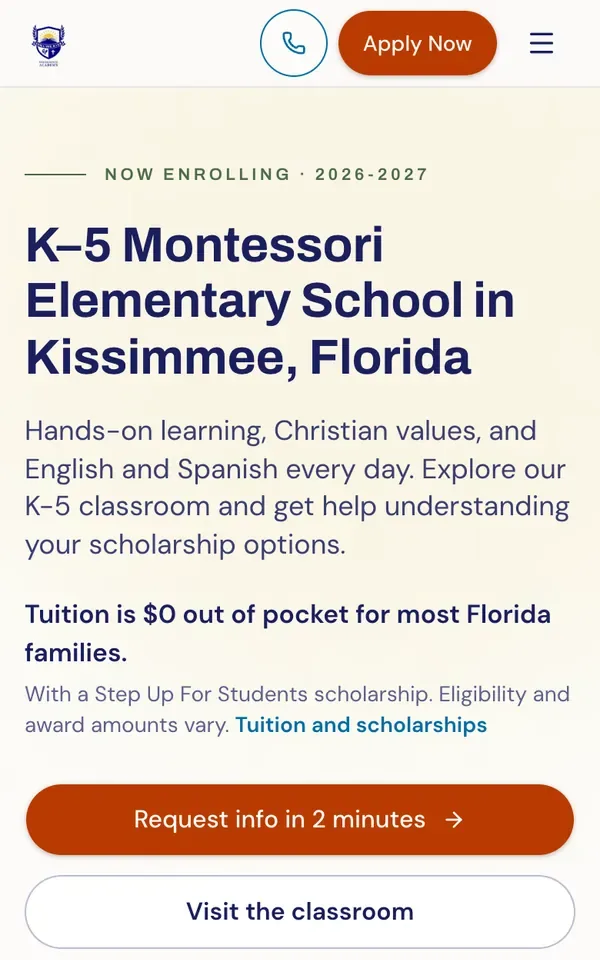
For a private school, the prospective door carries the enrollment load, so the first screen has to do real work. Before a parent scrolls, it should tell them what kind of school this is, where it is, how tuition support works if it changes the math, and what to do next. One action, such as requesting information or booking a visit, should stand out from everything else on the page. The pages behind that screen, and the parent questions they answer, are covered on our private school marketing page.
On the enrollment site we built for Still We Rise Excellence Academy, a Christ-centered Montessori school in Kissimmee, the first phone screen already points to tuition, scholarships and two next steps. Its families and staff also use ROEMedu, the school SIS and LMS we built.
The form is where the website hands off to admissions, and that handoff needs as much design as the homepage:
- Keep the form to the fields admissions uses in its first reply, and say when the family will hear back
- Show a thank-you page that names who will reply and offers tour dates right away
- Send the form to a named person's inbox, not a shared one nobody owns
- Test it from a phone every term, because forms break quietly
What happens after that reply is where enrollment is won or lost. Our enrollment marketing guide for private schools maps those stages and where families drop out.
What the best school websites have in common
Search for the best school websites and you'll find galleries of beautiful homepages. Looks are the least transferable part. When you study school website examples you admire, judge the habits that would survive a change of logo and photos:
| Pattern | Why it works |
|---|---|
| Two clear paths from the homepage | Neither audience wades through the other's pages |
| Real photos of your own classrooms, used with family permission | Parents can picture their child there, and staff recognize their school |
| A date on everything time-sensitive | Parents can tell at a glance whether a notice is current |
| Menus and calendars as web pages, not scanned PDFs | They read on a phone, work with screen readers and can appear in search |
| One short inquiry form with a stated reply time | Families know what happens next |
| Plain words in the menu | "Tuition" beats a clever label nobody searches for |
| A visible way to report an accessibility problem | Families can tell you what's broken so you can fix it |
Then run your two tests on the example itself. A homepage that wins admiration can still fail a parent at 7:40 on a Tuesday. The same habits carry over to education website design more broadly, from preschools to tutoring centers, but schools are unusual in serving both audiences every week of the year. Many of the basics, like a tappable phone number and proof near the main button, are the same ones in our 12 must-haves for a service business website.
Keeping a school website current without a web team
A school website goes stale one page at a time: last spring's calendar, a coach who left in June, an open house date that already passed. The fix is ownership, not a bigger staff. Give every page an owner and a shelf life:
- List every page and assign one owner by role, not by name, so the job survives staff changes.
- Tag each page by how often it changes: weekly (menus, notices), seasonal (calendar, admissions dates, open houses), yearly (tuition, handbook, staff list) or rarely (mission, history).
- Put a review date on every seasonal and yearly page, and check each one when that date arrives.
- Enter each date once, in the calendar, and let other pages pull from it where your platform allows.
- Remove or archive anything past its date in the same week it expires.
The platform matters as much as the process. If your office can't change a menu without calling a vendor, the menu won't change. Our comparison of custom-built sites and website builders covers that trade-off. Whatever you choose, the school, not a vendor, should own the domain and every account, and our guide to who owns your website and marketing accounts shows how to check. When we build a school site, it's hand-built rather than templated, and the school owns the domain, the website and the accounts.

Accessibility: what the ADA asks of public, charter and private schools
This is general information, not legal advice. The ADA treats schools differently depending on who runs them, and the rules for websites follow the same split.
Public schools and public charter schools: Title II and the 2024 web rule
The Justice Department's fact sheet on its Title II web and mobile app rule lists public schools among the state and local government bodies the rule covers and names WCAG 2.1, Level AA as the technical standard. After an interim final rule published April 20, 2026, the fact sheet gives a compliance date of April 26, 2027 for governments with a total population of 50,000 or more, and April 26, 2028 for those under 50,000 and for special district governments. It adds that a school district isn't a special district government: a city school district uses the city's population and a county school district uses the county's. The fact sheet also says the rule sets the technical standard governments must follow to meet their existing obligations under Title II, so treat the dates as a deadline for that standard, not a reason to wait.
Public charter schools fall under Title II as well. A 2014 joint FAQ from the Justice and Education Departments, archived on ADA.gov, says Title II applies to all public schools within school districts, and that this includes all public charter schools and magnet schools.
Two details from the fact sheet matter for school sites. A PDF posted after your compliance date generally needs to meet WCAG 2.1, Level AA, which is one more reason to publish menus and calendars as web pages. And the exception for password-protected documents covers only document files, such as PDFs, about one specific person or account, not the website itself, so the web pages inside a family portal aren't covered by it.
Private and faith-based schools: Title III and the religious exemption
The Justice Department's Title III regulations list private elementary and secondary schools as places of public accommodation. Its guidance on web accessibility and the ADA says the department has consistently held that the ADA applies to what public accommodations offer on the web. That guidance, from March 2022, also says the department has no regulation setting out detailed web standards.
The department's analysis published with those regulations says religious organizations and entities they control "have no obligations under the ADA," including a private school a church itself operates. Whether your school qualifies is a factual question about who controls it, which is one for an attorney.
Even where the law may not require it, an accessible site is a site more families can use. The ADA.gov guidance lists practical starting points:
- Enough contrast between text and background
- Alt text on images that carry information
- Captions on videos
- Form fields with labels, clear instructions and error messages
- Pages that work with a keyboard alone and zoom without breaking
- A way for families to report an accessibility problem
A redesign is the easiest moment to build these in, as our website redesign checklist notes.

When to talk to a professional instead
A web designer can build to WCAG and test the result, but can't tell you which legal duties apply to your school. Bring in a professional when:
- You're unsure whether Title II, Title III or the religious exemption applies: ask an attorney who works with schools or disability rights law
- You run a public or charter school and need to confirm your compliance date: ask your district's or charter's counsel
- You've received a complaint or a demand letter about your website: talk to an attorney before you reply
- You want an independent accessibility audit: hire a specialist who tests with assistive technology, since ADA.gov's guidance warns that a clean automated report doesn't mean everything is accessible
- Your school receives any federal funding: ask whether Department of Education disability rules apply, whatever the answer on the ADA
- A family asks about scholarship eligibility or amounts: send them to the scholarship organization itself
The Justice Department also runs an ADA Information Line, listed on ADA.gov, for questions about the law. For the design and build side, start with our website design and branding service.
Frequently asked questions
What should a school website include?
Two clear paths from the homepage. One serves prospective families with programs, tuition and aid, admissions steps and a way to book a visit. The other serves current families and staff with the calendar, menus, forms, notices, portal sign-in and contacts. Add real photos used with permission, a short inquiry form and accessible design throughout.
What do the best school websites have in common?
They let each audience finish its task quickly, especially on a phone. Time-sensitive pages are dated and current, menus and calendars are web pages rather than scanned PDFs, photos show the real school, and the inquiry form says when a family will hear back. Their looks vary a lot, but those habits repeat.
Do private school websites have to follow the ADA?
ADA Title III covers private schools as places of public accommodation, and the Justice Department's position is that the ADA applies to what public accommodations offer online. Schools controlled by religious organizations may be exempt from the ADA. Which rule applies depends on the facts, so ask an attorney. This is general information, not legal advice.
When do public school websites have to meet the ADA web rule?
According to the Justice Department's fact sheet, after an April 2026 extension, governments with a total population of 50,000 or more must comply by April 26, 2027, and those under 50,000 by April 26, 2028. A city or county school district uses that city's or county's population. Confirm your own date with counsel.
Should a school post its lunch menu and calendar as PDFs?
Usually not. Web pages read better on phones, work better with screen readers and can appear in search. For public schools, the Justice Department's fact sheet says a document posted after the compliance date generally needs to meet WCAG 2.1, Level AA. If you must post a PDF, make it accessible and put the key details on the page too.
Does a school website need a parent portal?
Not always. A portal helps when families need private, personal information such as grades, attendance or messages. Public information like the calendar, menus and forms belongs on the open website, where anyone can find it quickly. If you add a portal, link its sign-in from the current-family path so families never hunt for it.
How often should a school update its website?
Match each page to its shelf life. Menus and notices change weekly, the calendar and admissions dates each season, and tuition and handbooks once a year. Give every page an owner and a review date, and remove anything past its date right away. A dated, accurate page earns more trust than a beautiful stale one.